Unlock a world of possibilities! Login now and discover the exclusive benefits awaiting you.

- Qlik Community
- :
- All Forums
- :
- QlikView
- :
- Re: Calculated Variable in Set Analysis
- Subscribe to RSS Feed
- Mark Topic as New
- Mark Topic as Read
- Float this Topic for Current User
- Bookmark
- Subscribe
- Mute
- Printer Friendly Page

 stabben23
- Mark as New
- Bookmark
- Subscribe
- Mute
- Subscribe to RSS Feed
- Permalink
- Report Inappropriate Content
Calculated Variable in Set Analysis
Hi, I want to use my calculated variable in a set expression.
Vaiable=sum(OrderPrice*InvoicedSalesQty*RateFactor)+sum([Net cost 1]+[Net cost 3]) - sum([Total discount amount])
Expression=sum({$<Year = {$(=only(Year))}>} $(vNetSalesValue))
This will give me '-' in my calculation.
I know that this will get a sum sum sum spagetti, but how should my expression looks like instead of $(vNetSalesValue)?
if i only use = $(vNetSalesValue) in my expression everything works fine.
Accepted Solutions

- Mark as New
- Bookmark
- Subscribe
- Mute
- Subscribe to RSS Feed
- Permalink
- Report Inappropriate Content
Hm, hard to say without looking at the document but try putting an Aggr() around your $(vNetSalesValue).
sum({$<Year={$(=only(Year))}>} Aggr($(vNetSalesValue), Dim1, Dim2, etc.))
- Mark as New
- Bookmark
- Subscribe
- Mute
- Subscribe to RSS Feed
- Permalink
- Report Inappropriate Content
Hm, hard to say without looking at the document but try putting an Aggr() around your $(vNetSalesValue).
sum({$<Year={$(=only(Year))}>} Aggr($(vNetSalesValue), Dim1, Dim2, etc.))
stabben23
- Mark as New
- Bookmark
- Subscribe
- Mute
- Subscribe to RSS Feed
- Permalink
- Report Inappropriate Content
--> Johannes,
Quick, easy and just what i need!!
Thanks
- Mark as New
- Bookmark
- Subscribe
- Mute
- Subscribe to RSS Feed
- Permalink
- Report Inappropriate Content
Hi,
Maybe this one should work. (Untested) I have created 2 variables.
vNetSalesValue = OrderPrice*InvoicedSalesQty*RateFactor
vNetSalesValue1 = [Net cost 1]+[Net cost 3]
The expression looks like this.
sum({$<Year = {$(=only(Year))}>} $(vNetSalesValue))
+sum({$<Year = {$(=only(Year))}>} $(vNetSalesValue1))
-sum({$<Year = {$(=only(Year))}>} [Total discount amount])
Regards,
Janzen
stabben23
- Mark as New
- Bookmark
- Subscribe
- Mute
- Subscribe to RSS Feed
- Permalink
- Report Inappropriate Content
Hi Janzen,
That how i build my expression first (almost) and yes that works.
I was to fast answering Johannes because now
Expression last year=sum({$<Year = {$(=only(Year)-1)}>} aggr($(vNetSalesValue),dim))
dont behave as i want.,I will get this years value.
And how to use when i dont have any dimensions? for exampel in a gauge YTD data.
Is $#= whatever combination a way to get the calculated value?
- Mark as New
- Bookmark
- Subscribe
- Mute
- Subscribe to RSS Feed
- Permalink
- Report Inappropriate Content
Hi,
What answer works for your problem? Is it Johannes answer or my answer? $(=only(Year)-1) must give you last year if you need last year.
Regards,
Janzen
stabben23
- Mark as New
- Bookmark
- Subscribe
- Mute
- Subscribe to RSS Feed
- Permalink
- Report Inappropriate Content
Hi,
Johannes works with
sum({$<Year = {$(=only(Year))}>} aggr($(vNetSalesValue),dim,dim)) but not for $(=only(Year)-1) vierd.
your answer will works but i try to avoid that kind of set expressions and instead use variables, if it works?!
stabben23
- Mark as New
- Bookmark
- Subscribe
- Mute
- Subscribe to RSS Feed
- Permalink
- Report Inappropriate Content
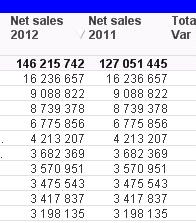
this is
sum({$<Year = {$(=only(Year))}>} aggr($(vNetSalesValue),dim)) and
sum({$<Year = {$(=only(Year))-1}>} aggr($(vNetSalesValue),dim))
all dimenssion value are the same, Total on top is correct.
- Mark as New
- Bookmark
- Subscribe
- Mute
- Subscribe to RSS Feed
- Permalink
- Report Inappropriate Content
Hi,
It should be
sum({$<Year = {$(=only(Year)-1)}>} aggr($(vNetSalesValue),dim))
-1 should be right after the first closing parenthesis.
Regards,
Janzen
stabben23
- Mark as New
- Bookmark
- Subscribe
- Mute
- Subscribe to RSS Feed
- Permalink
- Report Inappropriate Content
Hi,
sorry, edit the -1 in the answer, it is like this: sum({$<Year = {$(=only(Year)-1)}>} aggr($(vNetSalesValue),dim)) in the expression and dont works.