Unlock a world of possibilities! Login now and discover the exclusive benefits awaiting you.

- Qlik Community
- :
- All Forums
- :
- QlikView
- :
- Re: Calculated dimension total
- Subscribe to RSS Feed
- Mark Topic as New
- Mark Topic as Read
- Float this Topic for Current User
- Bookmark
- Subscribe
- Mute
- Printer Friendly Page

 nareshthavidish
- Mark as New
- Bookmark
- Subscribe
- Mute
- Subscribe to RSS Feed
- Permalink
- Report Inappropriate Content
Calculated dimension total
Hi,
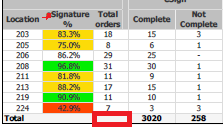
I have used calculated dimension but here i need to show total for this.
Calculated dimension: =aggr(sum({<Date={$(varMaxDate)}>} TOTAL_ORDERS_DAILY_NEW),Loc)
Table used : Pivot
Please find the below image.Here i need to show total of total orders.
Thanks..
Accepted Solutions

 MK_QSL
- Mark as New
- Bookmark
- Subscribe
- Mute
- Subscribe to RSS Feed
- Permalink
- Report Inappropriate Content
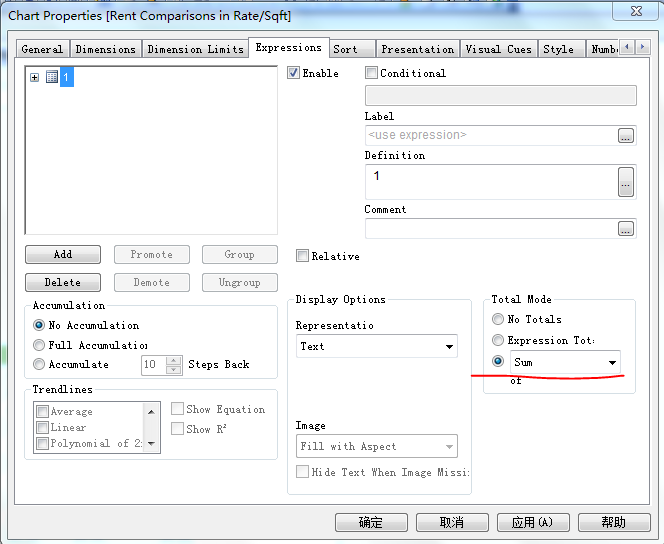
Like this?

- Mark as New
- Bookmark
- Subscribe
- Mute
- Subscribe to RSS Feed
- Permalink
- Report Inappropriate Content
MK_QSL
- Mark as New
- Bookmark
- Subscribe
- Mute
- Subscribe to RSS Feed
- Permalink
- Report Inappropriate Content
Use it as an expression rather than calculated dimension
SUM(aggr(sum({<Date={$(varMaxDate)}>} TOTAL_ORDERS_DAILY_NEW),Loc))
nareshthavidish- Mark as New
- Bookmark
- Subscribe
- Mute
- Subscribe to RSS Feed
- Permalink
- Report Inappropriate Content
Hi,
Attached is the sample application in which i need total for the total orders column in the table.
Thanks..
nareshthavidish- Mark as New
- Bookmark
- Subscribe
- Mute
- Subscribe to RSS Feed
- Permalink
- Report Inappropriate Content
Hi,
Please let me know if we can get this.
Thanks..
MK_QSL
- Mark as New
- Bookmark
- Subscribe
- Mute
- Subscribe to RSS Feed
- Permalink
- Report Inappropriate Content
Like this?
nareshthavidish- Mark as New
- Bookmark
- Subscribe
- Mute
- Subscribe to RSS Feed
- Permalink
- Report Inappropriate Content
Hi Manish,
It's very smart.
But i need it to show in bottom of the report.
Thanks..

- Mark as New
- Bookmark
- Subscribe
- Mute
- Subscribe to RSS Feed
- Permalink
- Report Inappropriate Content
Try to go Bottom and see whether values are there not not there? Would you confirm there. I got to see bottom with all values{I mean without any missing Total Values}
Would you check that?