Unlock a world of possibilities! Login now and discover the exclusive benefits awaiting you.

- Qlik Community
- :
- All Forums
- :
- QlikView
- :
- Re: Calculated second color gradient transparent?
- Subscribe to RSS Feed
- Mark Topic as New
- Mark Topic as Read
- Float this Topic for Current User
- Bookmark
- Subscribe
- Mute
- Printer Friendly Page

- Mark as New
- Bookmark
- Subscribe
- Mute
- Subscribe to RSS Feed
- Permalink
- Report Inappropriate Content
Calculated second color gradient transparent?
Hello,
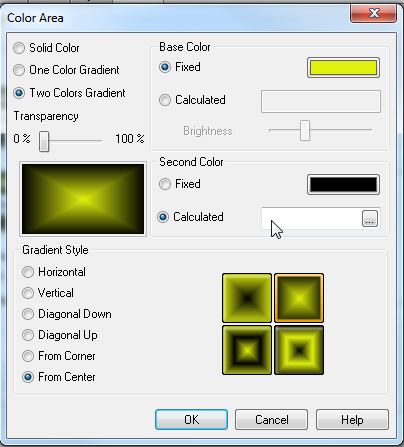
I have a caption set to Two color graidient. I am wondering whether its possible to set the Second Color to Transparent using a calculated expression?
Regards
Marek
Accepted Solutions

 flipside
- Mark as New
- Bookmark
- Subscribe
- Mute
- Subscribe to RSS Feed
- Permalink
- Report Inappropriate Content
Sure can - use ARGB instead of RGB and specify a value of 0 to 255 for A(alpha value) to represent the opacity.
flipside
EDIT: In your case you are looking for =ARGB(0,0,0,0).
flipside
- Mark as New
- Bookmark
- Subscribe
- Mute
- Subscribe to RSS Feed
- Permalink
- Report Inappropriate Content
Sure can - use ARGB instead of RGB and specify a value of 0 to 255 for A(alpha value) to represent the opacity.
flipside
EDIT: In your case you are looking for =ARGB(0,0,0,0).
- Mark as New
- Bookmark
- Subscribe
- Mute
- Subscribe to RSS Feed
- Permalink
- Report Inappropriate Content
thanks!
thats perfect
 giakoum
- Mark as New
- Bookmark
- Subscribe
- Mute
- Subscribe to RSS Feed
- Permalink
- Report Inappropriate Content
Hi flipside.
Do you have any idea how to convert a ARGB color to RGB color?
flipside
- Mark as New
- Bookmark
- Subscribe
- Mute
- Subscribe to RSS Feed
- Permalink
- Report Inappropriate Content
Yes, it IS possible, but I have only found out how to base it on a white background. Play about with the colours in the attached and you'll see what I mean.
flipside
giakoum
- Mark as New
- Bookmark
- Subscribe
- Mute
- Subscribe to RSS Feed
- Permalink
- Report Inappropriate Content
Hi Flipside.
excellent solution! This is exactly what I needed!
Please post the same solution in
http://community.qlik.com/message/345541#345541
so that I can mark it as correct.
Thank you
Ioannis
- Mark as New
- Bookmark
- Subscribe
- Mute
- Subscribe to RSS Feed
- Permalink
- Report Inappropriate Content
Thank you, this app helped me a lot 

 cspindley
- Mark as New
- Bookmark
- Subscribe
- Mute
- Subscribe to RSS Feed
- Permalink
- Report Inappropriate Content
on behalf of the nhs thanks , the Central Informatics Team @ CUH have implemented this in an eFFICIENT & generic manner, thanX4sharing ...