Unlock a world of possibilities! Login now and discover the exclusive benefits awaiting you.

- Qlik Community
- :
- All Forums
- :
- QlikView
- :
- Re: Calculation on Column itself
- Subscribe to RSS Feed
- Mark Topic as New
- Mark Topic as Read
- Float this Topic for Current User
- Bookmark
- Subscribe
- Mute
- Printer Friendly Page

 supriyabiware
- Mark as New
- Bookmark
- Subscribe
- Mute
- Subscribe to RSS Feed
- Permalink
- Report Inappropriate Content
Calculation on Column itself
Hi All,
I have a small requirement as below. Can anybody help in this?
You can suggest any script calculation or Set analysis (i prefer script calculation)
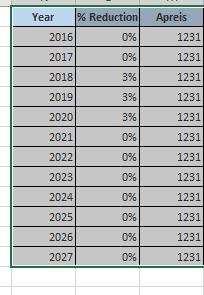
i want to reduce column APREIS depending on % Reduction - Expected result is as below...

Note - Comma is decimal point in Last column
Thanks
Supriya
- « Previous Replies
-
- 1
- 2
- Next Replies »

 sunny_talwar
- Mark as New
- Bookmark
- Subscribe
- Mute
- Subscribe to RSS Feed
- Permalink
- Report Inappropriate Content
Where is the id field in the image? Can you provide how the new data look like? I will have to test it out a little to give you a solution based on changing id
supriyabiware
- Mark as New
- Bookmark
- Subscribe
- Mute
- Subscribe to RSS Feed
- Permalink
- Report Inappropriate Content
Something like attached.
i want same operation only for one ID at a time. it should have reduced APREIS for one ID and start newly with next ID
(i have millions of IDs in my main Data model)
sunny_talwar
- Mark as New
- Bookmark
- Subscribe
- Mute
- Subscribe to RSS Feed
- Permalink
- Report Inappropriate Content
Try something like this
Table:
LOAD * INLINE [
ID,Year, % Reduction, Apreis
1,2016, 0, 1231
1,2017, 0, 1231
1,2018, 0.03, 1231
1,2019, 0.03, 1231
1, 2020, 0.03, 1231
1 ,2021, 0, 1231
1 ,2022, 0, 1231
1 ,2023, 0, 1231
1 ,2024, 0, 1231
1 ,2025, 0, 1231
1, 2026, 0, 1231
1 ,2027, 0, 1231
2,2016, 0, 14677
2,2017, 0.05, 14677
2,2018, 0.05, 14677
2,2019, 0.05, 14677
2, 2020, 0, 14677
2 ,2021, 0, 14677
2 ,2022, 0, 14677
2 ,2023, 0, 14677
2 ,2024, 0, 14677
2 ,2025, 0, 14677
2, 2026, 0, 14677
2 ,2027, 0, 14677
3,2016, 0, 12345
3,2017, 0.01, 12345
3,2018, 0.01, 12345
3,2019, 0.01, 12345
3, 2020, 0, 12345
3 ,2021, 0, 12345
3 ,2022, 0, 12345
];
TempTable:
LOAD *,
If(ID = Previous(ID), Alt(Peek('% Reduction'), 0), 0) as [New % Reduction]
Resident Table
Order By ID, Year Desc;
Final:
LOAD *,
[New % Reduction] * [Reduced APREIS] as Reduction;
LOAD *,
If(ID = Previous(ID), RangeSum(Alt(Peek('Reduced APREIS'), [Apreis]), -Alt(Peek('Reduction'), 0)), [Apreis]) as [Reduced APREIS]
Resident TempTable
Order By ID, Year;
DROP Table Table, TempTable;
sunny_talwar
- Mark as New
- Bookmark
- Subscribe
- Mute
- Subscribe to RSS Feed
- Permalink
- Report Inappropriate Content
Is it possible to have reduction % for the very first year also?
supriyabiware
- Mark as New
- Bookmark
- Subscribe
- Mute
- Subscribe to RSS Feed
- Permalink
- Report Inappropriate Content
yes in few cases i do have %reduction in first year as well!  .
.
Trying the above logic.. Thanks a lot!
sunny_talwar
- Mark as New
- Bookmark
- Subscribe
- Mute
- Subscribe to RSS Feed
- Permalink
- Report Inappropriate Content
In that case I would concatenate a dummy row for all your IDs with a very small year and delete that extra row at the very end...
sunny_talwar
- Mark as New
- Bookmark
- Subscribe
- Mute
- Subscribe to RSS Feed
- Permalink
- Report Inappropriate Content
Try like this
Table:
LOAD * INLINE [
ID,Year, % Reduction, Apreis
1,2016, 0, 1231
1,2017, 0, 1231
1,2018, 0.03, 1231
1,2019, 0.03, 1231
1, 2020, 0.03, 1231
1 ,2021, 0, 1231
1 ,2022, 0, 1231
1 ,2023, 0, 1231
1 ,2024, 0, 1231
1 ,2025, 0, 1231
1, 2026, 0, 1231
1 ,2027, 0, 1231
2,2016, 0.05, 14677
2,2017, 0.05, 14677
2,2018, 0.05, 14677
2,2019, 0.05, 14677
2, 2020, 0, 14677
2 ,2021, 0, 14677
2 ,2022, 0, 14677
2 ,2023, 0, 14677
2 ,2024, 0, 14677
2 ,2025, 0, 14677
2, 2026, 0, 14677
2 ,2027, 0, 14677
3,2016, 0, 12345
3,2017, 0.01, 12345
3,2018, 0.01, 12345
3,2019, 0.01, 12345
3, 2020, 0, 12345
3 ,2021, 0, 12345
3 ,2022, 0, 12345
];
Concatenate (Table)
LOAD DISTINCT ID,
1 as Year,
0 as [% Reduction],
Apreis
Resident Table;
TempTable:
LOAD *,
If(ID = Previous(ID), Alt(Peek('% Reduction'), 0), 0) as [New % Reduction]
Resident Table
Order By ID, Year Desc;
Final:
LOAD *,
[New % Reduction] * [Reduced APREIS] as Reduction;
LOAD *,
If(ID = Previous(ID), RangeSum(Alt(Peek('Reduced APREIS'), [Apreis]), -Alt(Peek('Reduction'), 0)), [Apreis]) as [Reduced APREIS]
Resident TempTable
Order By ID, Year;
FinalFinalTable:
NoConcatenate
LOAD *
Resident Final
Where Year <> 1;
DROP Table Table, TempTable, Final;
supriyabiware
- Mark as New
- Bookmark
- Subscribe
- Mute
- Subscribe to RSS Feed
- Permalink
- Report Inappropriate Content
PERFECT! as usual  Thanks a ton

- « Previous Replies
-
- 1
- 2
- Next Replies »