Unlock a world of possibilities! Login now and discover the exclusive benefits awaiting you.

- Qlik Community
- :
- All Forums
- :
- QlikView
- :
- Re: Calender Dates
- Subscribe to RSS Feed
- Mark Topic as New
- Mark Topic as Read
- Float this Topic for Current User
- Bookmark
- Subscribe
- Mute
- Printer Friendly Page

 manoj217
- Mark as New
- Bookmark
- Subscribe
- Mute
- Subscribe to RSS Feed
- Permalink
- Report Inappropriate Content
Calender Dates
Hi all
i have a calender object in my dashboard and i have 2 date fields like paid date and received date.
Now i am created a calender object based on paid date but user mentioned if he selects a start date in the object it should shows the data from 7 days before of his selection so i mentioned (paid date)-7 its working fine but he mentioned received date data should be in the range of his selection only
example:
if i select date range 7/10/2018 means paid date data should be 1/10/2018
but received date data in 7/10/2018 to current date only
- « Previous Replies
-
- 1
- 2
- Next Replies »

 qlikviewwizard
- Mark as New
- Bookmark
- Subscribe
- Mute
- Subscribe to RSS Feed
- Permalink
- Report Inappropriate Content
Hi,
Can you show your expected Sales in the attached output?
Data:
load *,DATE([paid date],'DD-MMM-YYYY') AS DateKey,DATE([paid date]-7) AS TEST;
LOAD DATE(DATE#([paid date],'DD/MM/YYYY')) as [paid date],DATE(DATE#([received date],'DD/MM/YYYY')) as [received date],Sales INLINE [
paid date,received date,Sales
10/12/2018,12/12/2018,12
13/12/2018,14/12/2018,10
14/12/2018,16/12/2018,45
15/12/2018,18/12/2018,76
17/12/2018,20/12/2018,90
20/12/2018,25/12/2018,80
];
Temp:
Load
min([paid date]) as minDate,
(max([paid date])) as maxDate
Resident Data;
Let varMinDate = Num(Peek('minDate', 0, 'Temp'));
Let varMaxDate = Num(Peek('maxDate', 0, 'Temp'));
DROP Table Temp;
TempCalendar:
LOAD
$(varMinDate) + Iterno()-1 As Num,
Date($(varMinDate) + IterNo() - 1) as TempDate
AutoGenerate 1 While $(varMinDate) + IterNo() -1 <= $(varMaxDate);
MasterCalendar:
LOAD
DATE(TempDate,'DD-MMM-YYYY') AS Date,
DATE(TempDate,'DD-MMM-YYYY') AS DateKey,
date(monthstart(TempDate),'MMM-YY') as MonthYr,
week(TempDate) As Week,
Year(TempDate) As Year,
Month(TempDate) As Month,
Day(TempDate) As Day,
YeartoDate(TempDate)*-1 as CurYTDFlag,
YeartoDate(TempDate,-1)*-1 as LastYTDFlag,
// date(monthstart(TempDate), 'MMM-YYYY') as MonthYear,
'Q'& ceil(month(TempDate)/3) as Quarter,
Week(weekstart(TempDate)) & '-' & WeekYear(TempDate) as WeekYear,
WeekDay(TempDate) as WeekDay
Resident TempCalendar
Order By TempDate ASC;
Drop Table TempCalendar;

 uacg0009
- Mark as New
- Bookmark
- Subscribe
- Mute
- Subscribe to RSS Feed
- Permalink
- Report Inappropriate Content
Hi manoj,
I think below is what you want, and please see my attachment.
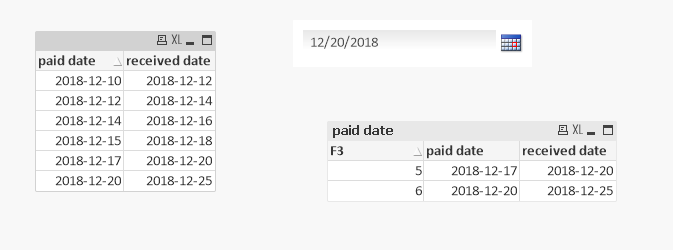
Thanks
Aiolos
manoj217
- Mark as New
- Bookmark
- Subscribe
- Mute
- Subscribe to RSS Feed
- Permalink
- Report Inappropriate Content
Thanks for your response i will check and let you know

- « Previous Replies
-
- 1
- 2
- Next Replies »