Unlock a world of possibilities! Login now and discover the exclusive benefits awaiting you.

- Qlik Community
- :
- All Forums
- :
- QlikView
- :
- Re: Can a drill down group be a variable
- Subscribe to RSS Feed
- Mark Topic as New
- Mark Topic as Read
- Float this Topic for Current User
- Bookmark
- Subscribe
- Mute
- Printer Friendly Page

 helen_pip
- Mark as New
- Bookmark
- Subscribe
- Mute
- Subscribe to RSS Feed
- Permalink
- Report Inappropriate Content
Can a drill down group be a variable
Dear Qlikview user
I have a variable called vField_OPD and this variable contains 3 field names I.e. Division, Care_Group, Function
I would like to use this variable as a drill down group in my pivot table
I created a drill down group called Test and used $(vField_OPD) as my Used Fields
From the front end, Division shows as my dimension, but I am unable to drill through
Is it possible to use a variable as my drill down group?
Kind Regards
Helen
Accepted Solutions

 sunny_talwar
- Mark as New
- Bookmark
- Subscribe
- Mute
- Subscribe to RSS Feed
- Permalink
- Report Inappropriate Content
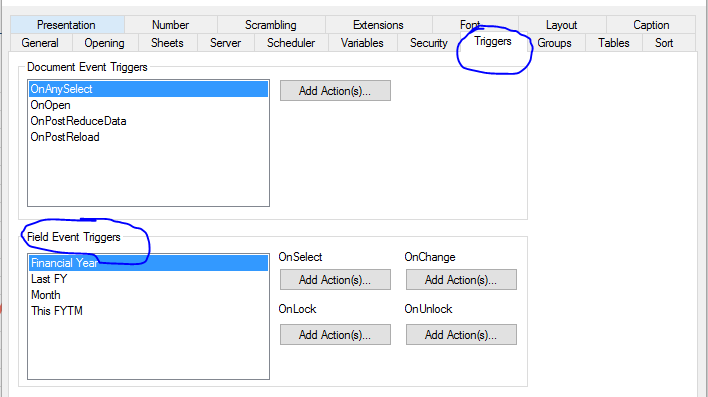
These triggers will be within the document properties -> Triggers Tab -> Field Event Trigger
I don't think you will need a input box here. All you would need is a list box and user making selection to it.
sunny_talwar
- Mark as New
- Bookmark
- Subscribe
- Mute
- Subscribe to RSS Feed
- Permalink
- Report Inappropriate Content
I think you can create three variables:
vField_OPD1
vField_OPD2
vField_OPD3
and then instead of assigning all three dimensions to one variable, assign one each to the above three.
Then use them as three fields using dollar sign expansion
$(=vField_OPD1)
$(=vField_OPD2)
$(=vField_OPD3)
helen_pip
- Mark as New
- Bookmark
- Subscribe
- Mute
- Subscribe to RSS Feed
- Permalink
- Report Inappropriate Content
Hello SunnyT
Thank you for your suggestion.
I have the drill down as you have suggested working with the 3 variables. I created a group called Test and within Test there are the 3 variables
My next quest it to have an input box where the end user can either drill down within the pivot table (Solved) or use the input box as a list box and choose one of the 3 categories I.e. Division, Care_Group, Treatment_Function
Can you kindly suggest any way I can get the pivot table to interact with the input box using the Test field I created?
sunny_talwar
- Mark as New
- Bookmark
- Subscribe
- Mute
- Subscribe to RSS Feed
- Permalink
- Report Inappropriate Content
So you can use triggers to assign the three values that have been selected into the three variables
variable 1 trigger can have the following search string:
SubField(Concat(DISTINCT ListBoxFieldName, ','), ',', 1)
variable 2 trigger
SubField(Concat(DISTINCT ListBoxFieldName, ','), ',', 2)
variable 3 trigger
SubField(Concat(DISTINCT ListBoxFieldName, ','), ',', 3)
Everything else can stay the same, right?
helen_pip
- Mark as New
- Bookmark
- Subscribe
- Mute
- Subscribe to RSS Feed
- Permalink
- Report Inappropriate Content
Hello SunnyT
Thank you for your suggestion. I am not sure I follow the logic. Where would I place these triggers? In the input box?
Kind Regards
Helen
sunny_talwar
- Mark as New
- Bookmark
- Subscribe
- Mute
- Subscribe to RSS Feed
- Permalink
- Report Inappropriate Content
These triggers will be within the document properties -> Triggers Tab -> Field Event Trigger
I don't think you will need a input box here. All you would need is a list box and user making selection to it.
helen_pip
- Mark as New
- Bookmark
- Subscribe
- Mute
- Subscribe to RSS Feed
- Permalink
- Report Inappropriate Content
Thank you SunnyT
This is working for me
