Unlock a world of possibilities! Login now and discover the exclusive benefits awaiting you.

- Qlik Community
- :
- All Forums
- :
- QlikView
- :
- Re: Cartesian Product
- Subscribe to RSS Feed
- Mark Topic as New
- Mark Topic as Read
- Float this Topic for Current User
- Bookmark
- Subscribe
- Mute
- Printer Friendly Page

 s2016
s2016
- Mark as New
- Bookmark
- Subscribe
- Mute
- Subscribe to RSS Feed
- Permalink
- Report Inappropriate Content
Cartesian Product
Hi,
I have two tables like below. I want to join these two tables to get a cartesian product.
Such that CG c1 has
5 rows for e1 and
2 rows for e2 and
1 row for e3 and
so on and so forth for c2, c3, c4.
I thought I could achieve this using outer join but its only giving the result for c1 and rest of the CG rows are ignored.
Table1:
LOAD * INLINE [
CG, Entity
c1, e1
c1, e2
c1, e3
c2, e1
c2, e3
c3, e2
c3, e3
c4, e10
];
Table2:
LOAD * INLINE [
Entity, timeslot, data
e1, ts1, xxx1
e1, ts2, xxx2
e1, ts3, xxx3
e1, ts4, xxx4
e1, ts5, xxx5
e2, ts1, yyy1
e2, ts2, yyy2
e3, ts1, zzz1
e6, ts1, aaa1
];
Accepted Solutions

 Siva_Sankar
- Mark as New
- Bookmark
- Subscribe
- Mute
- Subscribe to RSS Feed
- Permalink
- Report Inappropriate Content

 MK_QSL
- Mark as New
- Bookmark
- Subscribe
- Mute
- Subscribe to RSS Feed
- Permalink
- Report Inappropriate Content
What is the final output you are looking for?
Can you provide it here?
 antoniotiman
- Mark as New
- Bookmark
- Subscribe
- Mute
- Subscribe to RSS Feed
- Permalink
- Report Inappropriate Content
Hi,
try Inner Join
Regards,
Antonio
Siva_Sankar
- Mark as New
- Bookmark
- Subscribe
- Mute
- Subscribe to RSS Feed
- Permalink
- Report Inappropriate Content
Hi Shashank.
Find the attached example.
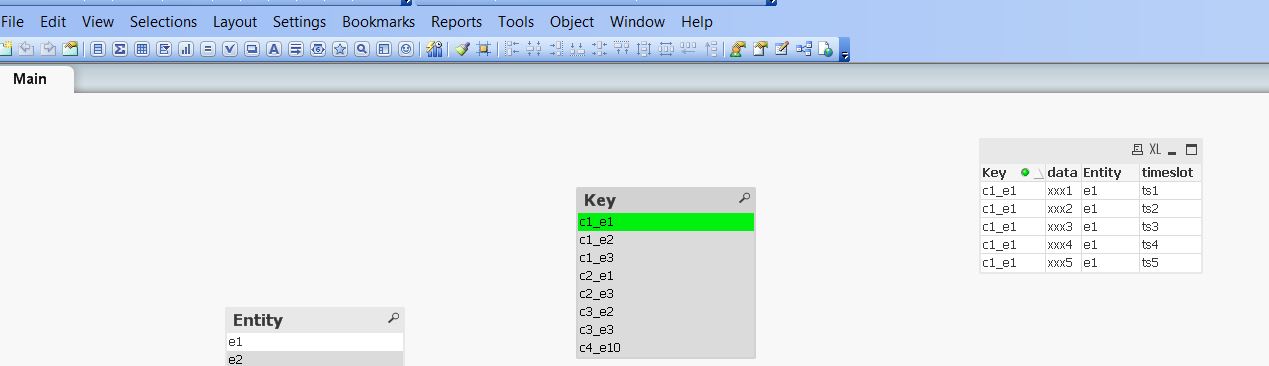
-Siva
s2016
- Mark as New
- Bookmark
- Subscribe
- Mute
- Subscribe to RSS Feed
- Permalink
- Report Inappropriate Content
Thanks Everyone. I figured out later that the "Join" works fine on my test data and I am getting the results as expected in the above example dataset that I shared.
However, in my original table1, I have an additional CG_ID field which I auto generate in the previous layer using
'CG' & num(AutoNumber(CG_Name, 'auto1'), '000000000') as CG_ID
I noticed that if I removed the CG_ID field from my table1, the join would work perfectly. Otherwise, I would get no matching rows.
I am wondering why that might happen?
s2016
- Mark as New
- Bookmark
- Subscribe
- Mute
- Subscribe to RSS Feed
- Permalink
- Report Inappropriate Content
Hi Manish, I was expecting a result I would get with a join. My join is behaving differently somehow, because of an additional CGID field about which I have explained in the comment below.
