Unlock a world of possibilities! Login now and discover the exclusive benefits awaiting you.

- Qlik Community
- :
- All Forums
- :
- QlikView
- :
- Chart Title Formula
- Subscribe to RSS Feed
- Mark Topic as New
- Mark Topic as Read
- Float this Topic for Current User
- Bookmark
- Subscribe
- Mute
- Printer Friendly Page

 knightwriter
- Mark as New
- Bookmark
- Subscribe
- Mute
- Subscribe to RSS Feed
- Permalink
- Report Inappropriate Content
Chart Title Formula
Hi all,
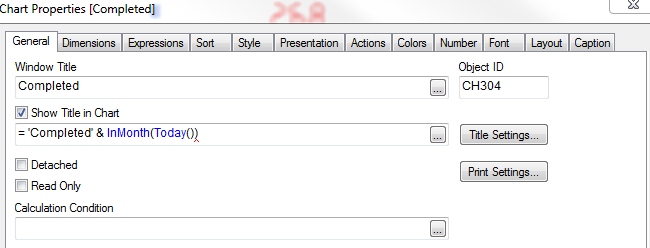
Easy one for a Monday. I wanted to have the words "Completed" and todays date in title window, how can I do this?
Many thanks.
- Tags:
- new_to_qlikview
- title
Accepted Solutions

 MK_QSL
- Mark as New
- Bookmark
- Subscribe
- Mute
- Subscribe to RSS Feed
- Permalink
- Report Inappropriate Content
='Completed ' & Date(Today())
MK_QSL
- Mark as New
- Bookmark
- Subscribe
- Mute
- Subscribe to RSS Feed
- Permalink
- Report Inappropriate Content
='Completed ' & Date(Today())
knightwriter
- Mark as New
- Bookmark
- Subscribe
- Mute
- Subscribe to RSS Feed
- Permalink
- Report Inappropriate Content
Hi Manish,
Thanks for the reply and the answer gives me the 30.03.15, how to I show this as "March"?

 ashfaq_haseeb
- Mark as New
- Bookmark
- Subscribe
- Mute
- Subscribe to RSS Feed
- Permalink
- Report Inappropriate Content
HI,
Just write below in window's Title.
='Compleated '&today()
Regards
ASHFAQ

 jsanchezh
- Mark as New
- Bookmark
- Subscribe
- Mute
- Subscribe to RSS Feed
- Permalink
- Report Inappropriate Content
You are not using the correct parameters for the inMonth funtion. But I think this should work:
='Completed ' & date(today())
 sagarkharpude
- Mark as New
- Bookmark
- Subscribe
- Mute
- Subscribe to RSS Feed
- Permalink
- Report Inappropriate Content
='Completed ' & Date(Today(),'DD/MMM/YYYY')
ashfaq_haseeb
- Mark as New
- Bookmark
- Subscribe
- Mute
- Subscribe to RSS Feed
- Permalink
- Report Inappropriate Content
Like this
='Completed ' & Date(Today(),'DD/MMMM/YYYY')
Regards
ASHFAQ
 avinashelite
- Mark as New
- Bookmark
- Subscribe
- Mute
- Subscribe to RSS Feed
- Permalink
- Report Inappropriate Content
Hi,
I don't know why your using INMONTH here , if you want to use inmonth function then in should has 3 parameter
EG:
InMonth (date, basedate , shift)
returns true if date lies inside the month containing basedate. The month can be offset by shift. Shift is an integer, where the value 0 indicates the month which contains basedate. Negative values in shift indicate preceding months and positive values indicate succeeding months.
Examples:
inmonth ( '2006-01-25', '2006-01-01', 0 ) returns true
inmonth ( '2006-01-25', '2006-04-01', 0 ) returns false
inmonth ( '2006-01-25', '2006-01-01', -1 ) returns false
inmonth ( '2005-12-25', '2006-01-01', -1 ) returns true
if you want only current date then use ='Completed ' & Date(Today())

- Mark as New
- Bookmark
- Subscribe
- Mute
- Subscribe to RSS Feed
- Permalink
- Report Inappropriate Content
hi
try like this expression
='Completed ' & Date(Today(),'DD/MMM/YYYY')
MK_QSL
- Mark as New
- Bookmark
- Subscribe
- Mute
- Subscribe to RSS Feed
- Permalink
- Report Inappropriate Content
'Completed ' & Month(Today())