Unlock a world of possibilities! Login now and discover the exclusive benefits awaiting you.

- Qlik Community
- :
- All Forums
- :
- QlikView
- :
- Re: Chart in e-mail body
- Subscribe to RSS Feed
- Mark Topic as New
- Mark Topic as Read
- Float this Topic for Current User
- Bookmark
- Subscribe
- Mute
- Printer Friendly Page

- Mark as New
- Bookmark
- Subscribe
- Mute
- Subscribe to RSS Feed
- Permalink
- Report Inappropriate Content
Chart in e-mail body
Hi guys, i have a small piece of code
Sub Email_Test()
EmailBody = "HI"
Subject = "test"
Set vOlApp = CreateObject("Outlook.Application")
Set vMessage = vOlApp.CreateItem(olMailItem)
vMessage.Subject = Subject
vMessage.To = Email_Recipient
vMessage.HTMLBody = EmailBody
vMessage.Display
End Sub
If i have a chart (CH11) - can someone tell me how to drop the chart into the body of the e-mail? I can use HTML to create a link to a file but i need to copy and paste the chart into the actual body of the message. Can anyone help?
- Tags:
- qlikview_scripting
Accepted Solutions

 Frank_Hartmann
- Mark as New
- Bookmark
- Subscribe
- Mute
- Subscribe to RSS Feed
- Permalink
- Report Inappropriate Content
try like this:
Sub Export2Mail
Set myApp = CreateObject ("Outlook.Application")
Set myMessage = myApp.CreateItem(olMailItem)
myMessage.BodyFormat = 2 'HTMLFormat
myMessage.To = "Name@Provider.com"
myMessage.Subject = "Qlikview Email "
myMessage.Attachments.Add("C:\Users\Admin\Desktop\MAKRO.txt")      'If you want to add a file
Set myInspector = myMessage.GetInspector 'add signature to e-mail
Set myDoc = myInspector.WordEditor
ActiveDocument.GetSheetObject("CH01").CopyBitmapToClipboard        ' adapt your Chart ID here
myDoc.Range(0,0).PasteSpecial False, False, 0, False, 5
myInspector.WordEditor.Content.InsertBefore chr(13)
myInspector.WordEditor.Content.InsertBefore chr(13)
myInspector.WordEditor.Content.InsertBefore "Hello, " & chr(13) & chr(13) & "Your Message here"
myMessage.Display
Set myMessage = Nothing
Set myApp = Nothing
Set myInspector = Nothing
Set myDoc = Nothing
End sub
hope this helps!
Frank_Hartmann
- Mark as New
- Bookmark
- Subscribe
- Mute
- Subscribe to RSS Feed
- Permalink
- Report Inappropriate Content
try like this:
Sub Export2Mail
Set myApp = CreateObject ("Outlook.Application")
Set myMessage = myApp.CreateItem(olMailItem)
myMessage.BodyFormat = 2 'HTMLFormat
myMessage.To = "Name@Provider.com"
myMessage.Subject = "Qlikview Email "
myMessage.Attachments.Add("C:\Users\Admin\Desktop\MAKRO.txt")      'If you want to add a file
Set myInspector = myMessage.GetInspector 'add signature to e-mail
Set myDoc = myInspector.WordEditor
ActiveDocument.GetSheetObject("CH01").CopyBitmapToClipboard        ' adapt your Chart ID here
myDoc.Range(0,0).PasteSpecial False, False, 0, False, 5
myInspector.WordEditor.Content.InsertBefore chr(13)
myInspector.WordEditor.Content.InsertBefore chr(13)
myInspector.WordEditor.Content.InsertBefore "Hello, " & chr(13) & chr(13) & "Your Message here"
myMessage.Display
Set myMessage = Nothing
Set myApp = Nothing
Set myInspector = Nothing
Set myDoc = Nothing
End sub
hope this helps!
Frank_Hartmann
- Mark as New
- Bookmark
- Subscribe
- Mute
- Subscribe to RSS Feed
- Permalink
- Report Inappropriate Content
Make sure that you have following settings in module activated:
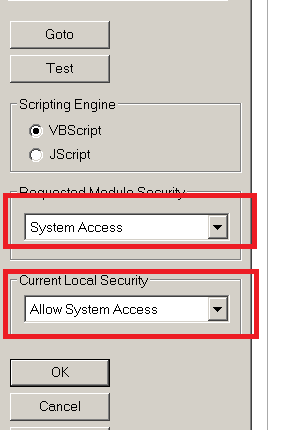
hope this helps
- Mark as New
- Bookmark
- Subscribe
- Mute
- Subscribe to RSS Feed
- Permalink
- Report Inappropriate Content
I got it. I was using your text but the chart was on a different tab so when i ran it in the correct tab it worked just fine. Thanks for your help Frank.
- Mark as New
- Bookmark
- Subscribe
- Mute
- Subscribe to RSS Feed
- Permalink
- Report Inappropriate Content
The code doesn't work for me. It throws an error - Object required: 'myDoc'
I guess its not able to create object through myInspector.WordEditor
Can you please help!!