Unlock a world of possibilities! Login now and discover the exclusive benefits awaiting you.

- Qlik Community
- :
- All Forums
- :
- QlikView
- :
- Choose Persistent Colors
- Subscribe to RSS Feed
- Mark Topic as New
- Mark Topic as Read
- Float this Topic for Current User
- Bookmark
- Subscribe
- Mute
- Printer Friendly Page

 gerhardl
- Mark as New
- Bookmark
- Subscribe
- Mute
- Subscribe to RSS Feed
- Permalink
- Report Inappropriate Content
Choose Persistent Colors
Hi there,
I'm sure this is a silly question - don't know why I can't figure this out or find another such discussion.
I have a Funnel Chart with 10 sections (based on the "CD Status" Dimension Split). It is sorted highest to lowest and I then chose colors per section, with the highest CD Status being the darkest.
When I make selections in other part of the QV doc and it for instance only shows CD Status 2 to 4, then the colors change to the top 3 "chosen" colors, which I want to always be for CD 7,8 and 9.
I know that I can choose Persistent colors, and then making selections will not change the colors - but when persistent colors is ticked, it ignores the order of the colors I chose, and assigns its own colors to each CD Status.
Any ideas?
Accepted Solutions

- Mark as New
- Bookmark
- Subscribe
- Mute
- Subscribe to RSS Feed
- Permalink
- Report Inappropriate Content
- Mark as New
- Bookmark
- Subscribe
- Mute
- Subscribe to RSS Feed
- Permalink
- Report Inappropriate Content
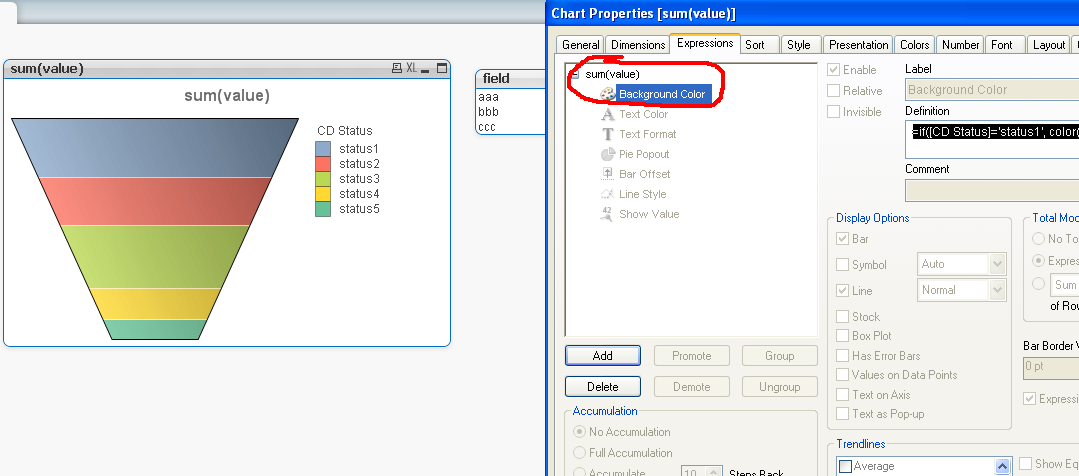
did you try to define expression background color rhis way:
=if(CDstatus='CDstatus1', color(1),if(CDstatus='CDstatus2', color(2),if(CDstatus='CDstatus3', color(3),if(CDstatus='CDstatus4', color(4),color(5)))))
?
- Mark as New
- Bookmark
- Subscribe
- Mute
- Subscribe to RSS Feed
- Permalink
- Report Inappropriate Content
see att qvw
gerhardl
- Mark as New
- Bookmark
- Subscribe
- Mute
- Subscribe to RSS Feed
- Permalink
- Report Inappropriate Content
I have QV Personal Edition so unfortunately can't open your example.
As far as I can figure out, that will only affect the chart's background color?
I want to be able to choose the colors of the individual segments of teh chart, like you can do on the Colors TAB.
See image - I want to keep CD 0 and 1 white when I select only them. Currently they will change to Black and Dark Grey when I select them (colors 1 and 2). And if I use persistent colors then it mixes up the colors I have selected.
Thanks for helping

- Mark as New
- Bookmark
- Subscribe
- Mute
- Subscribe to RSS Feed
- Permalink
- Report Inappropriate Content
lok at this printscreen...
gerhardl
- Mark as New
- Bookmark
- Subscribe
- Mute
- Subscribe to RSS Feed
- Permalink
- Report Inappropriate Content
AAAAHHHHHHH!
Very nice, that works perfectly.
Thanks