Unlock a world of possibilities! Login now and discover the exclusive benefits awaiting you.

- Qlik Community
- :
- All Forums
- :
- QlikView
- :
- Re: Classify under weight category
- Subscribe to RSS Feed
- Mark Topic as New
- Mark Topic as Read
- Float this Topic for Current User
- Bookmark
- Subscribe
- Mute
- Printer Friendly Page

 ngreddy1982
- Mark as New
- Bookmark
- Subscribe
- Mute
- Subscribe to RSS Feed
- Permalink
- Report Inappropriate Content
Classify under weight category
I am trying to get a report looks some thing like this which is an example from bi manager.
| Orders/Mth 2016 | Under250g | C250to500g | C500to750g | c750gto1Kg | c1Kgto125Kg | c125Kgto1_5Kg | c1_5kgto175Kg | c175kgto2Kg | Over2kg |
| 1 | 2,821 | 1,696 | 946 | 525 | 268 | 156 | 94 | 81 | 286 |
| 2 | 2,679 | 1,342 | 732 | 384 | 228 | 124 | 70 | 84 | 233 |
| 9 | 1,393 | 901 | 555 | 340 | 204 | 111 | 66 | 60 | 152 |
| 10 | 1,542 | 1,028 | 655 | 343 | 214 | 93 | 58 | 51 | 129 |
| I |
I have used below query
Select
ih.[Order GuID],
sum(il.[Gross Weight]) as ShipWeight,
cn.[Actual Packaging], itm.[Description],
count(il.No_) as coutn
FROM [TBW_BI].[dbo].[dreams$Sales Invoice Line] as il
inner join [TBW_BI].[dbo].[dreams$Sales Invoice Header] as ih
on il.[Document No_]=ih.No_
inner join [TBW_BI].[dbo].[dreams$Consignment] as cn
on ih.[Consignment ID]=cn.[id]
left join [TBW_BI].[dbo].[dreams$Item] as itm
on cn.[Actual Packaging]=itm.[No_]
where ih.[Ship-to Country_Region Code]='HK'
and ih.[Shipment Date]>='2016-10-01' and ih.[Shipment Date]<'2017-03-31'
group by ih.[Order GuID],itm.Description, cn.[Actual Packaging]
to get table like below
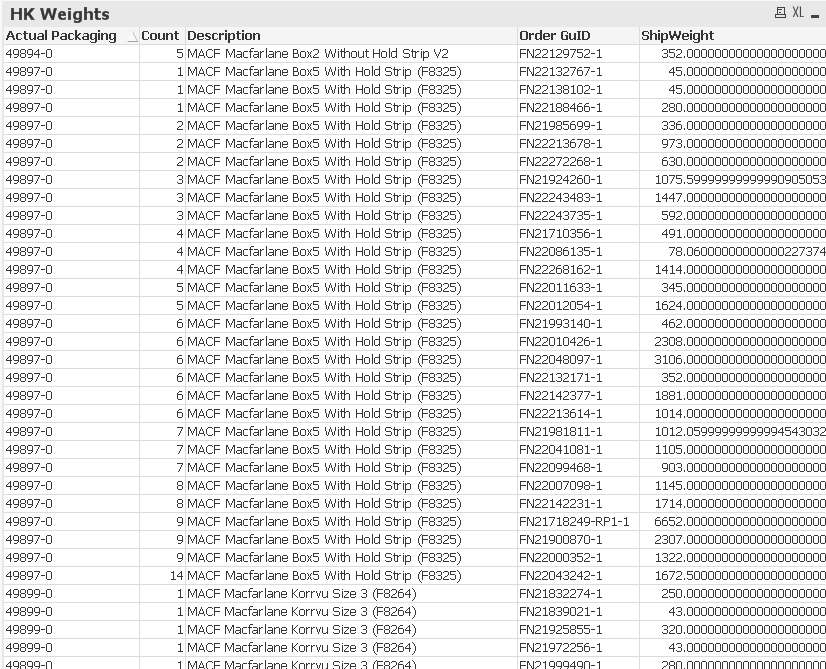
now how can I classify them or group them as per the request. Got to get how many orders which count column are under 250 grams , and how many are under 250 to 500 grams etc..??
- « Previous Replies
-
- 1
- 2
- Next Replies »
ngreddy1982
- Mark as New
- Bookmark
- Subscribe
- Mute
- Subscribe to RSS Feed
- Permalink
- Report Inappropriate Content
Which dimension shall i use and what expression

 sunny_talwar
- Mark as New
- Bookmark
- Subscribe
- Mute
- Subscribe to RSS Feed
- Permalink
- Report Inappropriate Content
Dimension
Aggr(
If(ShipWeight < 250, Dual('Under250g', 1),
If(ShipWeight < 500, Dual('C250to500g', 2),
....
, [Order GuID])
Expression
Count(DISTINCT [Order GuID])
ngreddy1982
- Mark as New
- Bookmark
- Subscribe
- Mute
- Subscribe to RSS Feed
- Permalink
- Report Inappropriate Content
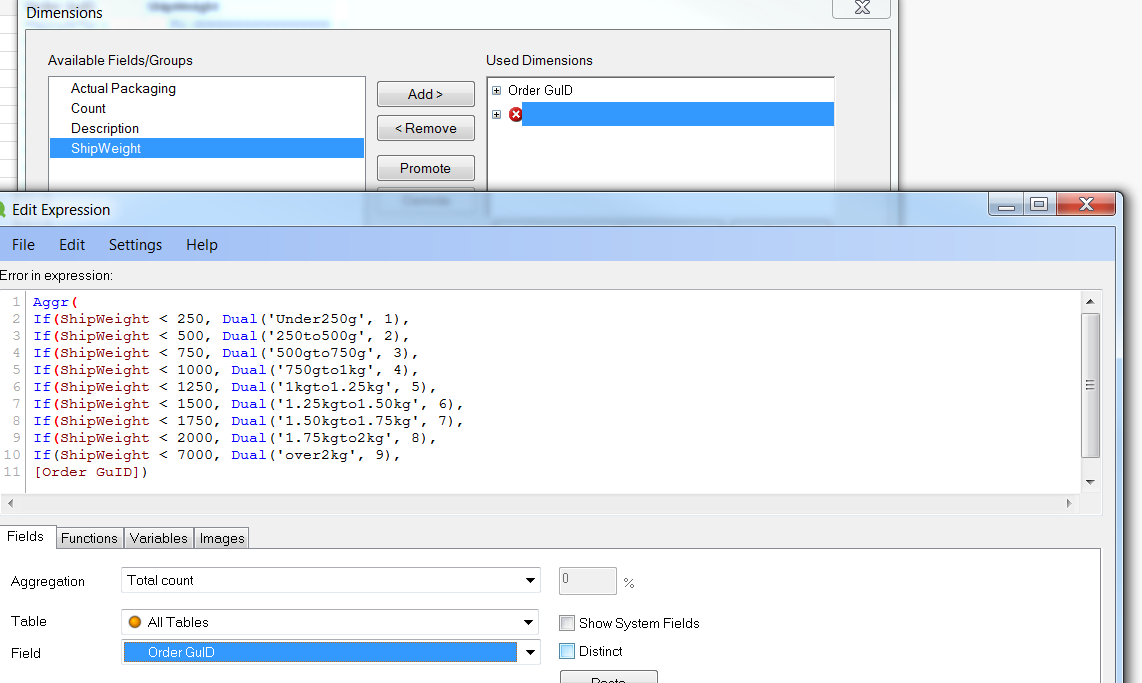
I have created new straight table took only orderguid to used dimensions and under add calculated dimension i am using this. correct?
sunny_talwar
- Mark as New
- Bookmark
- Subscribe
- Mute
- Subscribe to RSS Feed
- Permalink
- Report Inappropriate Content
Do you see the unclosed parenthesis for each of the if? You need to close them Giridhar
ngreddy1982
- Mark as New
- Bookmark
- Subscribe
- Mute
- Subscribe to RSS Feed
- Permalink
- Report Inappropriate Content
How to close it ?
sunny_talwar
- Mark as New
- Bookmark
- Subscribe
- Mute
- Subscribe to RSS Feed
- Permalink
- Report Inappropriate Content
 Would you be able to share what you have typed in your dimension here? as text and not as an image
ngreddy1982
- Mark as New
- Bookmark
- Subscribe
- Mute
- Subscribe to RSS Feed
- Permalink
- Report Inappropriate Content
Aggr(
If(ShipWeight < 250, Dual('Under250g', 1),
If(ShipWeight < 500, Dual('250to500g', 2),
If(ShipWeight < 750, Dual('500gto750g', 3),
If(ShipWeight < 1000, Dual('750gto1kg', 4),
If(ShipWeight < 1250, Dual('1kgto1.25kg', 5),
If(ShipWeight < 1500, Dual('1.25kgto1.50kg', 6),
If(ShipWeight < 1750, Dual('1.50kgto1.75kg', 7),
If(ShipWeight < 2000, Dual('1.75kgto2kg', 8),
If(ShipWeight < 7000, Dual('over2kg', 9),
[Order GuID])
sunny_talwar
- Mark as New
- Bookmark
- Subscribe
- Mute
- Subscribe to RSS Feed
- Permalink
- Report Inappropriate Content
Try this:
Aggr(
If(ShipWeight < 250, Dual('Under250g', 1),
If(ShipWeight < 500, Dual('250to500g', 2),
If(ShipWeight < 750, Dual('500gto750g', 3),
If(ShipWeight < 1000, Dual('750gto1kg', 4),
If(ShipWeight < 1250, Dual('1kgto1.25kg', 5),
If(ShipWeight < 1500, Dual('1.25kgto1.50kg', 6),
If(ShipWeight < 1750, Dual('1.50kgto1.75kg', 7),
If(ShipWeight < 2000, Dual('1.75kgto2kg', 8),
If(ShipWeight < 7000, Dual('over2kg', 9)))))))))),
[Order GuID])

- « Previous Replies
-
- 1
- 2
- Next Replies »