Unlock a world of possibilities! Login now and discover the exclusive benefits awaiting you.

- Qlik Community
- :
- All Forums
- :
- QlikView
- :
- Re: Color coding with Full Accumulation expression...
Options
- Subscribe to RSS Feed
- Mark Topic as New
- Mark Topic as Read
- Float this Topic for Current User
- Bookmark
- Subscribe
- Mute
- Printer Friendly Page
Turn on suggestions
Auto-suggest helps you quickly narrow down your search results by suggesting possible matches as you type.
Showing results for

 nenadvukovic
Creator III
2017-04-06
05:34 AM
- Mark as New
- Bookmark
- Subscribe
- Mute
- Subscribe to RSS Feed
- Permalink
- Report Inappropriate Content
Color coding with Full Accumulation expressions is not as expected
Hi,
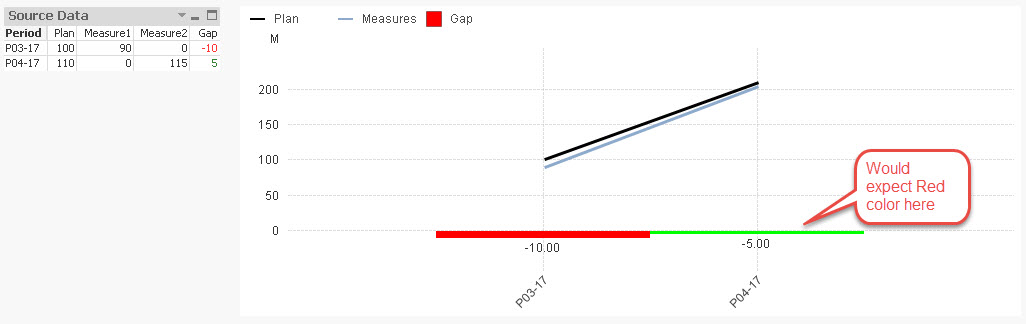
Can you please take a look into the provided example and help me fix this issue. I would expect to see the second bar colored in red, and it is colored in green because the period 2 is green, but cumulative it is red.
Here is the screenshot and the test qvw file attached.
Thanks
999 Views
1 Solution
Accepted Solutions

 sunny_talwar
MVP
2017-04-06
05:37 AM
- Mark as New
- Bookmark
- Subscribe
- Mute
- Subscribe to RSS Feed
- Permalink
- Report Inappropriate Content
Try this for background color
if(RangeSum(Above(sum(Measure1) + sum(Measure2) - sum(Plan), 0, RowNo())) < 0, lightred(), lightgreen())
2 Replies
sunny_talwar
MVP
2017-04-06
05:37 AM
- Mark as New
- Bookmark
- Subscribe
- Mute
- Subscribe to RSS Feed
- Permalink
- Report Inappropriate Content
Try this for background color
if(RangeSum(Above(sum(Measure1) + sum(Measure2) - sum(Plan), 0, RowNo())) < 0, lightred(), lightgreen())
nenadvukovic
Creator III
2017-04-06
05:41 AM
Author
- Mark as New
- Bookmark
- Subscribe
- Mute
- Subscribe to RSS Feed
- Permalink
- Report Inappropriate Content
Great Sunny. Thank you
937 Views
