Unlock a world of possibilities! Login now and discover the exclusive benefits awaiting you.

- Qlik Community
- :
- All Forums
- :
- QlikView
- :
- Re: Conditional Show Based on OSUser
- Subscribe to RSS Feed
- Mark Topic as New
- Mark Topic as Read
- Float this Topic for Current User
- Bookmark
- Subscribe
- Mute
- Printer Friendly Page

- Mark as New
- Bookmark
- Subscribe
- Mute
- Subscribe to RSS Feed
- Permalink
- Report Inappropriate Content
Conditional Show Based on OSUser
Trying to add a conditional statement to a button based on OSUser
Currently, I have the following syntax in the SHOW/Conditional dialouge box of the button:
OSUser () = '*melillo*, *userlastname*'
This does not seem to be working, even when I try it with just my last name.
Any suggestions? Thank you.
Accepted Solutions

 petter
- Mark as New
- Bookmark
- Subscribe
- Mute
- Subscribe to RSS Feed
- Permalink
- Report Inappropriate Content
You should be able to use the WildMatch() function like this:
WildMatch( OsUser() , '*melillo*', '*userlastname*' )
petter
- Mark as New
- Bookmark
- Subscribe
- Mute
- Subscribe to RSS Feed
- Permalink
- Report Inappropriate Content
You should be able to use the WildMatch() function like this:
WildMatch( OsUser() , '*melillo*', '*userlastname*' )
- Mark as New
- Bookmark
- Subscribe
- Mute
- Subscribe to RSS Feed
- Permalink
- Report Inappropriate Content
Thanks Petter.

 cbaqir
- Mark as New
- Bookmark
- Subscribe
- Mute
- Subscribe to RSS Feed
- Permalink
- Report Inappropriate Content
Petter,
On my Sheet Properties for Validation, I have Show Sheet Conditional:
=WildMatch( OsUser() , '*cbaqir*', '*jbrowning002*', '*clondono*','*draffensperger*' )
However, as you can see in the screenshot, this user can see this sheet but should not be able to. Any idea why? Does the type of license or distribution make a difference?
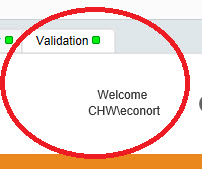
Thanks,
Cassandra