Unlock a world of possibilities! Login now and discover the exclusive benefits awaiting you.

- Qlik Community
- :
- All Forums
- :
- QlikView
- :
- Re: Convert 201501 to Jan
- Subscribe to RSS Feed
- Mark Topic as New
- Mark Topic as Read
- Float this Topic for Current User
- Bookmark
- Subscribe
- Mute
- Printer Friendly Page

- Mark as New
- Bookmark
- Subscribe
- Mute
- Subscribe to RSS Feed
- Permalink
- Report Inappropriate Content
Convert 201501 to Jan
How can I take a YearMonthId = 201501 and convert it to the month of Jan?
Thanks,
Joe
Accepted Solutions

 jonasheisterkam
- Mark as New
- Bookmark
- Subscribe
- Mute
- Subscribe to RSS Feed
- Permalink
- Report Inappropriate Content
Do you mean only the Month() without Year info?=>
=month(date#(201501,'YYYYMM'))
jonasheisterkam
- Mark as New
- Bookmark
- Subscribe
- Mute
- Subscribe to RSS Feed
- Permalink
- Report Inappropriate Content
Do you mean only the Month() without Year info?=>
=month(date#(201501,'YYYYMM'))
- Mark as New
- Bookmark
- Subscribe
- Mute
- Subscribe to RSS Feed
- Permalink
- Report Inappropriate Content
I separated it out to the last 2 characters using right(YearMonthId, 2) now how do I convert this 01 to January?
- Mark as New
- Bookmark
- Subscribe
- Mute
- Subscribe to RSS Feed
- Permalink
- Report Inappropriate Content
Thank you. Much appreciated. Serious brainfart on that one.
Joe
jonasheisterkam
- Mark as New
- Bookmark
- Subscribe
- Mute
- Subscribe to RSS Feed
- Permalink
- Report Inappropriate Content
If you have only the number you need creation of date/timestamp if you want to use month(). You can create string and use functions like date#() oder you use makedate() with a fix year.
You can also use the defined Monthnames from the beginning of youre Skript, generatet by qlick.
=subfield(MonthNames,';',01)

 MarcoWedel
- Mark as New
- Bookmark
- Subscribe
- Mute
- Subscribe to RSS Feed
- Permalink
- Report Inappropriate Content
converting 01 to January could be done like:
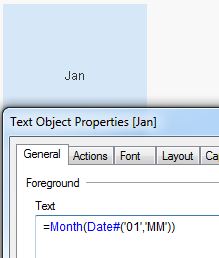
=Month(Date#('01','MM'))
hope this helps
regards
Marco