Unlock a world of possibilities! Login now and discover the exclusive benefits awaiting you.

- Qlik Community
- :
- All Forums
- :
- QlikView
- :
- Convert a string to a Date
- Subscribe to RSS Feed
- Mark Topic as New
- Mark Topic as Read
- Float this Topic for Current User
- Bookmark
- Subscribe
- Mute
- Printer Friendly Page

- Mark as New
- Bookmark
- Subscribe
- Mute
- Subscribe to RSS Feed
- Permalink
- Report Inappropriate Content
Convert a string to a Date
Hi Community,
Maybe someone could help me...
I have a string field called 'Departure' populate like that = [January 11th 2018 12:00:00]
I would like to convert it into a Date field/dimension => [01/11/2018]
Maybe someone nice could help me...
my brain is going to expose 
Thanks a lot,
Thomas
ps: currently I get only the number of the month with the formula below:
=wildmatch((LEFT(Departure,FindOneOf(Departure,' '))), 'ja*','fe*','ma*','April','May','Jun','July','August','September','October','November','December')

 maxgro
- Mark as New
- Bookmark
- Subscribe
- Mute
- Subscribe to RSS Feed
- Permalink
- Report Inappropriate Content
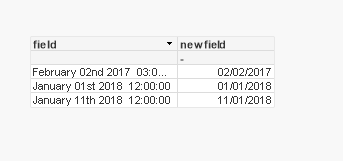
you can use the LongMonthNames
Set LongMonthNames =
'January;February;March;April;May;June;July;August;September;October;November;December';
load
field,
date(
date#(
subfield(field, ' ', 1) & ' ' &
left(subfield(field, ' ', 2),2) & ' ' &
subfield(field, ' ', 3)
,
'MMMM DD YYYY')
,'DD/MM/YYYY') as newfield
inline [
field
January 11th 2018 12:00:00
January 01st 2018 12:00:00
February 02nd 2017 03:00:00
];