Unlock a world of possibilities! Login now and discover the exclusive benefits awaiting you.

- Qlik Community
- :
- All Forums
- :
- QlikView
- :
- Re: Convert seconds to time format
- Subscribe to RSS Feed
- Mark Topic as New
- Mark Topic as Read
- Float this Topic for Current User
- Bookmark
- Subscribe
- Mute
- Printer Friendly Page

- Mark as New
- Bookmark
- Subscribe
- Mute
- Subscribe to RSS Feed
- Permalink
- Report Inappropriate Content
Convert seconds to time format
Hi,
I have calculated field in script as Second and now I want to convert it to time format.
for eg. 5326 to 01:28:46
Accepted Solutions

 Chanty4u
- Mark as New
- Bookmark
- Subscribe
- Mute
- Subscribe to RSS Feed
- Permalink
- Report Inappropriate Content
Chanty4u
- Mark as New
- Bookmark
- Subscribe
- Mute
- Subscribe to RSS Feed
- Permalink
- Report Inappropriate Content
hi,
try lik dis
Interval(TIME_SECONDS/86400, 'hh:mm:ss') as TIME_1 |
Chanty4u
- Mark as New
- Bookmark
- Subscribe
- Mute
- Subscribe to RSS Feed
- Permalink
- Report Inappropriate Content
 Kushal_Chawda
- Mark as New
- Bookmark
- Subscribe
- Mute
- Subscribe to RSS Feed
- Permalink
- Report Inappropriate Content

 tamilarasu
- Mark as New
- Bookmark
- Subscribe
- Mute
- Subscribe to RSS Feed
- Permalink
- Report Inappropriate Content
Try,
Expression:
=Timestamp(FieldName/86400 ,'hh:mm:ss')
Script:
Timestamp(FieldName/86400 ,'hh:mm:ss') as Time
Chanty4u
- Mark as New
- Bookmark
- Subscribe
- Mute
- Subscribe to RSS Feed
- Permalink
- Report Inappropriate Content
or else
time(YourField/3600/24, 'hh:mm:ss') as YourFiled
Sample attached
- Mark as New
- Bookmark
- Subscribe
- Mute
- Subscribe to RSS Feed
- Permalink
- Report Inappropriate Content
U can the time funcion
=time('field'/3600,'hh:mm')

 HirisH_V7
- Mark as New
- Bookmark
- Subscribe
- Mute
- Subscribe to RSS Feed
- Permalink
- Report Inappropriate Content
Hi,
May be like this,
Data:
LOAD * ,
Time(Time#(Field,'ss'),'hh:mm:ss') as Time
INLINE [
Field
5326
];
Output:
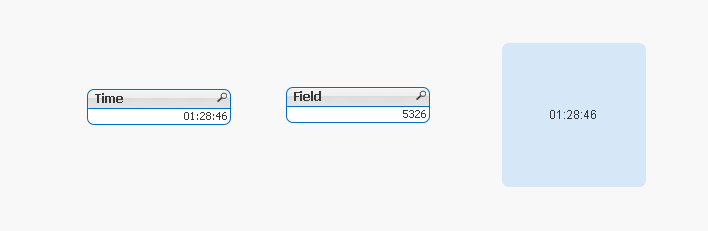
In Text Box:
=Time(Time#(Field,'ss'),'hh:mm:ss')
HTH,
PFA,
Hirish
- Mark as New
- Bookmark
- Subscribe
- Mute
- Subscribe to RSS Feed
- Permalink
- Report Inappropriate Content
Try,
Expression:
=Timestamp(FieldName/86400 ,'hh:mm:ss')
Script:
Timestamp(FieldName/86400 ,'hh:mm:ss') as Time