Unlock a world of possibilities! Login now and discover the exclusive benefits awaiting you.

- Qlik Community
- :
- All Forums
- :
- QlikView
- :
- CopyTableToClipboard versus SendToExcel in Macro
- Subscribe to RSS Feed
- Mark Topic as New
- Mark Topic as Read
- Float this Topic for Current User
- Bookmark
- Subscribe
- Mute
- Printer Friendly Page

 schumi1980
- Mark as New
- Bookmark
- Subscribe
- Mute
- Subscribe to RSS Feed
- Permalink
- Report Inappropriate Content
CopyTableToClipboard versus SendToExcel in Macro
Dear All
I am struggling with the following problem:
I use this peace of code to get a table from Qlikview into excel in a macro:
Set obj3 = ActiveDocument.GetSheetObject(aSheetObj3(i))
obj3.CopyTableToClipboard True
oSH3.Paste
which results in a table:

I extract several tables into one sheet.
However, I would like to have the tables in their original format (qlikview, classic style), especially the table borders should be black instead of a mere grey.
If I used
obj3.SendToExcel
I could achieve that but would no longer be able to extract the tables in their original format, like this:
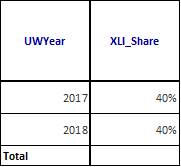
Is there a command that specifies that the original format is maintained?
Many thanks for your help.
Jan
Accepted Solutions

 marcus_sommer
- Mark as New
- Bookmark
- Subscribe
- Mute
- Subscribe to RSS Feed
- Permalink
- Report Inappropriate Content
In regard to several questions of you all regarding Excel exporting/formatting issues - I'm not sure that it's sensible to go this way. Of course with enough efforts it's possible to format everything (if I remember correctly you mentioned a lot of files, sheets and objects) with QlikView and/or Excel macros. I have done a lot stuff like this and know that this could be very expensive especially if there isn't already a quite wide experience of VBA/VBS.
Easier than this is to use appropriate prepared Excel files in which all formattings are already done and just to update/change the data. I mean to fill/update one or several (usually hidden) data- and pivot-sheets and all the visible user-content grabbed the data from there.
Further I suggest to consider the use of NPrinting or similar tools. Of course it adds some extra costs but by larger requirements to export/print/mail data it might be a lot cheaper than developing everything yourself.
- Marcus
marcus_sommer
- Mark as New
- Bookmark
- Subscribe
- Mute
- Subscribe to RSS Feed
- Permalink
- Report Inappropriate Content
In regard to several questions of you all regarding Excel exporting/formatting issues - I'm not sure that it's sensible to go this way. Of course with enough efforts it's possible to format everything (if I remember correctly you mentioned a lot of files, sheets and objects) with QlikView and/or Excel macros. I have done a lot stuff like this and know that this could be very expensive especially if there isn't already a quite wide experience of VBA/VBS.
Easier than this is to use appropriate prepared Excel files in which all formattings are already done and just to update/change the data. I mean to fill/update one or several (usually hidden) data- and pivot-sheets and all the visible user-content grabbed the data from there.
Further I suggest to consider the use of NPrinting or similar tools. Of course it adds some extra costs but by larger requirements to export/print/mail data it might be a lot cheaper than developing everything yourself.
- Marcus
