Unlock a world of possibilities! Login now and discover the exclusive benefits awaiting you.

- Qlik Community
- :
- All Forums
- :
- QlikView
- :
- Re: Could not complete the development of Raphael ...
- Subscribe to RSS Feed
- Mark Topic as New
- Mark Topic as Read
- Float this Topic for Current User
- Bookmark
- Subscribe
- Mute
- Printer Friendly Page

- Mark as New
- Bookmark
- Subscribe
- Mute
- Subscribe to RSS Feed
- Permalink
- Report Inappropriate Content
Could not complete the development of Raphael Pie Chart Extension Object
Dear All,
I'm learning Qlikview Extension Object and i'm trying to build raphael Pie Chart extension. I'm struck and could not complete it.
Could you please have a look at my script and let me know what i'm missing?
I have less knowledege in Scripting and hence i could have missed few things. Please help me.
var template_path = Qva.Remote + "?public=only&name=Extensions/RaphelPieChart/";
function extension_Init()
{
// Use QlikView's method of loading other files needed by an extension. These files should be added to your extension .zip file (.qar)
if (typeof jQuery == 'undefined') {
Qva.LoadScript(template_path + 'raphael.js', function() {
Qva.LoadScript(template_path + 'pie.js', extension_Done);
});
}
else {
Qva.LoadScript(template_path + 'raphael.js', function() {
Qva.LoadScript(template_path + 'jquery.js', function() {
Qva.LoadScript(template_path + 'pie.js', extension_Done);
});
});
}
}
function extension_Done(){
//Add extension
Qva.AddExtension('RaphelPieChart',
function(){
//Load a CSS style sheet
Qva.LoadCSS(template_path + "demo.css");
Qva.LoadCSS(template_path + "demo-print.css");
var _this = this;
var iFrameWidth = _this.GetWidth();
var iFrameHeight = _this.GetHeight();
var divName = _this.Layout.ObjectId.replace("\\", "_");
if (_this.Element.children.length == 0) {
var ui = document.createElement("div");
ui.setAttribute("id", divName);
_this.Element.appendChild(ui);
$("#" + divName).css("height", iFrameHeight + "px").css("width", iFrameWidth + "px");
} else {
$("#" + divName).css("height", iFrameHeight + "px").css("width", iFrameWidth + "px");
$("#" + divName).empty();
};
for (var i=0,k=_this.Data.Rows.length;i<k;i++){
var row = _this.Data.Rows;
var th = row[0].text;
var td = row[1].text;
var temptd = Number(td);
var renderer = new Raphael.fn.pieChart(iFrameWidth, iFrameHeight, 200, td, th, "#fff");
}
renderer.draw();
});
}
//Initiate extension
extension_Init();
Thanks in advance,
Srini.
- « Previous Replies
-
- 1
- 2
- Next Replies »

 rbecher
- Mark as New
- Bookmark
- Subscribe
- Mute
- Subscribe to RSS Feed
- Permalink
- Report Inappropriate Content
It depends on the problem. Just post here again. There are a lot more community members with a sound extension knowledge.
- Ralf
- Mark as New
- Bookmark
- Subscribe
- Mute
- Subscribe to RSS Feed
- Permalink
- Report Inappropriate Content
I understand Ralf.
Thanks,
Srini.

 paulwalker
- Mark as New
- Bookmark
- Subscribe
- Mute
- Subscribe to RSS Feed
- Permalink
- Report Inappropriate Content
Hi Ralf,
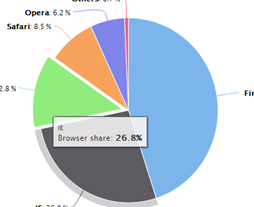
is it possible to show popup message...
like this....
rbecher
- Mark as New
- Bookmark
- Subscribe
- Mute
- Subscribe to RSS Feed
- Permalink
- Report Inappropriate Content
Hi Paul,
I've added a tooltip and made a little code refactoring (resizable). Still one issue is that the tooltip is blinking sometimes because of late arriving events (hover?) and redraws. I don't know yet how to fix..
- Ralf
paulwalker
- Mark as New
- Bookmark
- Subscribe
- Mute
- Subscribe to RSS Feed
- Permalink
- Report Inappropriate Content
Great work.... Ralf
- « Previous Replies
-
- 1
- 2
- Next Replies »