Unlock a world of possibilities! Login now and discover the exclusive benefits awaiting you.

- Qlik Community
- :
- All Forums
- :
- QlikView
- :
- Re: Count Distinct Based on Sum
- Subscribe to RSS Feed
- Mark Topic as New
- Mark Topic as Read
- Float this Topic for Current User
- Bookmark
- Subscribe
- Mute
- Printer Friendly Page

- Mark as New
- Bookmark
- Subscribe
- Mute
- Subscribe to RSS Feed
- Permalink
- Report Inappropriate Content
Count Distinct Based on Sum
I'm fairly new to Qlikview and need some help with a pivot table. I have a dataset that includes Clients; each client can have multiple Segments of business, and each Segment can have multiple Benefits. I have Expenses by fiscal year for each available Benefit. It looks something like this:
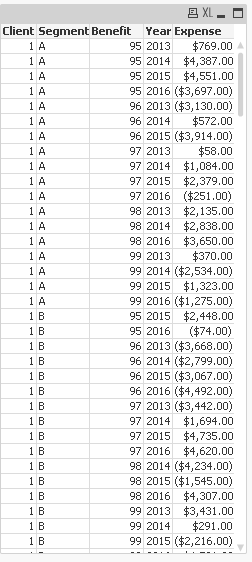
I need to show a summary of a subset of clients/expenses based on the Segment and Benefit so I've created a calculated dimension:
=IF((Segment='A' OR Segment='C') AND (Benefit=96 OR Benefit=97 OR Benefit=98),Client)
I'd like to see the sum of expenses for all years, which is easy enough. Here's where I'm stumped: I need to show the count of years where the sum of expenses for the year is less than 0, without having the year as a dimension. I want my final pivot table to look something like this (but obviously with the correct data in the Count column):
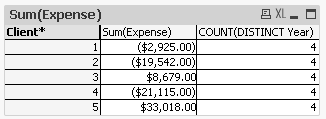
f I throw the Year into another pivot, I can use that to eyeball what the results should be, I just don't know how to get it.
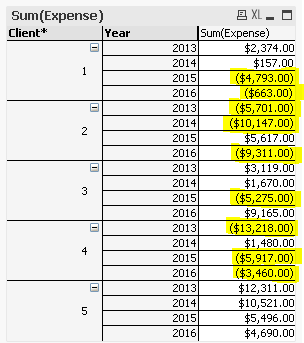
Expected Counts:
Client 1 - 2
Client 2 - 3
Client 3 - 1
Client 4 - 3
Client 5 - 0
Any help would be greatly appreciated. I've attached a QVW file if that helps.
Accepted Solutions

 sunny_talwar
- Mark as New
- Bookmark
- Subscribe
- Mute
- Subscribe to RSS Feed
- Permalink
- Report Inappropriate Content
Another way to avoid the if statement and use set analysis instead of using calculated dimension
=-Sum(Aggr(RangeMin(Sign(Sum({<Segment = {'A'}, Benefit = {96, 97, 98}>+<Segment = {'C'}, Benefit = {96, 97, 98}>}Expense)), 0), Client, Year))

 vishsaggi
- Mark as New
- Bookmark
- Subscribe
- Mute
- Subscribe to RSS Feed
- Permalink
- Report Inappropriate Content
Check this attached. You cannot use a calculatedDimension in your aggr() expression to get the count. So created a Calculated dimension in the script.
Change your Excel file path if you want to reload the script again.

 craigsutton
- Mark as New
- Bookmark
- Subscribe
- Mute
- Subscribe to RSS Feed
- Permalink
- Report Inappropriate Content
=SUM(If((Aggr(Sum(Expense), Client, Year))<0,1))
sunny_talwar
- Mark as New
- Bookmark
- Subscribe
- Mute
- Subscribe to RSS Feed
- Permalink
- Report Inappropriate Content
Another way to avoid the if statement and use set analysis instead of using calculated dimension
=-Sum(Aggr(RangeMin(Sign(Sum({<Segment = {'A'}, Benefit = {96, 97, 98}>+<Segment = {'C'}, Benefit = {96, 97, 98}>}Expense)), 0), Client, Year))
- Mark as New
- Bookmark
- Subscribe
- Mute
- Subscribe to RSS Feed
- Permalink
- Report Inappropriate Content
That works perfectly. Thanks for your help.
- Mark as New
- Bookmark
- Subscribe
- Mute
- Subscribe to RSS Feed
- Permalink
- Report Inappropriate Content
Thanks Craig. Unfortunately I think your formula is picking up some of the Segments and Benefits that are supposed to be excluded so I don't get the correct result in every case:

The answer from @stalwar1 works well by using a set analysis (although I'd prefer to avoid that if at all possible).