Unlock a world of possibilities! Login now and discover the exclusive benefits awaiting you.

- Qlik Community
- :
- All Forums
- :
- QlikView
- :
- Re: Count if style expression
- Subscribe to RSS Feed
- Mark Topic as New
- Mark Topic as Read
- Float this Topic for Current User
- Bookmark
- Subscribe
- Mute
- Printer Friendly Page

- Mark as New
- Bookmark
- Subscribe
- Mute
- Subscribe to RSS Feed
- Permalink
- Report Inappropriate Content
Count if style expression
Hi – I am looking for help with expressions to get an excel type “countifs” result.
Basically I have a table with cases data that is similar to the below:
| Case Number | Case Status | Created On | Closed Date |
| CP01 | Closed | 20/9/2013 | 14/01/2015 |
| CP02 | Open | 21/11/2013 | |
| CP03 | Closed | 22/12/2014 | 12/01/2015 |
| CP04 | Closed | 23/12/2014 | 13/01/2015 |
| CP05 | Open | 24/12/2014 | |
| CP06 | Closed | 22/12/2014 | 13/01/2015 |
| CP07 | Open | 26/12/2014 | |
| CP08 | Open | 2/1/2015 |
|
| CP09 | Open | 5/1/2015 |
|
| CP10 | Open | 7/1/2015 |
|
The results I am after are similar to:
| Canonical Year | Canonical Month | No. Cases Created | No. Cases Closed | % of cases closed within 60 days that closed that month |
| 2013 | 9 | 1 | 0 |
|
| 2014 | 12 | 5 | 0 |
|
| 2015 | 1 | 3 | 4 | 75% |
All fine with the No. cases created [Using: Count({$<DateType={'Created'}>} [CaseNumber]) ] and No. Cases Closed [Using: Count({$<[Case Status]={'Closed'},DateType={'Closed'}>}[CaseNumber])] , but can’t get the % of cases closed within 60 days (the KPI we are measuring)
I’ve tried the following and variations of this, but with no luck…
if(([ClosedDate]-[CreatedOn])<=60,
Count({$<[CaseStatus]={'Closed'},DateType={'Closed'}>}[CaseNumber])
)
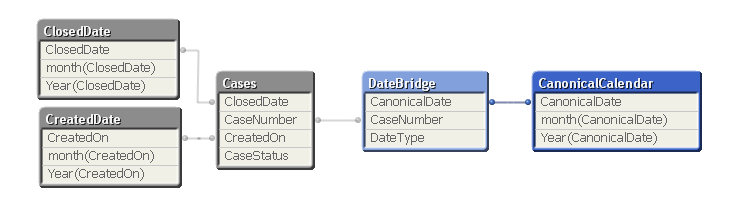
My data model is similar to the below:

 jzimolong
- Mark as New
- Bookmark
- Subscribe
- Mute
- Subscribe to RSS Feed
- Permalink
- Report Inappropriate Content
Try using this formula to get the # days between dates:
=
Above([Closed Date])-
[Created On]
jzimolong
- Mark as New
- Bookmark
- Subscribe
- Mute
- Subscribe to RSS Feed
- Permalink
- Report Inappropriate Content
Check out the attached. I mocked up a chart based on attached Excel file. Not sure if this is where you are going.