Unlock a world of possibilities! Login now and discover the exclusive benefits awaiting you.

- Qlik Community
- :
- All Forums
- :
- QlikView
- :
- Re: Count if
- Subscribe to RSS Feed
- Mark Topic as New
- Mark Topic as Read
- Float this Topic for Current User
- Bookmark
- Subscribe
- Mute
- Printer Friendly Page

- Mark as New
- Bookmark
- Subscribe
- Mute
- Subscribe to RSS Feed
- Permalink
- Report Inappropriate Content
Count if
Hi,
I want to count the column "workerid" where the field isapplies='appliead' else i want to show the value "0"
i have the table:
| WorkerID | IsApplied | Applied Job Count | the result I want |
|---|---|---|---|
| 4202 | Applied | 2 | 2 |
| 24875 | Not Applied | 1 | 0 |
| 8796 | Not Applied | 1 | 0 |
| 8745 | Not Applied | 1 | 0 |
i have the folowing formula
count({<IsApplied-= {"=if((Not Applied"}>} WorkerID_WorkerDetails)
Which shows the result shown in the column "Applied Job Count" in the table above
Thanks in advance
- « Previous Replies
-
- 1
- 2
- Next Replies »
Accepted Solutions

 vinieme12
- Mark as New
- Bookmark
- Subscribe
- Mute
- Subscribe to RSS Feed
- Permalink
- Report Inappropriate Content
or maybe you just need this
=if(IsApplied ='Applied',[Applied Job Count],0)
If a post helps to resolve your issue, please accept it as a Solution.

 prma7799
- Mark as New
- Bookmark
- Subscribe
- Mute
- Subscribe to RSS Feed
- Permalink
- Report Inappropriate Content
Try like this
=count({<IsApplied -= {"Not Applied"}>}WorkerID)
- Mark as New
- Bookmark
- Subscribe
- Mute
- Subscribe to RSS Feed
- Permalink
- Report Inappropriate Content
Now I get the result
| WorkerID | IsApplied | Applied Job Count |
|---|---|---|
| 4202 | Applied | 2 |
worker that did not apply is not shown in the table,
the result i want,is to show also the workers who did not apply, with the value "0".
vinieme12
- Mark as New
- Bookmark
- Subscribe
- Mute
- Subscribe to RSS Feed
- Permalink
- Report Inappropriate Content
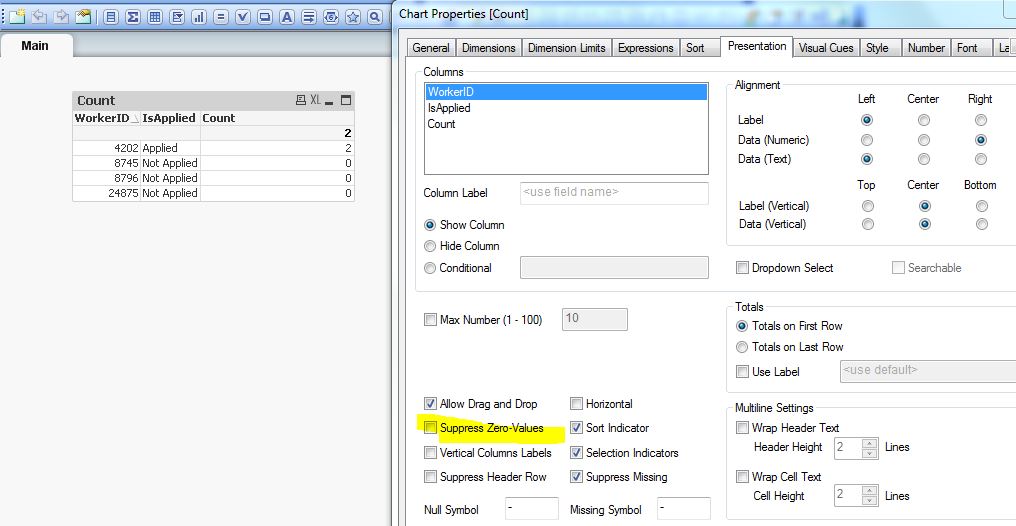
uncheck "Supress Zero values" in PResentation tab
If a post helps to resolve your issue, please accept it as a Solution.
vinieme12
- Mark as New
- Bookmark
- Subscribe
- Mute
- Subscribe to RSS Feed
- Permalink
- Report Inappropriate Content
or maybe you just need this
=if(IsApplied ='Applied',[Applied Job Count],0)
If a post helps to resolve your issue, please accept it as a Solution.
 devarasu07
- Mark as New
- Bookmark
- Subscribe
- Mute
- Subscribe to RSS Feed
- Permalink
- Report Inappropriate Content
Hi,
Try to uncheck "Suppress Zero-Values" in the Presentation page then it should work
=if(IsApplied ='Applied',Applied_Job_Count,0)


- Mark as New
- Bookmark
- Subscribe
- Mute
- Subscribe to RSS Feed
- Permalink
- Report Inappropriate Content
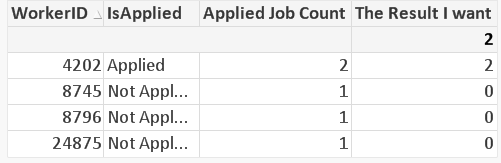
Is this you are expecting? Added Sum over expression from Vinit
Sum(If(IsApplied = 'Applied', [Applied Job Count],0))
vinieme12
- Mark as New
- Bookmark
- Subscribe
- Mute
- Subscribe to RSS Feed
- Permalink
- Report Inappropriate Content
Just use the expression posted above by P M and uncheck Supress Zero value, that is all you need
If a post helps to resolve your issue, please accept it as a Solution.

 qlikview979
- Mark as New
- Bookmark
- Subscribe
- Mute
- Subscribe to RSS Feed
- Permalink
- Report Inappropriate Content
Hi,
Are you expecting like this

regards
prma7799
- Mark as New
- Bookmark
- Subscribe
- Mute
- Subscribe to RSS Feed
- Permalink
- Report Inappropriate Content
Like this ?
- « Previous Replies
-
- 1
- 2
- Next Replies »