Unlock a world of possibilities! Login now and discover the exclusive benefits awaiting you.

- Qlik Community
- :
- All Forums
- :
- QlikView
- :
- Re: Countif Function in Qlick View
- Subscribe to RSS Feed
- Mark Topic as New
- Mark Topic as Read
- Float this Topic for Current User
- Bookmark
- Subscribe
- Mute
- Printer Friendly Page

- Mark as New
- Bookmark
- Subscribe
- Mute
- Subscribe to RSS Feed
- Permalink
- Report Inappropriate Content
Countif Function in Qlick View
Hi,
I M new to QlickView so can any one help me how will I get the count of
Branches in the straight table of QlikView.
In excel I get the same result by using the formula [ =COUNTIFS($B$2:$B$14,A2) ]
Please find the attachment of excel where there is a table on sheet 1 and wanted the result given on sheet2.
- « Previous Replies
- Next Replies »

 tamilarasu
- Mark as New
- Bookmark
- Subscribe
- Mute
- Subscribe to RSS Feed
- Permalink
- Report Inappropriate Content
Hi Bijay,
Create straight table and add
Dimension: Branches
Expression: Count(Branches)

 qlikview979
- Mark as New
- Bookmark
- Subscribe
- Mute
- Subscribe to RSS Feed
- Permalink
- Report Inappropriate Content
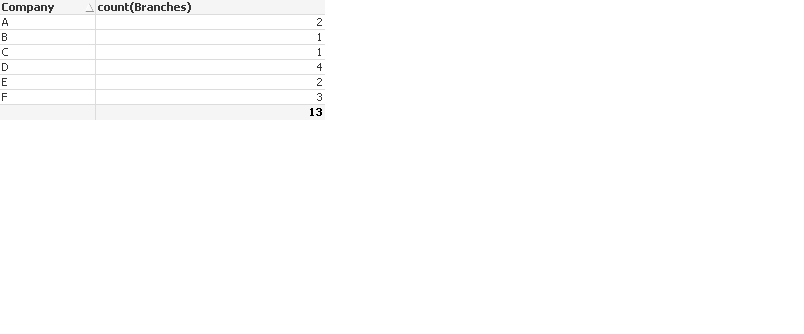
may be like this
- Mark as New
- Bookmark
- Subscribe
- Mute
- Subscribe to RSS Feed
- Permalink
- Report Inappropriate Content
Hi Mahesh,
If you observe carefully Company A have 3 Branches.
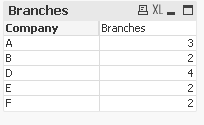
I want the result as given in sheet 2

 sanjay006
- Mark as New
- Bookmark
- Subscribe
- Mute
- Subscribe to RSS Feed
- Permalink
- Report Inappropriate Content
- Mark as New
- Bookmark
- Subscribe
- Mute
- Subscribe to RSS Feed
- Permalink
- Report Inappropriate Content
Yes Sanjay,
This is what I want can you share the expression...
As downloading features is not available in my network.
sanjay006
- Mark as New
- Bookmark
- Subscribe
- Mute
- Subscribe to RSS Feed
- Permalink
- Report Inappropriate Content
dimension : Company
expression :sum([Total Branches])
if u got the right ans pls mark it as a correct.
tamilarasu
- Mark as New
- Bookmark
- Subscribe
- Mute
- Subscribe to RSS Feed
- Permalink
- Report Inappropriate Content
Do you want to us to show the result is correct by attaching the screenshot? Did you try what I have suggested?
sanjay006
- Mark as New
- Bookmark
- Subscribe
- Mute
- Subscribe to RSS Feed
- Permalink
- Report Inappropriate Content
Guru 
- Mark as New
- Bookmark
- Subscribe
- Mute
- Subscribe to RSS Feed
- Permalink
- Report Inappropriate Content
Hi Tamil,
Yes, I have tried for the same.
1. Select straight Table
2. Dimension: Company
3. Expression: Count(Branches)
The result is 1 for all branches.
- « Previous Replies
- Next Replies »