Unlock a world of possibilities! Login now and discover the exclusive benefits awaiting you.

- Qlik Community
- :
- All Forums
- :
- QlikView
- :
- Counting Entries spread on multiple rows with mult...
- Subscribe to RSS Feed
- Mark Topic as New
- Mark Topic as Read
- Float this Topic for Current User
- Bookmark
- Subscribe
- Mute
- Printer Friendly Page

- Mark as New
- Bookmark
- Subscribe
- Mute
- Subscribe to RSS Feed
- Permalink
- Report Inappropriate Content
Counting Entries spread on multiple rows with multiple criteria
My data consists of something similar
mytable:
LOAD * INLINE [GroupId, Question, Answer
G1, Q1, 3
G1, Q2, B
G2, Q1, 5
G2, Q2, B
G3, Q1, 1
G3, Q2, C
G4, Q1, 1
G4, Q2, B
G5, Q1, 3
G5, Q2, D
G6, Q1, 2
G6, Q2, B
];
Each GroupID(G1..G6) has 2 questions in it (Q1 and Q2)
Q1: Possible Answers: 1,2,3,4,5
Q2: Possible Answers: A,B,C,D
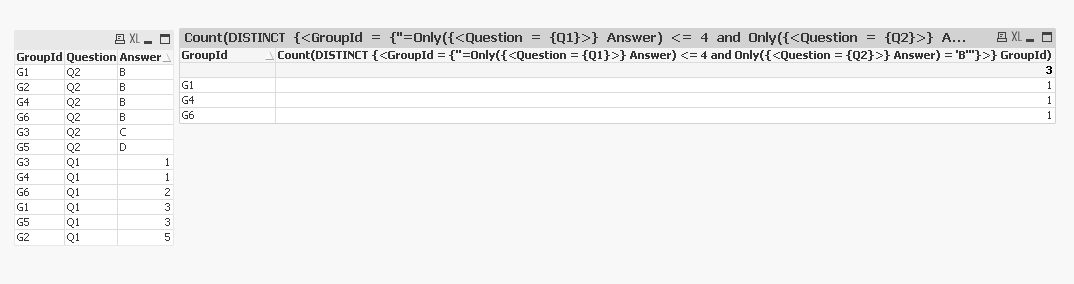
What I want to do is count Unique GroupIDs where Q1 was answered less than or equal to 4 and Q2 was answered B
In the Above data the count should be 3
thank you all
Accepted Solutions

 antoniotiman
- Mark as New
- Bookmark
- Subscribe
- Mute
- Subscribe to RSS Feed
- Permalink
- Report Inappropriate Content
Another way
=Count({<GroupId=P({<Question={'Q1'}, Answer={'<4'}>})*P({<Question={'Q2'}, Answer={'B'}>})>} DISTINCT GroupId)

 sunny_talwar
- Mark as New
- Bookmark
- Subscribe
- Mute
- Subscribe to RSS Feed
- Permalink
- Report Inappropriate Content
May be this
Count(DISTINCT {<GroupId = {"=Only({<Question = {Q1} Answer) <= 4 and Only({<Question = {Q2} Answer) = B"}>} GroupId)
sunny_talwar
- Mark as New
- Bookmark
- Subscribe
- Mute
- Subscribe to RSS Feed
- Permalink
- Report Inappropriate Content
My bad, I had some typos, try this
Count(DISTINCT {<GroupId = {"=Only({<Question = {Q1}>} Answer) <= 4 and Only({<Question = {Q2}>} Answer) = 'B'"}>} GroupId)
antoniotiman
- Mark as New
- Bookmark
- Subscribe
- Mute
- Subscribe to RSS Feed
- Permalink
- Report Inappropriate Content
Another way
=Count({<GroupId=P({<Question={'Q1'}, Answer={'<4'}>})*P({<Question={'Q2'}, Answer={'B'}>})>} DISTINCT GroupId)
- Mark as New
- Bookmark
- Subscribe
- Mute
- Subscribe to RSS Feed
- Permalink
- Report Inappropriate Content
Thank you both
Since in my original data the Q1 answers are string rather than numeric, I used the following:
=Count({<GroupId=P({<Question={'Q1'}, Answer-={'5'}>})*P({<Question={'Q2'}, Answer={'B'}>})>} DISTINCT GroupId)
thanks
antoniotiman
- Mark as New
- Bookmark
- Subscribe
- Mute
- Subscribe to RSS Feed
- Permalink
- Report Inappropriate Content
Yes, or
Answer={'1','2','3','4'}
if You need.
Thanks and Regards,
Antonio