Unlock a world of possibilities! Login now and discover the exclusive benefits awaiting you.

Announcements
Share your agentic AI experience, learn from others, and earn a new badge: Put Agentic AI to Work
- Qlik Community
- :
- All Forums
- :
- QlikView
- :
- Create Calculated Dimension
Options
- Subscribe to RSS Feed
- Mark Topic as New
- Mark Topic as Read
- Float this Topic for Current User
- Bookmark
- Subscribe
- Mute
- Printer Friendly Page
Turn on suggestions
Auto-suggest helps you quickly narrow down your search results by suggesting possible matches as you type.
Showing results for

Not applicable
2012-05-22
03:26 PM
- Mark as New
- Bookmark
- Subscribe
- Mute
- Subscribe to RSS Feed
- Permalink
- Report Inappropriate Content
Create Calculated Dimension
Hi
I have a current "dimension" called NIVEL with several elements as shown:
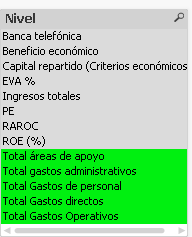
Now I want to create a bar chart with a CALCULATED DIMENSION but including ONLY the GREEN shaded elements.
How can I accomplish this??
1,227 Views
1 Solution
Accepted Solutions

 swuehl
Champion III
2012-05-22
03:30 PM
- Mark as New
- Bookmark
- Subscribe
- Mute
- Subscribe to RSS Feed
- Permalink
- Report Inappropriate Content
if you want to use a calculated dimension, maybe like
=if( wildmatch( Nivel, 'Total*'), Nivel)
599 Views
2 Replies
swuehl
Champion III
2012-05-22
03:30 PM
- Mark as New
- Bookmark
- Subscribe
- Mute
- Subscribe to RSS Feed
- Permalink
- Report Inappropriate Content
if you want to use a calculated dimension, maybe like
=if( wildmatch( Nivel, 'Total*'), Nivel)
600 Views

 oscar_ortiz
Partner - Specialist
2012-05-22
03:34 PM
- Mark as New
- Bookmark
- Subscribe
- Mute
- Subscribe to RSS Feed
- Permalink
- Report Inappropriate Content
Or you can try
=If( NivelLike 'Total*', Nivel, Null())