Unlock a world of possibilities! Login now and discover the exclusive benefits awaiting you.

- Qlik Community
- :
- All Forums
- :
- QlikView
- :
- Re: Create a Flag in script
- Subscribe to RSS Feed
- Mark Topic as New
- Mark Topic as Read
- Float this Topic for Current User
- Bookmark
- Subscribe
- Mute
- Printer Friendly Page

- Mark as New
- Bookmark
- Subscribe
- Mute
- Subscribe to RSS Feed
- Permalink
- Report Inappropriate Content
Create a Flag in script
I have two table like
Table A
| ID | Amount |
|---|---|
| 1 | 100 |
| 2 | 150 |
| 3 | 250 |
| 4 | 120 |
Table B
| ID | Amount |
|---|---|
| 5 | 100 |
| 4 | 150 |
| 3 | 250 |
| 7 | 120 |
I have concatenate this both table in script and I don't want to change this script.
Note- There are others fields also in both tables.It's just sample
Now my requirement is that I want to create the Flag in script for ID which will indicate which ID is not available in Table
for eg. in this case
ID 1 is not available in Table2 so I want to Flag the ID as 'Not in A'
for ID 4 'In Both'
For ID 5 'Not in B'
- Mark as New
- Bookmark
- Subscribe
- Mute
- Subscribe to RSS Feed
- Permalink
- Report Inappropriate Content
I think you are expecting 3 fields in your output like ID, Amount , Flag.
In the Final table you want to see 2 values for ID = 4 ?

 rubenmarin
- Mark as New
- Bookmark
- Subscribe
- Mute
- Subscribe to RSS Feed
- Permalink
- Report Inappropriate Content
Hi, if there are a max of 1 record by ID in each table you can use this script:
TableFinal:
NoConcatenate LOAD * Resident TableA;
Concatenate LOAD * Resident TableB;
Flag:
NoConcatenate
LOAD ID, '1' as table Resident TableA;
Concatenate LOAD ID, '-1' as table Resident TableB;
Left Join (TableFinal)
LOAD ID, If(Sum(table)=0, 'Both', If(Sum(table)=1, 'Not in B', 'Not in A')) as Flag Resident Flag Group By ID;
DROP table Flag;
 avinashelite
- Mark as New
- Bookmark
- Subscribe
- Mute
- Subscribe to RSS Feed
- Permalink
- Report Inappropriate Content
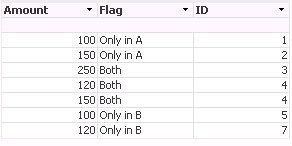
Only_A:
LOAD ID as A
FROM
[https://community.qlik.com/thread/184546]
(html, codepage is 1252, embedded labels, table is @1);
Only_B:
LOAD ID as B
FROM
[https://community.qlik.com/thread/184546]
(html, codepage is 1252, embedded labels, table is @2);
Temp:
LOAD ID,
Amount
FROM
[https://community.qlik.com/thread/184546]
(html, codepage is 1252, embedded labels, table is @1);
Concatenate
LOAD ID,
Amount
FROM
[https://community.qlik.com/thread/184546]
(html, codepage is 1252, embedded labels, table is @2);
master:
LOAD ID,
Amount,
if(Exists(B,ID)='-1' and Exists(A,ID)='-1','Both',if(Exists(A,ID)='-1','Only in A',if(Exists(B,ID)='-1','Only in B','Not in Both'))) as Flag
Resident
Temp;
Drop Tables Temp,Only_A,Only_B;

 sinanozdemir
- Mark as New
- Bookmark
- Subscribe
- Mute
- Subscribe to RSS Feed
- Permalink
- Report Inappropriate Content
Here is another way of doing it by using Count() of occurrences in Tables:
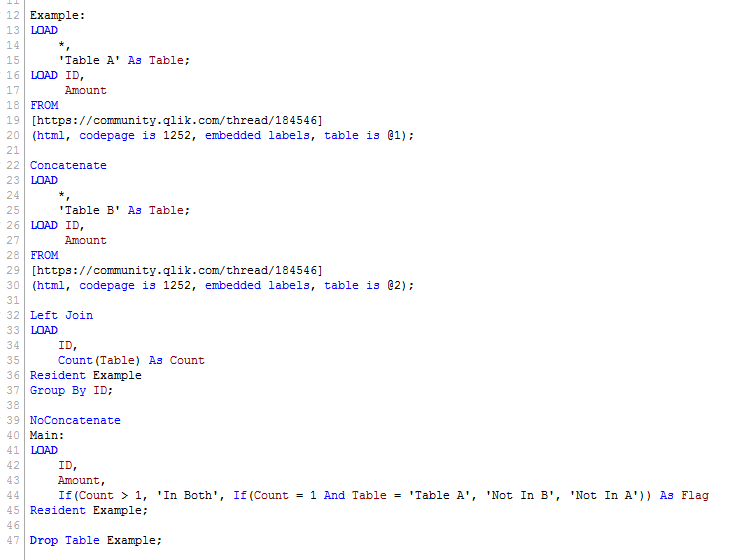
Here is the data model:
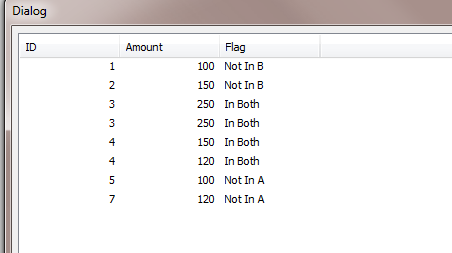
Hope this helps.
Thanks
avinashelite
- Mark as New
- Bookmark
- Subscribe
- Mute
- Subscribe to RSS Feed
- Permalink
- Report Inappropriate Content
if you have got the answer, please mark the correct answer and close this thread 