Unlock a world of possibilities! Login now and discover the exclusive benefits awaiting you.

- Qlik Community
- :
- All Forums
- :
- QlikView
- :
- Re: Create a field in a pivot table
- Subscribe to RSS Feed
- Mark Topic as New
- Mark Topic as Read
- Float this Topic for Current User
- Bookmark
- Subscribe
- Mute
- Printer Friendly Page

- Mark as New
- Bookmark
- Subscribe
- Mute
- Subscribe to RSS Feed
- Permalink
- Report Inappropriate Content
Create a field in a pivot table
Hello, I have a question about how create calculated fields on a pivot table.
The table that I have is this:
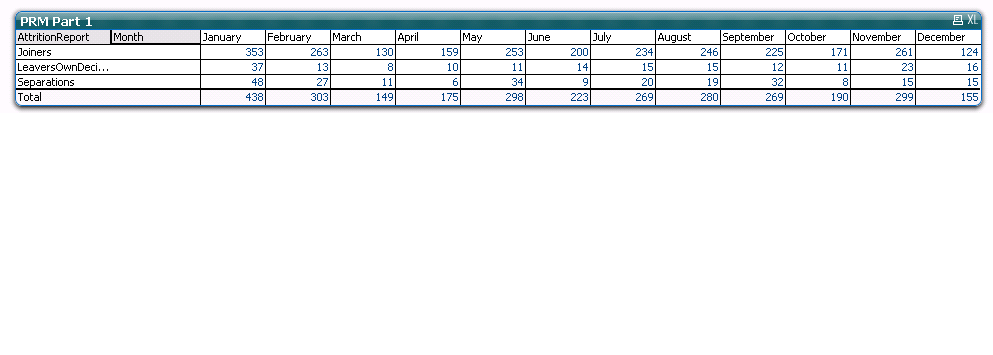
That I need it, is a substraction of the field Joiners with the other fields, in other words, this: (Joiners - LeaversOwnDesicion - Separations), and create a new field in the same table that show that substraction with the name "Movement Total".
Other thing that I need is show the percentaje of the months for years, for example, in the same table put a field with the name "2011" (that year is in the model and data of .qvw), and show the percentaje of the field "Joiners" and "Movement Total" , calculate from a immovable value, for example, 150.
I attach the .qvw fiel with my model if someone can help me. I only have Personal Edition, I won't can see your files, so I would so glad if you can wrote the code or show me a image.
Beforehand, thanks you for you answers 
- Mark as New
- Bookmark
- Subscribe
- Mute
- Subscribe to RSS Feed
- Permalink
- Report Inappropriate Content
Assuming your current expression is:
Count(Employee)
You can try the below one:
Fabs(Count({<AttritionReport={"Joiners"}>} Employee)-Count({<AttritionReport-={"Joiners"}>} Employee))
Kiran Rokkam.
- Mark as New
- Bookmark
- Subscribe
- Mute
- Subscribe to RSS Feed
- Permalink
- Report Inappropriate Content
Thanks, this code is going to on the report or in the script?, regards
- Mark as New
- Bookmark
- Subscribe
- Mute
- Subscribe to RSS Feed
- Permalink
- Report Inappropriate Content
In the chart. You would notice change in the total row of the chart.
Kiran.
- Mark as New
- Bookmark
- Subscribe
- Mute
- Subscribe to RSS Feed
- Permalink
- Report Inappropriate Content
I apologize, but I didn't understand where I write the code that you show me, I wrote in the chart, like expression, like dimension, and not work :s.
By the way, my current expression is NumericCount (DISTINCT GlobalEmployeeId).
Regards!
- Mark as New
- Bookmark
- Subscribe
- Mute
- Subscribe to RSS Feed
- Permalink
- Report Inappropriate Content
Please, exactly in what wpart of the chat is going wrote that code :s, thanks