Unlock a world of possibilities! Login now and discover the exclusive benefits awaiting you.

- Qlik Community
- :
- All Forums
- :
- QlikView
- :
- Re: Create column % from other column values
- Subscribe to RSS Feed
- Mark Topic as New
- Mark Topic as Read
- Float this Topic for Current User
- Bookmark
- Subscribe
- Mute
- Printer Friendly Page

- Mark as New
- Bookmark
- Subscribe
- Mute
- Subscribe to RSS Feed
- Permalink
- Report Inappropriate Content
Create column % from other column values
Hello,
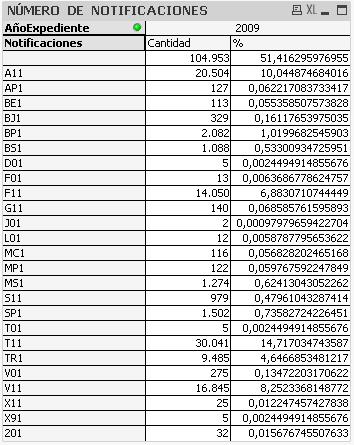
I have a calculated expresion in the script to create a new column in my table. The calculate expresion is to obtain only the "Tipo actuacion" which finish in "1":
LOAD if(Right([Tipo actuacion],1)='1',[Tipo actuacion]) as [Notificaciones],
*;
The problem is that when I calculate a % column in a Pivot Table, it takes in consideration the other values (those which don't finish in "1" which appear in blank in the column "Notificaciones"), so the percentages aren't as I want.
- Tags:
- new_to_qlikview
- « Previous Replies
-
- 1
- 2
- Next Replies »

 alexandros17
- Mark as New
- Bookmark
- Subscribe
- Mute
- Subscribe to RSS Feed
- Permalink
- Report Inappropriate Content
Please send the expression that computes the % and the dimensions of your chart.

 rustyfishbones
- Mark as New
- Bookmark
- Subscribe
- Mute
- Subscribe to RSS Feed
- Permalink
- Report Inappropriate Content
There is no need to use
LOAD if(Right([Tipo actuacion],1)='1',[Tipo actuacion]) as [Notificaciones],
*;
Add Notificaciones as your dimension, and use the following as your expression
SUM({<Notificaciones = {'*1'}>}Cantidad)
and then use relative to get your percentage

 tresB
tresB
- Mark as New
- Bookmark
- Subscribe
- Mute
- Subscribe to RSS Feed
- Permalink
- Report Inappropriate Content
Use set in your expression like:
Sum({<[Notificaciones]={1}>} YourField) / Sum({<[Notificaciones]={1}>} TOTAL YourField)
- Mark as New
- Bookmark
- Subscribe
- Mute
- Subscribe to RSS Feed
- Permalink
- Report Inappropriate Content
I can not use Relative to get the percentage, this is a Pivot Table
- Mark as New
- Bookmark
- Subscribe
- Mute
- Subscribe to RSS Feed
- Permalink
- Report Inappropriate Content
The dimensions are both calculated in the script, and are these:
- Notificaciones: if(Right([Tipo actuacion],1)='1',[Tipo actuacion])
- AñoExpediente: RIGHT(LEFT([Nº Expediente],7),4)
The expression that computes the % is:
((Sum(Cantidad))/Aggr(NODISTINCT Sum(Cantidad), [AñoExpediente]))*100
- Mark as New
- Bookmark
- Subscribe
- Mute
- Subscribe to RSS Feed
- Permalink
- Report Inappropriate Content
I have tested it but it doesn´t show the percentages in the table...
alexandros17
- Mark as New
- Bookmark
- Subscribe
- Mute
- Subscribe to RSS Feed
- Permalink
- Report Inappropriate Content
Try this and let me know
((Sum({$ <Notificaciones={'1'}>} Cantidad))/Aggr(NODISTINCT Sum({$ <Notificaciones={'1'}>}Cantidad), [AñoExpediente]))*100
tresB
- Mark as New
- Bookmark
- Subscribe
- Mute
- Subscribe to RSS Feed
- Permalink
- Report Inappropriate Content
Goto number tab-> enable 'Show in Percent (%)'
- Mark as New
- Bookmark
- Subscribe
- Mute
- Subscribe to RSS Feed
- Permalink
- Report Inappropriate Content
It is enable
- « Previous Replies
-
- 1
- 2
- Next Replies »