Unlock a world of possibilities! Login now and discover the exclusive benefits awaiting you.

- Qlik Community
- :
- All Forums
- :
- QlikView
- :
- Re: Create date field using file names in incremen...
- Subscribe to RSS Feed
- Mark Topic as New
- Mark Topic as Read
- Float this Topic for Current User
- Bookmark
- Subscribe
- Mute
- Printer Friendly Page

- Mark as New
- Bookmark
- Subscribe
- Mute
- Subscribe to RSS Feed
- Permalink
- Report Inappropriate Content
Create date field using file names in incremental load
Hi All,
PFA
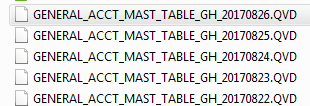
I would like to concatenete QVD files and create a date field based on the QVD filename ,these files are sitting in one of the folders in my computer. Please below.

 Clever_Anjos
- Mark as New
- Bookmark
- Subscribe
- Mute
- Subscribe to RSS Feed
- Permalink
- Report Inappropriate Content
Load *,
Right(Subfield(Filename(),'.',-1),10) as Date
From [Folder\GENERAL_ACCT_MAST_TABLE_GH_*.QVD](QVD);

 its_anandrjs
- Mark as New
- Bookmark
- Subscribe
- Mute
- Subscribe to RSS Feed
- Permalink
- Report Inappropriate Content
Write this way in load script for loading all qvds at once and by using filebasename create the datefield.
LOAD *
Date(Date#( SubField( FileBaseName() ,'_',-1),'YYYYMMDD'),'YYYYMMDD') as DateField
FROM
D:\Qcomm\GENERAL_ACCT_MAST_TABLE_*.qvd
(qvd);
Or
LOAD *
Date( SubField( FileBaseName() ,'_',-1),'YYYYMMDD') as DateField
FROM
D:\Qcomm\GENERAL_ACCT_MAST_TABLE_*.qvd
(qvd);
its_anandrjs
- Mark as New
- Bookmark
- Subscribe
- Mute
- Subscribe to RSS Feed
- Permalink
- Report Inappropriate Content
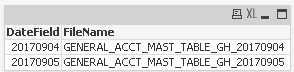
Also try this you have to write this for identifying file name as well
LOAD
*
SubField( FileBaseName() ,'_',-1) as DateField,
FileBaseName() as FileName
FROM
GENERAL_ACCT_MAST_TABLE_GH_*.qvd (qvd);