Unlock a world of possibilities! Login now and discover the exclusive benefits awaiting you.

- Qlik Community
- :
- All Forums
- :
- QlikView
- :
- Creating Month-Year Field From Date
- Subscribe to RSS Feed
- Mark Topic as New
- Mark Topic as Read
- Float this Topic for Current User
- Bookmark
- Subscribe
- Mute
- Printer Friendly Page

- Mark as New
- Bookmark
- Subscribe
- Mute
- Subscribe to RSS Feed
- Permalink
- Report Inappropriate Content
Creating Month-Year Field From Date
Hi all,
I'm currently trying to convert a date value (eg 01/01/2013, DD/MM/YYYY) to a month-year format - Jan-13. In my script I am using the following line to achieve this:
Date(date,'MMM-YY') AS MonthYear
What I expect to see is a single row for each unique MonthYear value. What I get though is what appears to be a new row for each day of the month for a given MonthYear value:
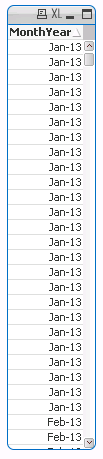
It's as if the field is displaying the date correctly but somewhere in the back end there is extra date data attached to the row. I have other apps that use similar code but don't exhibit this behavior. Any ideas what's going on?
Thanks,
Adam
- Tags:
- date
Accepted Solutions
- Mark as New
- Bookmark
- Subscribe
- Mute
- Subscribe to RSS Feed
- Permalink
- Report Inappropriate Content
Hi Robert,
Thanks for the suggestion. After a little more research I've found that the following code does what I like without needing to convert the date to text:
date(monthstart(date,), 'MMM-YY'))
Thanks again,
Adam

 robert_mika
- Mark as New
- Bookmark
- Subscribe
- Mute
- Subscribe to RSS Feed
- Permalink
- Report Inappropriate Content
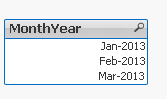
try this:
t1:
load * Inline
[
datek
01/01/2013
02/01/2013
02/02/2013
01/01/2013
01/03/2013
02/03/2013
]
;
t2:
DATE(makedate(right(datek,4),mid(datek,4,2)),'MMM-YY') as MonthYear
Resident t1;
DROP TABLE t1
- Mark as New
- Bookmark
- Subscribe
- Mute
- Subscribe to RSS Feed
- Permalink
- Report Inappropriate Content
Hi Robert,
Thanks for the suggestion. After a little more research I've found that the following code does what I like without needing to convert the date to text:
date(monthstart(date,), 'MMM-YY'))
Thanks again,
Adam