Unlock a world of possibilities! Login now and discover the exclusive benefits awaiting you.

- Qlik Community
- :
- All Forums
- :
- QlikView
- :
- Re: Creating a Button
Options
- Subscribe to RSS Feed
- Mark Topic as New
- Mark Topic as Read
- Float this Topic for Current User
- Bookmark
- Subscribe
- Mute
- Printer Friendly Page
Turn on suggestions
Auto-suggest helps you quickly narrow down your search results by suggesting possible matches as you type.
Showing results for

Not applicable
2015-01-27
03:54 PM
- Mark as New
- Bookmark
- Subscribe
- Mute
- Subscribe to RSS Feed
- Permalink
- Report Inappropriate Content
Creating a Button
if i have a simple excel file listing like:
SKU SUPPLIER
12345 A
45678 A
23456 B
55678 A
How do i create a button to only show SKU's that are associated with supplier A?
Thanks for your help!
- Tags:
- new_to_qlikview
899 Views
1 Solution
Accepted Solutions

 sunny_talwar
MVP
2015-01-27
04:15 PM
- Mark as New
- Bookmark
- Subscribe
- Mute
- Subscribe to RSS Feed
- Permalink
- Report Inappropriate Content
827 Views
3 Replies
sunny_talwar
MVP
2015-01-27
04:15 PM
- Mark as New
- Bookmark
- Subscribe
- Mute
- Subscribe to RSS Feed
- Permalink
- Report Inappropriate Content
Is this what you are looking for? PFA
Best,
S
828 Views
 maxgro
MVP
2015-01-27
04:18 PM
- Mark as New
- Bookmark
- Subscribe
- Mute
- Subscribe to RSS Feed
- Permalink
- Report Inappropriate Content
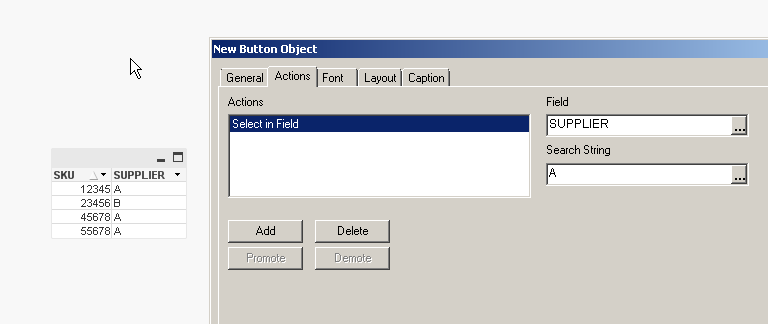
see image, add an action to the button
 rwunderlich
MVP
2015-01-27
04:19 PM
- Mark as New
- Bookmark
- Subscribe
- Mute
- Subscribe to RSS Feed
- Permalink
- Report Inappropriate Content
Do you want to select SUPPLIER=A or select SKU's associated with SUPPLIER A?
To select SKUs associated with SUPPLIER A, use Select in Field as the Action.
Field: SKU
Search String: ='=SUPPLIER=' & chr(39) & 'A' & chr(39)
The search string is a bit awkward because of needing to get the quotes in there.
-Rob