Unlock a world of possibilities! Login now and discover the exclusive benefits awaiting you.

- Qlik Community
- :
- All Forums
- :
- QlikView
- :
- Re: Creating a Dynamic Listbox
- Subscribe to RSS Feed
- Mark Topic as New
- Mark Topic as Read
- Float this Topic for Current User
- Bookmark
- Subscribe
- Mute
- Printer Friendly Page

- Mark as New
- Bookmark
- Subscribe
- Mute
- Subscribe to RSS Feed
- Permalink
- Report Inappropriate Content
Creating a Dynamic Listbox
Hello,
I am trying to create a List box that filters its displayed values based on selection within another list box. The two list boxes are Divisions and Metrics. When I select any given Division, I want that divisions metrics to display within the Metrics box. However, I am having trouble hiding those that are not selected.
I go to the Metrics listbox, and on the General tab I select <expression> as the field type, within which I write:
=GetCurrentSelections(Divisions), which on returns, when selected, Divisions: (Selection Made), ex: Divisions: Finance.
Any and all help is appreciated. Thanks.
- Tags:
- qlikview_scripting
Accepted Solutions

 MarcoWedel
- Mark as New
- Bookmark
- Subscribe
- Mute
- Subscribe to RSS Feed
- Permalink
- Report Inappropriate Content
or
=Aggr(Only({$<Metrics=>}Metrics), Metrics)
if you want to keep the division metrics visible even with metric selections.

hope this helps
regards
Marco
MarcoWedel
- Mark as New
- Bookmark
- Subscribe
- Mute
- Subscribe to RSS Feed
- Permalink
- Report Inappropriate Content
Hi,
one solution could be:
=Aggr(Metrics, Metrics)
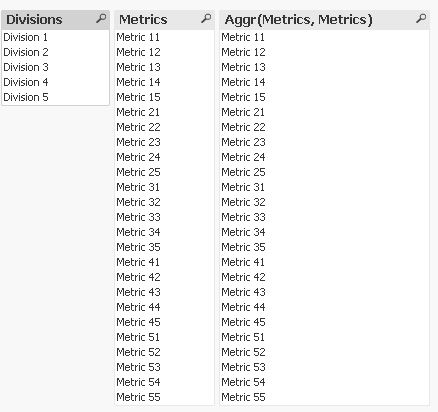
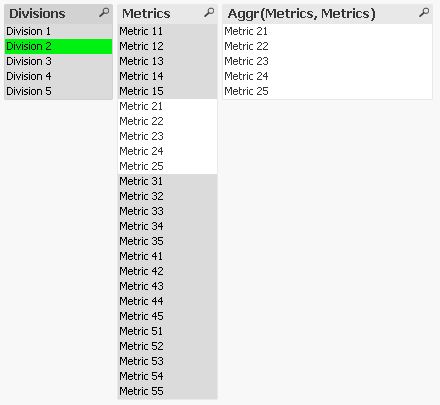
hope this helps
regards
Marco
MarcoWedel
- Mark as New
- Bookmark
- Subscribe
- Mute
- Subscribe to RSS Feed
- Permalink
- Report Inappropriate Content
or
=Aggr(Only({$<Metrics=>}Metrics), Metrics)
if you want to keep the division metrics visible even with metric selections.
hope this helps
regards
Marco
- Mark as New
- Bookmark
- Subscribe
- Mute
- Subscribe to RSS Feed
- Permalink
- Report Inappropriate Content
Try a drill-down group: Division -> Metrics
- Mark as New
- Bookmark
- Subscribe
- Mute
- Subscribe to RSS Feed
- Permalink
- Report Inappropriate Content
Thank you all for the fast reply. That was exactly what I was looking for!
MarcoWedel
- Mark as New
- Bookmark
- Subscribe
- Mute
- Subscribe to RSS Feed
- Permalink
- Report Inappropriate Content
nice that it worked.
please select a correct answer.
thanks
regards
Marco