Unlock a world of possibilities! Login now and discover the exclusive benefits awaiting you.

- Qlik Community
- :
- All Forums
- :
- QlikView
- :
- Re: CrossTable or Join or Something
- Subscribe to RSS Feed
- Mark Topic as New
- Mark Topic as Read
- Float this Topic for Current User
- Bookmark
- Subscribe
- Mute
- Printer Friendly Page

- Mark as New
- Bookmark
- Subscribe
- Mute
- Subscribe to RSS Feed
- Permalink
- Report Inappropriate Content
CrossTable or Join or Something
Hello there. I need some help.
This is the situation:
I have one table named Messages. It contains some messages.
Messages.csv

When received a new message, it is inserted the table with Status=1. Then, when cleared the message it is inserted the table again with Status=0. (eg. Top 2 records)
This table what I need.
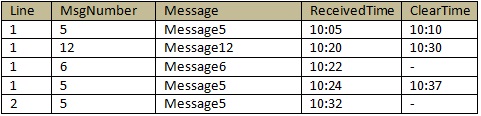
I want to show each related message in one row. I tried many approach. Join, CrossTable, some script etc. But I couldn't make it. I'am stuck. Thank you
- Mark as New
- Bookmark
- Subscribe
- Mute
- Subscribe to RSS Feed
- Permalink
- Report Inappropriate Content
Hai,
use interval match
Thanks.
- Mark as New
- Bookmark
- Subscribe
- Mute
- Subscribe to RSS Feed
- Permalink
- Report Inappropriate Content
Hi
I tried but i didnt get it
it is interesting ,if u get plz share it to me
i get below values
im using script like this
Times:
LOAD line,
msgno,
message,
time,
status
FROM
C:\Users\Desktop\time1.xlsx
(ooxml, embedded labels, table is Sheet1)
;
Times1:
LOAD distinct line,
msgno,
message,
time as startdate Resident Times Where status=1;
Join(Times1)
LOAD Distinct line,
msgno,
message,
time as enddate Resident Times Where status=0;
below is my result
| line | message | msgno | startdate | enddate |
|---|---|---|---|---|
| 1 | msg5 | 5 | 10:05 | 10:10 |
| 1 | msg5 | 5 | 10:05 | 10:37 |
| 1 | msg5 | 5 | 10:24 | 10:10 |
| 1 | msg5 | 5 | 10:24 | 10:37 |
| 1 | msg12 | 12 | 10:20 | 10:30 |
| 1 | msg6 | 6 | 10:22 | |
| 2 | msg5 | 5 | 10:32 |
- Mark as New
- Bookmark
- Subscribe
- Mute
- Subscribe to RSS Feed
- Permalink
- Report Inappropriate Content
Yes, I got this result before. I divided two tables then joined the tables. When I use Join or Left Join, records are being related as many to many. Each record which has Status=1 must join First 1 record which is Status=0, the same MsgNumber and closest Time (the point).
I am still on it. It is realy complicated. I am triying with intervalmatch right now.
Thanks for your trying. Regards.

 sujeetsingh
- Mark as New
- Bookmark
- Subscribe
- Mute
- Subscribe to RSS Feed
- Permalink
- Report Inappropriate Content
Hi ,
Yes a little bit complicated but no isssue trying is the way to reach.
Why not try outer join
or
Applymap,
Lookups
And yes post a sample QVW.It will be helpful.
- Mark as New
- Bookmark
- Subscribe
- Mute
- Subscribe to RSS Feed
- Permalink
- Report Inappropriate Content
I divided two tables. One of them includes Status=1 (ReceivedAlarmsTable), another one includes Status=0 records.
//
ReceivedAlarmsTable:
LOAD
Line & MsgNumber as Key,
Line,
MsgNumber,
MsgText,
Time_ms,
Status
FROM
[logdata\QLog2.csv]
(txt, codepage is 1254, embedded labels, delimiter is ';')
Where Status = 1;
ClearAlarmsTable:
LOAD
Line & MsgNumber as Key,
Line,
MsgNumber,
Time_ms
FROM
[logdata\QLog2.csv]
(txt, codepage is 1254, embedded labels, delimiter is ';')
Where Status = 0;
Mapped:
Mapping LOAD
ClearAlarmsTable.Key,
ClearAlarmsTable.Time_ms
Resident ClearAlarmsTable;
FinalTable:
LOAD
ReceivedAlarmsTable.Key,
ReceivedAlarmsTable.Line,
ReceivedAlarmsTable.MsgNumber,
ReceivedAlarmsTable.MsgText,
ReceivedAlarmsTable.Time_ms as ReceivedTime,
ApplyMap('Mapped', ReceivedAlarmsTable.Key, '-') as ClearTime
Resident ReceivedAlarmsTable;
//
This is the result.
| Key | Line | MsgNumber | MsgText | ReceivedTime | ClearTime |
|---|---|---|---|---|---|
| 15 | 1 | 5 | Message5 | 10:05 | 10:10 |
| 15 | 1 | 5 | Message5 | 10:24 | 10:10 |
| 16 | 1 | 6 | Message6 | 10:22 | - |
| 112 | 1 | 12 | Message12 | 10:20 | 10:30 |
| 25 | 2 | 5 | Message5 | 10:25 | - |
ApplyMap function returns first mapped value. I must to map first nearest value of each ReceivedTime. Conditional Applymap or something that i need. Any suggestion? Thank you.