Unlock a world of possibilities! Login now and discover the exclusive benefits awaiting you.

- Qlik Community
- :
- All Forums
- :
- QlikView
- :
- Re: Cumulative Sum Help!
- Subscribe to RSS Feed
- Mark Topic as New
- Mark Topic as Read
- Float this Topic for Current User
- Bookmark
- Subscribe
- Mute
- Printer Friendly Page

 amit_saini
- Mark as New
- Bookmark
- Subscribe
- Mute
- Subscribe to RSS Feed
- Permalink
- Report Inappropriate Content
Cumulative Sum Help!
Hi Folks,
I need to cumulative sum on bar chart , below is my expression:
=num(Money(sum(aggr(sum(fcur_PeakAnnualRevenue__c)/sum( distinct Rate), CurrencyIsoCode, Month))/1000000),'####')
I'm trying Something like below , but it's not working:
=aggr( rangesum(above( sum(fcur_PeakAnnualRevenue__c)/sum( distinct Rate), 0, rowno() )), CurrencyIsoCode, Month)
Thanks,
AS
- Tags:
- qlikview_scripting

 sunny_talwar
- Mark as New
- Bookmark
- Subscribe
- Mute
- Subscribe to RSS Feed
- Permalink
- Report Inappropriate Content
What expression are you using to get this current scenario chart?
amit_saini
- Mark as New
- Bookmark
- Subscribe
- Mute
- Subscribe to RSS Feed
- Permalink
- Report Inappropriate Content
I'm sorry you are right:
Expression is :
=num(Money(sum(aggr(sum(fcur_PeakAnnualRevenue__c)/sum( distinct Rate), UP2GO_2F__pkl_ProductStatus__c, Month))/1000000),'####')
Thanks
AS
sunny_talwar
- Mark as New
- Bookmark
- Subscribe
- Mute
- Subscribe to RSS Feed
- Permalink
- Report Inappropriate Content
Using that expression, I get this chart
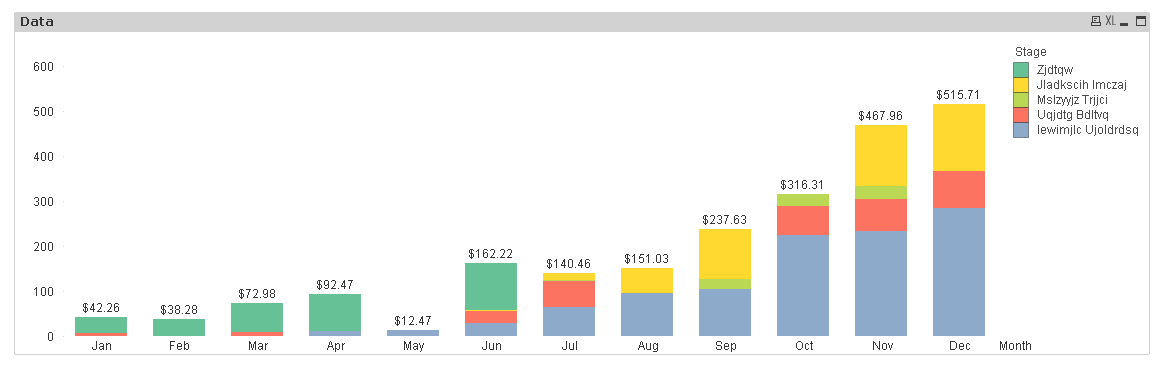
But this is not the same as the one you have currently
amit_saini
- Mark as New
- Bookmark
- Subscribe
- Mute
- Subscribe to RSS Feed
- Permalink
- Report Inappropriate Content
Please select below option:
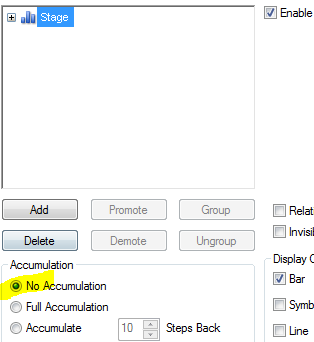
In my attachment by mistake I have selected "Accumulate".
Thanks,
AS
amit_saini
- Mark as New
- Bookmark
- Subscribe
- Mute
- Subscribe to RSS Feed
- Permalink
- Report Inappropriate Content
Attached is correct sample.
 Kushal_Chawda
- Mark as New
- Bookmark
- Subscribe
- Mute
- Subscribe to RSS Feed
- Permalink
- Report Inappropriate Content
take month as dimension and below expression
=rangesum(aggr(above( sum( aggr(sum(fcur_PeakAnnualRevenue__c)/sum( distinct Rate), CurrencyIsoCode, Month))/1000000,0,RowNo()),Month))
Kushal_Chawda
- Mark as New
- Bookmark
- Subscribe
- Mute
- Subscribe to RSS Feed
- Permalink
- Report Inappropriate Content
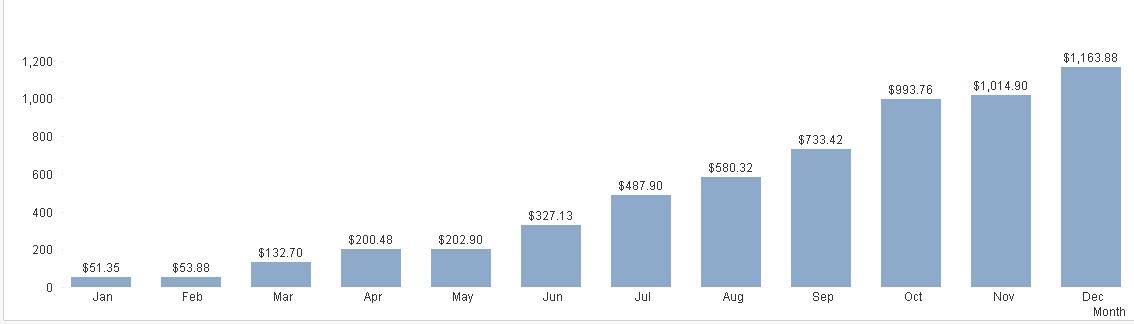
see this
Dimension: month
Expression:
rangesum(aggr(above( sum( aggr(sum(fcur_PeakAnnualRevenue__c)/sum( distinct Rate), CurrencyIsoCode, Month))/1000000,0,RowNo()),Month))
amit_saini
- Mark as New
- Bookmark
- Subscribe
- Mute
- Subscribe to RSS Feed
- Permalink
- Report Inappropriate Content
This I can achieve by simply selecting below option :
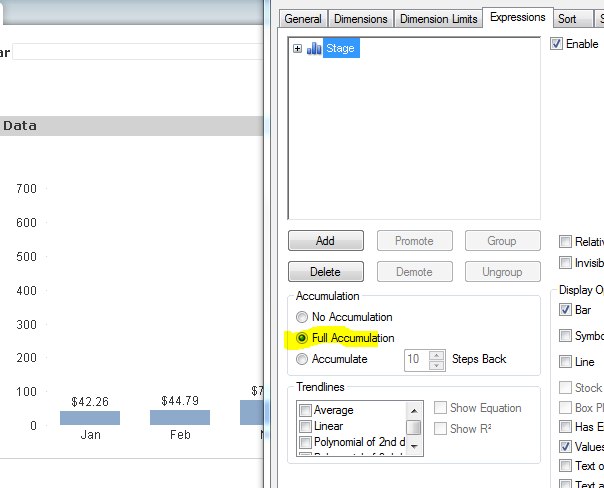
But it's mandatory to call 2 dim and when we are calling this I'm not getting expected output.
Thanks,
AS
sunny_talwar
- Mark as New
- Bookmark
- Subscribe
- Mute
- Subscribe to RSS Feed
- Permalink
- Report Inappropriate Content
May be this
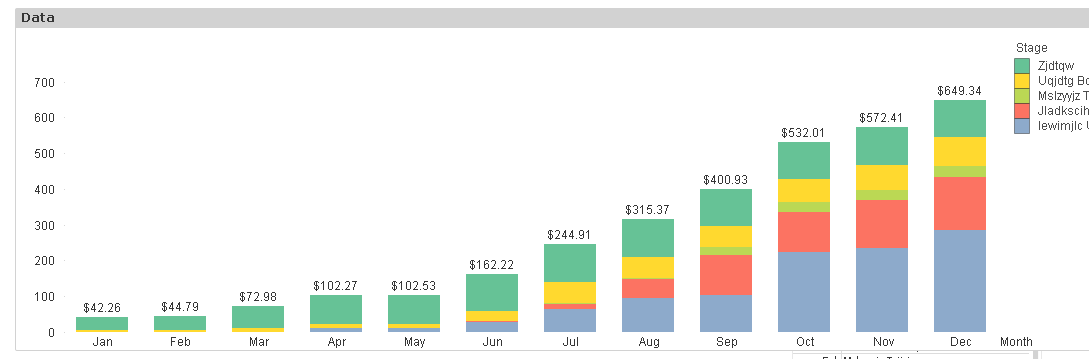
=Sum(Aggr(RangeSum(Above(sum(fcur_PeakAnnualRevenue__c)/sum( distinct Rate)/1000000, 0, RowNo())), UP2GO_2F__pkl_ProductStatus__c, MonthNum))
Added this to your script
TempTable:
LOAD Month
Resident Deliverable;
Left Join (TempTable)
LOAD UP2GO_2F__pkl_ProductStatus__c
Resident Deliverable;
Concatenate(Deliverable)
LOAD *
Resident TempTable;
MonthSort:
LOAD Month,
Num(Month) as MonthNum
Resident Deliverable
Order By Month;
DROP Table TempTable;
sunny_talwar
- Mark as New
- Bookmark
- Subscribe
- Mute
- Subscribe to RSS Feed
- Permalink
- Report Inappropriate Content
Slightly modify your script to this
TempTable:
LOAD DISTINCT Month
Resident Deliverable;
Left Join (TempTable)
LOAD DISTINCT UP2GO_2F__pkl_ProductStatus__c
Resident Deliverable;
Concatenate(Deliverable)
LOAD *
Resident TempTable;
MonthSort:
LOAD DISTINCT Month,
Num(Month) as MonthNum
Resident Deliverable
Order By Month;
DROP Table TempTable;
