Unlock a world of possibilities! Login now and discover the exclusive benefits awaiting you.

- Qlik Community
- :
- All Forums
- :
- QlikView
- :
- Currency Conversion
- Subscribe to RSS Feed
- Mark Topic as New
- Mark Topic as Read
- Float this Topic for Current User
- Bookmark
- Subscribe
- Mute
- Printer Friendly Page

- Mark as New
- Bookmark
- Subscribe
- Mute
- Subscribe to RSS Feed
- Permalink
- Report Inappropriate Content
Currency Conversion
Hi All,
I have the dashboard with amount showing in GBP. I want to convert into USD, INR or any other currencies based on the conversion rate.
I will be getting the conversion rate from the database on a day to day basis.
Please help me with this how to change the currency.
I have attached the QVW. Please have look into it.
Thanks in Regards,
Keerthi
- « Previous Replies
- Next Replies »
Accepted Solutions
- Mark as New
- Bookmark
- Subscribe
- Mute
- Subscribe to RSS Feed
- Permalink
- Report Inappropriate Content

 Siva_Sankar
- Mark as New
- Bookmark
- Subscribe
- Mute
- Subscribe to RSS Feed
- Permalink
- Report Inappropriate Content
 sujeetsingh
- Mark as New
- Bookmark
- Subscribe
- Mute
- Subscribe to RSS Feed
- Permalink
- Report Inappropriate Content
On the number tab of Properties you can set it what ever you want
- Mark as New
- Bookmark
- Subscribe
- Mute
- Subscribe to RSS Feed
- Permalink
- Report Inappropriate Content
HI all,
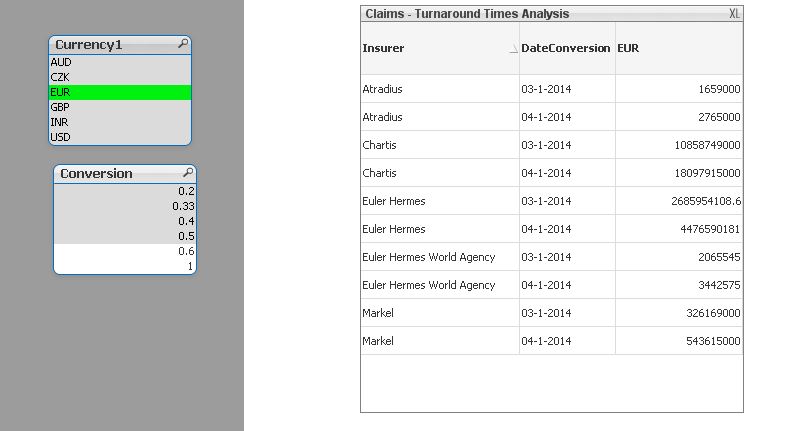
I worked on it. But when i have two values for EUR we have to take latest dates(Max date) conversion rate, how do i take MAX of a date.
I want to display only for one latest date for each currency.
Please help me with this.
Regards,
Keerthi
- Mark as New
- Bookmark
- Subscribe
- Mute
- Subscribe to RSS Feed
- Permalink
- Report Inappropriate Content
Hi all,
Please tell me how to filter the data in this scenario???
Regards,
keerthi

 tresB
tresB
- Mark as New
- Bookmark
- Subscribe
- Mute
- Subscribe to RSS Feed
- Permalink
- Report Inappropriate Content
Try this:
=Sum([Amount Approved])* FirstSortedValue(Conversion,-Date#(DateConversion,'DD-MM-YYYY'))
- Mark as New
- Bookmark
- Subscribe
- Mute
- Subscribe to RSS Feed
- Permalink
- Report Inappropriate Content
Hi,
Please find the attached file.
- Mark as New
- Bookmark
- Subscribe
- Mute
- Subscribe to RSS Feed
- Permalink
- Report Inappropriate Content
Hi Tresesco,
When i select EUR it showing two values. I want only the latest dates conversion rate to be displayed.
Thanks & Regards,
keerthi
tresB
- Mark as New
- Bookmark
- Subscribe
- Mute
- Subscribe to RSS Feed
- Permalink
- Report Inappropriate Content
In text box, try
= FirstSortedValue(Conversion,-Date#(DateConversion,'DD-MM-YYYY')
- Mark as New
- Bookmark
- Subscribe
- Mute
- Subscribe to RSS Feed
- Permalink
- Report Inappropriate Content
When i select EUR i am getting two dates i want only one date
- « Previous Replies
- Next Replies »