Unlock a world of possibilities! Login now and discover the exclusive benefits awaiting you.

- Qlik Community
- :
- All Forums
- :
- QlikView
- :
- Re: Current Selections - Confusion with Values Sho...
- Subscribe to RSS Feed
- Mark Topic as New
- Mark Topic as Read
- Float this Topic for Current User
- Bookmark
- Subscribe
- Mute
- Printer Friendly Page

- Mark as New
- Bookmark
- Subscribe
- Mute
- Subscribe to RSS Feed
- Permalink
- Report Inappropriate Content
Current Selections - Confusion with Values Shown
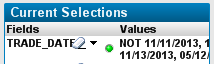
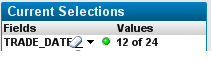
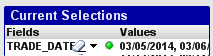
The users are having some confusion with the Current Selections values displayed. Sometimes it shows a list of dates, sometimes is shows "NOT" and a list of dates and sometime it shows "# out of #". Is there any way to control this so that it always just displays in one way consistently?
- Mark as New
- Bookmark
- Subscribe
- Mute
- Subscribe to RSS Feed
- Permalink
- Report Inappropriate Content
Let me also explain that this occurs when the user selects a value in a Straight Table containing various columns, one of which is not TRADE_DATE. The column they select is firm name and the current selections box will show the firm name and also the TRADE_DATE for some reason.

 maxgro
- Mark as New
- Bookmark
- Subscribe
- Mute
- Subscribe to RSS Feed
- Permalink
- Report Inappropriate Content
for "# out of "
This is from online help
The maximum number of distinct selected values to be shown in the Current Selections windows is specified in the User Preferences dialog (User Preferences). When more values are selected, they will only be displayed as 'x values of y' for the respective field.
- Mark as New
- Bookmark
- Subscribe
- Mute
- Subscribe to RSS Feed
- Permalink
- Report Inappropriate Content
That explains the "# out of #" but then why does it sometimes use negation - "NOT". I think I understand why, for efficiency purposes depending on the set of values selected vs not selected but that is causing confusion with the users and they are making a big deal about it.
Even more so, I don't understand why it is showing "TRADE_DATE" when that is not even a field that can be selected in my Straight Table.
 rwunderlich
- Mark as New
- Bookmark
- Subscribe
- Mute
- Subscribe to RSS Feed
- Permalink
- Report Inappropriate Content
"NOT" is displayed when the user has used the "Select Excluded" action.
Re the TRADE_DATE value being selected when "FIRM" is selected. There are a couple of ways this can happen.
1. When an Expression column is selected, all Dimension values (even hidden) on that row are selected.
2. Any field used in a calculated dimension is selected when that Calculated Dimension column is selected. For example, assume a calculated dimension of
"=if(TRADE_DATE>='01/01/2014', FIRM)"
FIRM values will be displayed in the chart column. If you select one of those FIRM values, both the FIRM value and TRADE_DATE n of n will show in the current selections box.
-Rob
- Mark as New
- Bookmark
- Subscribe
- Mute
- Subscribe to RSS Feed
- Permalink
- Report Inappropriate Content
In regards to the "NOT", the user did not use the option "Select Excluded". I also was able to replicate this as well. Firm name was clicked only.
I am using trade date for calculated dimensions. I don't understand why the QlikView internal functionality shows that in the selections regardless if I only use it in the calculation.
Thanks for the replies!
rwunderlich
- Mark as New
- Bookmark
- Subscribe
- Mute
- Subscribe to RSS Feed
- Permalink
- Report Inappropriate Content
'I am using trade date for calculated dimensions. I don't understand why the QlikView internal functionality shows that in the selections regardless if I only use it in the calculation."
A calculated dimension is a composite value, it does not represent a single field. It represents a new, subset of rows. When you select a calculated dimension value, you are potentially selecting multiple fields, or the criteria that created that subset. In the previous example, you are selecting FIRM='ABC" AND TRADE_DATE>=01/01/2014.
Any expression in the chart will reflect both those limits as well.
-Rob