Unlock a world of possibilities! Login now and discover the exclusive benefits awaiting you.

- Qlik Community
- :
- All Forums
- :
- QlikView
- :
- Current selection box- hiding a column
- Subscribe to RSS Feed
- Mark Topic as New
- Mark Topic as Read
- Float this Topic for Current User
- Bookmark
- Subscribe
- Mute
- Printer Friendly Page

 rdsuperlike
- Mark as New
- Bookmark
- Subscribe
- Mute
- Subscribe to RSS Feed
- Permalink
- Report Inappropriate Content
Current selection box- hiding a column
Hi,
Is there a way to hide a column from appearing in the current selection box?
Ny input is appreciated.
thanks

 MarcoWedel
- Mark as New
- Bookmark
- Subscribe
- Mute
- Subscribe to RSS Feed
- Permalink
- Report Inappropriate Content
Hi,
you could deselect the Values and/or Status column in the current selection box properties:
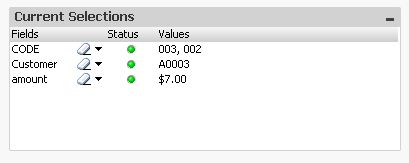
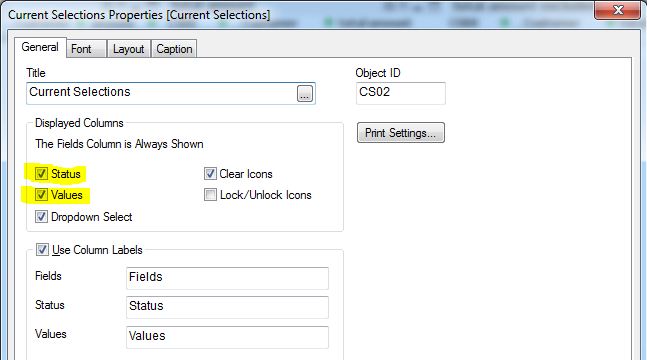
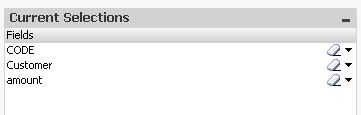
hope this helps
regards
Marco
rdsuperlike
- Mark as New
- Bookmark
- Subscribe
- Mute
- Subscribe to RSS Feed
- Permalink
- Report Inappropriate Content
Ok. But if I want Code and customer to be displayed as it is and hide amount column from appearing in current selection box?

 Colin-Albert
- Mark as New
- Bookmark
- Subscribe
- Mute
- Subscribe to RSS Feed
- Permalink
- Report Inappropriate Content
TAG the field as $hidden in your load script.
TAG field your_field_name with $hidden ;
TAG field amount with $hidden ;
 rwunderlich
- Mark as New
- Bookmark
- Subscribe
- Mute
- Subscribe to RSS Feed
- Permalink
- Report Inappropriate Content
I perhaps you mean hiding a Field? Hidden fields will not appear in the Current Selections box. You make a field hidden either by using the SET HidePrefix or HideSuffix variable, or script:
TAG FIELD myfield with '$hidden';
-Rob
rdsuperlike
- Mark as New
- Bookmark
- Subscribe
- Mute
- Subscribe to RSS Feed
- Permalink
- Report Inappropriate Content
can you post one small sample?
rwunderlich
- Mark as New
- Bookmark
- Subscribe
- Mute
- Subscribe to RSS Feed
- Permalink
- Report Inappropriate Content
Try the attached example. Note that selections made in Fields "_Key1" and "X" do not show up in the Current Selections box. See the script to understand how it's done.
-Rob
