Unlock a world of possibilities! Login now and discover the exclusive benefits awaiting you.

- Qlik Community
- :
- All Forums
- :
- QlikView
- :
- Custom checkbox in qlikview
- Subscribe to RSS Feed
- Mark Topic as New
- Mark Topic as Read
- Float this Topic for Current User
- Bookmark
- Subscribe
- Mute
- Printer Friendly Page

- Mark as New
- Bookmark
- Subscribe
- Mute
- Subscribe to RSS Feed
- Permalink
- Report Inappropriate Content
Custom checkbox in qlikview
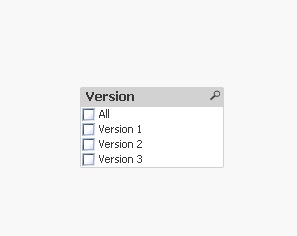
Hi I am using list box to show available version of specific software in my qlikview. I have 3 versions ,version 1,version 2 and version 3.I have a checkbox with name All.I want to make all checkbox checked when click the All checkbox and to show the corresponding result,below attached is a screenshot.Is this possible in qlikview

 danieloberbilli
- Mark as New
- Bookmark
- Subscribe
- Mute
- Subscribe to RSS Feed
- Permalink
- Report Inappropriate Content
I think not. Also be aware that (normally) a listbox selection limits the data...if there is no selection (like in your screenshot) it shows most probably already 'All versions' as result. But you could add a button that triggers a selection of Version 1-3: create a Textbox - Properties - Actions - Add - Selection - Select Possible - Version
danieloberbilli
- Mark as New
- Bookmark
- Subscribe
- Mute
- Subscribe to RSS Feed
- Permalink
- Report Inappropriate Content
Maybe this could be an alternative: a treeview in listboxes that shows a hierarchy...

 tresB
tresB
- Mark as New
- Bookmark
- Subscribe
- Mute
- Subscribe to RSS Feed
- Permalink
- Report Inappropriate Content
You can use trigger like in attached sample.