Unlock a world of possibilities! Login now and discover the exclusive benefits awaiting you.

- Qlik Community
- :
- All Forums
- :
- QlikView
- :
- Re: Custom irregular classes pie chart
- Subscribe to RSS Feed
- Mark Topic as New
- Mark Topic as Read
- Float this Topic for Current User
- Bookmark
- Subscribe
- Mute
- Printer Friendly Page

 jankobelair
- Mark as New
- Bookmark
- Subscribe
- Mute
- Subscribe to RSS Feed
- Permalink
- Report Inappropriate Content
Custom irregular classes pie chart
Hello everyone,
Here is a pie chart :
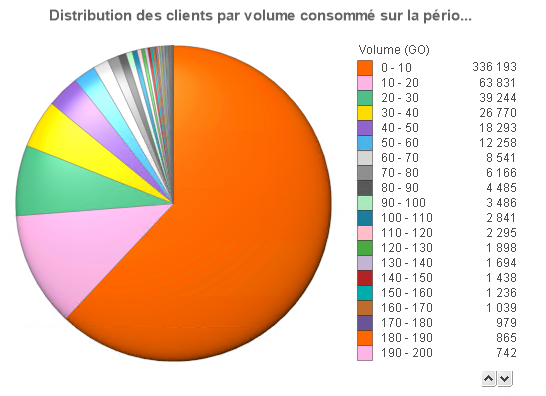
Dimension :
=Replace(Class(Aggr(Sum(VOLUME_TOTAL)/1024, CONTRACT_ID), $(vDistrParVolume_Step)), '<= x <', '-')
Expression :
=Num(Count (DISTINCT CONTRACT_ID))
I would like to get these class but I haven't found the way yet :
0 - 0.05
0.05 - 0.5
0.5 - 1
1- 2
2 - 5
5 - 10
10 - 20
20 - 50
> 50
Is it possible ?
Accepted Solutions

 sunny_talwar
- Mark as New
- Bookmark
- Subscribe
- Mute
- Subscribe to RSS Feed
- Permalink
- Report Inappropriate Content
sunny_talwar
- Mark as New
- Bookmark
- Subscribe
- Mute
- Subscribe to RSS Feed
- Permalink
- Report Inappropriate Content
May be look here
jankobelair
- Mark as New
- Bookmark
- Subscribe
- Mute
- Subscribe to RSS Feed
- Permalink
- Report Inappropriate Content
Thank you that's perfect 
What I did :
=if(Aggr(Sum(VOLUME_TOTAL)/1024, CONTRACT_ID) < 0.05, '0 - 50 MO',
if(Aggr(Sum(VOLUME_TOTAL)/1024, CONTRACT_ID) < 0.5, '50 - 500 MO',
if(Aggr(Sum(VOLUME_TOTAL)/1024, CONTRACT_ID) < 1, '500 MO - 1 GO',
if(Aggr(Sum(VOLUME_TOTAL)/1024, CONTRACT_ID) < 2, '1 - 2 GO',
if(Aggr(Sum(VOLUME_TOTAL)/1024, CONTRACT_ID) < 5, '2 - 5 GO',
if(Aggr(Sum(VOLUME_TOTAL)/1024, CONTRACT_ID) < 10, '5 - 10 GO',
if(Aggr(Sum(VOLUME_TOTAL)/1024, CONTRACT_ID) < 20, '10 - 20 GO',
if(Aggr(Sum(VOLUME_TOTAL)/1024, CONTRACT_ID) < 50, '20 - 50 GO', '> 50 GO'
))))))))
jankobelair
- Mark as New
- Bookmark
- Subscribe
- Mute
- Subscribe to RSS Feed
- Permalink
- Report Inappropriate Content
I have another problem. I want to sort to get the same order as in the IF I wrote.
I tried an expression like this to sort :
=if(Aggr(Sum(VOLUME_TOTAL)/1024, CONTRACT_ID) < 0.05, 0,
if(Aggr(Sum(VOLUME_TOTAL)/1024, CONTRACT_ID) < 0.5, 1,
if(Aggr(Sum(VOLUME_TOTAL)/1024, CONTRACT_ID) < 1, 2,
if(Aggr(Sum(VOLUME_TOTAL)/1024, CONTRACT_ID) < 2, 3,
if(Aggr(Sum(VOLUME_TOTAL)/1024, CONTRACT_ID) < 5, 4,
if(Aggr(Sum(VOLUME_TOTAL)/1024, CONTRACT_ID) < 10, 5,
if(Aggr(Sum(VOLUME_TOTAL)/1024, CONTRACT_ID) < 20, 6,
if(Aggr(Sum(VOLUME_TOTAL)/1024, CONTRACT_ID) < 50, 7, 8
))))))))
However the lines are not sorted.... I get :
10 - 20 GO
20 - 50 GO
> 50 GO
5 - 10 GO
2 - 5 GO
1 - 2 GO
50 - 500 MO
500 MO - 1 GO
0 - 50 MO
....
sunny_talwar
- Mark as New
- Bookmark
- Subscribe
- Mute
- Subscribe to RSS Feed
- Permalink
- Report Inappropriate Content
Use a numerically sort with this slightly modified calculated dimension
=if(Aggr(Sum(VOLUME_TOTAL)/1024, CONTRACT_ID) < 0.05, Dual('0 - 50 MO', 1),
if(Aggr(Sum(VOLUME_TOTAL)/1024, CONTRACT_ID) < 0.5, Dual('50 - 500 MO', 2),
if(Aggr(Sum(VOLUME_TOTAL)/1024, CONTRACT_ID) < 1, Dual('500 MO - 1 GO', 3),
if(Aggr(Sum(VOLUME_TOTAL)/1024, CONTRACT_ID) < 2, Dual('1 - 2 GO', 4),
if(Aggr(Sum(VOLUME_TOTAL)/1024, CONTRACT_ID) < 5, Dual('2 - 5 GO', 5),
if(Aggr(Sum(VOLUME_TOTAL)/1024, CONTRACT_ID) < 10, Dual('5 - 10 GO', 6),
if(Aggr(Sum(VOLUME_TOTAL)/1024, CONTRACT_ID) < 20, Dual('10 - 20 GO', 7),
if(Aggr(Sum(VOLUME_TOTAL)/1024, CONTRACT_ID) < 50, Dual('20 - 50 GO', 8), Dual('> 50 GO', 9)
))))))))
jankobelair
- Mark as New
- Bookmark
- Subscribe
- Mute
- Subscribe to RSS Feed
- Permalink
- Report Inappropriate Content
Great ! Problem solved !
