Unlock a world of possibilities! Login now and discover the exclusive benefits awaiting you.

- Qlik Community
- :
- All Forums
- :
- QlikView
- :
- Data Transformation - Inter record functions
- Subscribe to RSS Feed
- Mark Topic as New
- Mark Topic as Read
- Float this Topic for Current User
- Bookmark
- Subscribe
- Mute
- Printer Friendly Page

 sudhakar_budde
- Mark as New
- Bookmark
- Subscribe
- Mute
- Subscribe to RSS Feed
- Permalink
- Report Inappropriate Content
Data Transformation - Inter record functions
Hi,
Can any one help me with the below requirement please?
Existing source Table:
| ID | EVENT | DATE |
| 100 | IN | 23/03/2017 |
| 100 | OUT | 09/05/2017 |
| 100 | IN | 25/07/2017 |
| 100 | OUT | 30/08/2018 |
Required Output:
| ID | DATE-IN | DATE-OUT | DIFF (DATE-OUT, DATE-IN) Days |
| 100-23/03/2017 | 23/03/2017 | 09/05/2017 | 47 |
| 100-25/07/2017 | 25/07/2017 | 30/08/2018 | 401 |
I'm mainly looking on how to get the DATE-OUT against each ID&'-'&DATE-IN record within the script please?
Thanks
SB
- Tags:
- qlikview_scripting
Accepted Solutions

 sunny_talwar
- Mark as New
- Bookmark
- Subscribe
- Mute
- Subscribe to RSS Feed
- Permalink
- Report Inappropriate Content
Try this
Table:
LOAD *,
	 If(ID = Previous(ID), RangeSum(Peek('Order'), 1), 1) as Order,
	 Ceil(If(ID = Previous(ID), RangeSum(Peek('Order'), 1), 1)/2) as Key;
LOAD * INLINE [
    ID, EVENT, DATE
    100, IN, 23/03/2017
    100, OUT, 09/05/2017
    100, IN, 25/07/2017
    100, OUT, 30/08/2018
];

TempTable:
LOAD ID,
	 Key,
	 DATE as [DATE-IN]
Resident Table
Where EVENT = 'IN';

Left Join (TempTable)
LOAD ID,
	 Key,
	 DATE as [DATE-OUT]
Resident Table
Where EVENT = 'OUT';

FinalTable:
LOAD *,
	 [DATE-OUT] - [DATE-IN] as DIFF_DAYS
Resident TempTable;

DROP Tables Table, TempTable;
sunny_talwar
- Mark as New
- Bookmark
- Subscribe
- Mute
- Subscribe to RSS Feed
- Permalink
- Report Inappropriate Content
Try this script
TempTable:
LOAD * INLINE [
    ID, EVENT, DATE
    100, IN, 23/03/2017
    100, OUT, 09/05/2017
    100, IN, 25/07/2017
    100, OUT, 30/08/2018
    101, IN, 25/07/2018
    101, OUT, 30/07/2018
    101, IN, 01/08/2018
    101, OUT, 03/08/2018
    100, IN, 01/09/2018
    100, OUT, 05/09/2018
    100, IN, 10/09/2018
    100, OUT,
];

Table:
LOAD *,
	 If(ID = Previous(ID), RangeSum(Peek('Order'), 1), 1) as Order,
	 Ceil(If(ID = Previous(ID), RangeSum(Peek('Order'), 1), 1)/2) as Key
Resident TempTable
Order By ID, DATE;

DROP Table TempTable;

TempTable:
LOAD ID,
	 Key,
	 DATE as [DATE-IN]
Resident Table
Where EVENT = 'IN';

Left Join (TempTable)
LOAD ID,
	 Key,
	 Date(Alt(DATE, Today())) as [DATE-OUT]
Resident Table
Where EVENT = 'OUT';

FinalTable:
LOAD *,
	 [DATE-OUT] - [DATE-IN] as DIFF_DAYS
Resident TempTable;

DROP Tables Table, TempTable;
sunny_talwar
- Mark as New
- Bookmark
- Subscribe
- Mute
- Subscribe to RSS Feed
- Permalink
- Report Inappropriate Content
You are looking to do this in the script or front end of the app?
sudhakar_budde
- Mark as New
- Bookmark
- Subscribe
- Mute
- Subscribe to RSS Feed
- Permalink
- Report Inappropriate Content
Hi Sunny,
I wanted to achieve this within the script please?
Thanks
SB
sunny_talwar
- Mark as New
- Bookmark
- Subscribe
- Mute
- Subscribe to RSS Feed
- Permalink
- Report Inappropriate Content
Try this
Table:
LOAD *,
	 If(ID = Previous(ID), RangeSum(Peek('Order'), 1), 1) as Order,
	 Ceil(If(ID = Previous(ID), RangeSum(Peek('Order'), 1), 1)/2) as Key;
LOAD * INLINE [
    ID, EVENT, DATE
    100, IN, 23/03/2017
    100, OUT, 09/05/2017
    100, IN, 25/07/2017
    100, OUT, 30/08/2018
];

TempTable:
LOAD ID,
	 Key,
	 DATE as [DATE-IN]
Resident Table
Where EVENT = 'IN';

Left Join (TempTable)
LOAD ID,
	 Key,
	 DATE as [DATE-OUT]
Resident Table
Where EVENT = 'OUT';

FinalTable:
LOAD *,
	 [DATE-OUT] - [DATE-IN] as DIFF_DAYS
Resident TempTable;

DROP Tables Table, TempTable;
sudhakar_budde
- Mark as New
- Bookmark
- Subscribe
- Mute
- Subscribe to RSS Feed
- Permalink
- Report Inappropriate Content
Hi Sunny,
That's working as expected!
You are brilliant!
Thanks for your time and helping me Sunny.
SB
sudhakar_budde
- Mark as New
- Bookmark
- Subscribe
- Mute
- Subscribe to RSS Feed
- Permalink
- Report Inappropriate Content
Hi Sunny,
Your idea is working only for the data set I attached in the post. But unfortunately, if the ID is keep coming (EVENT re-occurring) as IN going OUT as many times as it can, the code seemed to be not working!
For each ID the IN and OUT are a pair and I need to calculate the duration for each IN and OUT pair. If the DATE for the OUT is Null, then I will return as null or I will used OUT date as Today() to show the duration.
I added few more ID events in the below data set.
For example:
Table:
LOAD *,
If(ID = Previous(ID), RangeSum(Peek('Order'), 1), 1) as Order,
Ceil(If(ID = Previous(ID), RangeSum(Peek('Order'), 1), 1)/Peek('Order')) as Key;
LOAD * INLINE [
ID, EVENT, DATE
100, IN, '23/03/2017'
100, OUT, '09/05/2017'
100, IN, '25/07/2017'
100, OUT, '30/08/2018'
101, IN, '25/07/2018'
101, OUT,'30/07/2018'
101, IN, '01/08/2018'
101, OUT,'03/08/2018'
100, IN, '01/09/2018'
100, OUT, '05/09/2018'
100, IN, '10/09/2018'
100, OUT, ''
];
The result data set required at the moment is:
ID | Key | DATE-IN | DATE-OUT | DIFF_DAYS |
100 | 1 | 23/03/2017 | 09/05/2017 | 47 |
100 | 2 | 25/07/2017 | 30/08/2018 | 401 |
100 | 3 | 01/09/2018 | 05/09/2018 | 4 |
100 | 4 | 10/09/2018 | 25/01/2019 | 137 |
101 | 1 | 25/07/2018 | 30/07/2018 | 5 |
101 | 2 | 01/08/2018 | 03/08/2018 | 2 |
I think the Key field is working like the number of the IN and OUT pair. That's why I added 3 and 4 for the records I included in the Inline table.
Have you got any thoughts about it please?
Thanks
SB
sunny_talwar
- Mark as New
- Bookmark
- Subscribe
- Mute
- Subscribe to RSS Feed
- Permalink
- Report Inappropriate Content
Try this script
TempTable:
LOAD * INLINE [
    ID, EVENT, DATE
    100, IN, 23/03/2017
    100, OUT, 09/05/2017
    100, IN, 25/07/2017
    100, OUT, 30/08/2018
    101, IN, 25/07/2018
    101, OUT, 30/07/2018
    101, IN, 01/08/2018
    101, OUT, 03/08/2018
    100, IN, 01/09/2018
    100, OUT, 05/09/2018
    100, IN, 10/09/2018
    100, OUT,
];

Table:
LOAD *,
	 If(ID = Previous(ID), RangeSum(Peek('Order'), 1), 1) as Order,
	 Ceil(If(ID = Previous(ID), RangeSum(Peek('Order'), 1), 1)/2) as Key
Resident TempTable
Order By ID, DATE;

DROP Table TempTable;

TempTable:
LOAD ID,
	 Key,
	 DATE as [DATE-IN]
Resident Table
Where EVENT = 'IN';

Left Join (TempTable)
LOAD ID,
	 Key,
	 Date(Alt(DATE, Today())) as [DATE-OUT]
Resident Table
Where EVENT = 'OUT';

FinalTable:
LOAD *,
	 [DATE-OUT] - [DATE-IN] as DIFF_DAYS
Resident TempTable;

DROP Tables Table, TempTable;
sudhakar_budde
- Mark as New
- Bookmark
- Subscribe
- Mute
- Subscribe to RSS Feed
- Permalink
- Report Inappropriate Content
Hi Sunny,
Thanks for your response, unfortunately not getting the required data set!
I am getting the below records (looks like a Cartesian table) :
ID Key DATE-IN DATE-OUT DIFF_DAYS
100 1 23/03/2017 09/05/2017 47
100 1 01/09/2018 - -
100 2 25/07/2017 09/05/2017 -77
100 2 25/07/2017 30/08/2018 401
100 2 25/07/2017 05/09/2018 407
100 2 25/07/2017 - -
100 2 10/09/2018 09/05/2017 -489
100 2 10/09/2018 30/08/2018 -11
100 2 10/09/2018 05/09/2018 -5
100 2 10/09/2018 - -
100 3 01/09/2018 05/09/2018 4
100 4 10/09/2018 25/01/2019 137
100 - 23/03/2017 - -
101 1 25/07/2018 30/07/2018 5
101 1 25/07/2018 - -
101 2 01/08/2018 30/07/2018 -2
101 2 01/08/2018 03/08/2018 2
Thanks
SB
sunny_talwar
- Mark as New
- Bookmark
- Subscribe
- Mute
- Subscribe to RSS Feed
- Permalink
- Report Inappropriate Content
Using the new code? I am getting this
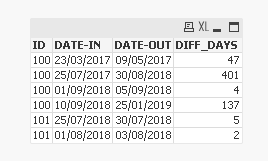
May be check the attached app (attached to my previous response)
