Unlock a world of possibilities! Login now and discover the exclusive benefits awaiting you.

- Qlik Community
- :
- All Forums
- :
- QlikView
- :
- Re: Date Format in Script
- Subscribe to RSS Feed
- Mark Topic as New
- Mark Topic as Read
- Float this Topic for Current User
- Bookmark
- Subscribe
- Mute
- Printer Friendly Page

- Mark as New
- Bookmark
- Subscribe
- Mute
- Subscribe to RSS Feed
- Permalink
- Report Inappropriate Content
Date Format in Script
Hello,
I would like to create a variable on my script with a specific Date Format. I tried this:

But when i look into the data structure i see this:
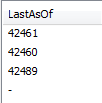
The Format doesn't work :/.
I need this because i do a check between two variables:
AsOf_E = Last_Update_Projection
And AsOf_E is configured like this:
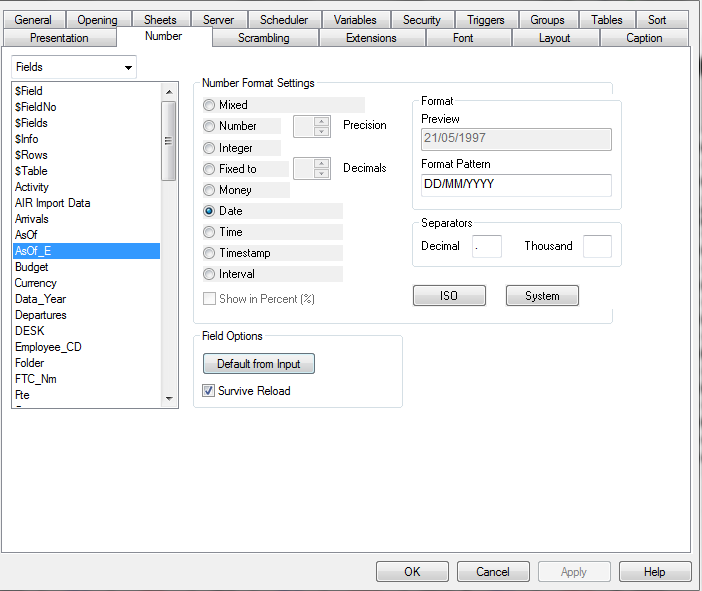
Thanks you in advance for your help,
Sébastien.
Accepted Solutions

 Kushal_Chawda
- Mark as New
- Bookmark
- Subscribe
- Mute
- Subscribe to RSS Feed
- Permalink
- Report Inappropriate Content
just Date function will work
MaxDate:
LOAD
Date(Max(AsOf_E) ,'DD/MM/YYY') as [LastAsOf]
...
LET Last_Update_Projection = peek('LastAsOf',0,'MaxDate');
 PrashantSangle
- Mark as New
- Bookmark
- Subscribe
- Mute
- Subscribe to RSS Feed
- Permalink
- Report Inappropriate Content
Hi,
Use date() instead of date#()
Regards
Please appreciate our Qlik community members by giving Kudos for sharing their time for your query. If your query is answered, please mark the topic as resolved 🙂
 MK_QSL
- Mark as New
- Bookmark
- Subscribe
- Mute
- Subscribe to RSS Feed
- Permalink
- Report Inappropriate Content
Date(Date#(Max(AsOf_E,'DD/MM/YYYY')) as
 Chanty4u
- Mark as New
- Bookmark
- Subscribe
- Mute
- Subscribe to RSS Feed
- Permalink
- Report Inappropriate Content
try
Load,
Date(Date#(Max(Asof_E,'Dateformat')) as new
Kushal_Chawda
- Mark as New
- Bookmark
- Subscribe
- Mute
- Subscribe to RSS Feed
- Permalink
- Report Inappropriate Content
just Date function will work
MaxDate:
LOAD
Date(Max(AsOf_E) ,'DD/MM/YYY') as [LastAsOf]
...
LET Last_Update_Projection = peek('LastAsOf',0,'MaxDate');
- Mark as New
- Bookmark
- Subscribe
- Mute
- Subscribe to RSS Feed
- Permalink
- Report Inappropriate Content
Hi ,
Load Date(Date#(Max(Asof_E,'DD/MM/YYYY')) as [LastAsOf]
 sunny_talwar
- Mark as New
- Bookmark
- Subscribe
- Mute
- Subscribe to RSS Feed
- Permalink
- Report Inappropriate Content
I think Manish you forgot to close Max() function
sunny_talwar
- Mark as New
- Bookmark
- Subscribe
- Mute
- Subscribe to RSS Feed
- Permalink
- Report Inappropriate Content
Not sure if Date#() function is still required to interpret the date.
Date(Date#(Max(AsOf_E),'DD/MM/YYYY'), 'DD/MM/YYYY') as [LastAsOf]