Unlock a world of possibilities! Login now and discover the exclusive benefits awaiting you.

- Qlik Community
- :
- All Forums
- :
- QlikView
- :
- Re: Date Range Selection
- Subscribe to RSS Feed
- Mark Topic as New
- Mark Topic as Read
- Float this Topic for Current User
- Bookmark
- Subscribe
- Mute
- Printer Friendly Page

- Mark as New
- Bookmark
- Subscribe
- Mute
- Subscribe to RSS Feed
- Permalink
- Report Inappropriate Content
Date Range Selection
Hi All,
Could you help to check my QVW file? I encounter a select issue below:
When I select the date, the data does not change. Many thanks.
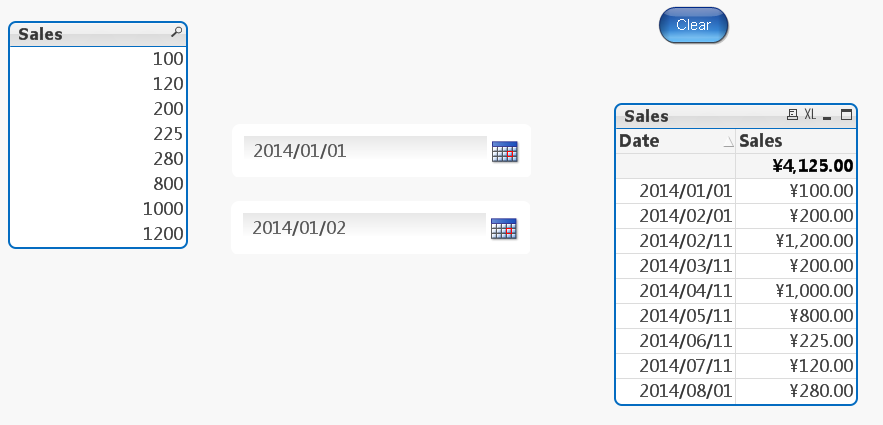
Below is my script:
Sales:
Load * Inline
[
Date, Sales
2014/01/01, 100
2014/02/01, 200
2014/02/11, 1200
2014/03/11, 200
2014/04/11, 1000
2014/05/11, 800
2014/06/11, 225
2014/07/11, 120
2014/08/01, 280
];
MinMaxDate:
Load
Min(Date) as MinDate,
Max(Date) as MaxDate
Resident Sales;
Let vMinDate = PEEK('MinDate',0,'MinMaxDate');
Let vMaxDate = PEEK('MaxDate',0,'MinMaxDate');
Drop Table MinMaxDate;
Calendar:
Load
Date($(vMinDate) + IterNo() - 1) as Date
AutoGenerate 1
While $(vMinDate) + IterNo() - 1 <= $(vMaxDate);
Accepted Solutions

 sunny_talwar
- Mark as New
- Bookmark
- Subscribe
- Mute
- Subscribe to RSS Feed
- Permalink
- Report Inappropriate Content
I added triggers to your two variables
1) vFromDate -> Action: Select in Field -> Field: Date -> Search String: ='>=' & Date(vFromDate) & '<=' & Date(vToDate)
2) vToDate- > Action: Select in Field -> Field: Date -> Search String: ='>=' & Date(vFromDate) & '<=' & Date(vToDate)

sunny_talwar
- Mark as New
- Bookmark
- Subscribe
- Mute
- Subscribe to RSS Feed
- Permalink
- Report Inappropriate Content
Try now
- Mark as New
- Bookmark
- Subscribe
- Mute
- Subscribe to RSS Feed
- Permalink
- Report Inappropriate Content
Hi Sunny,
For my Qlikview is personal version, so I could not open your QVW file. Could you help to copy the script to me directly? Thanks a lot.
sunny_talwar
- Mark as New
- Bookmark
- Subscribe
- Mute
- Subscribe to RSS Feed
- Permalink
- Report Inappropriate Content
I added triggers to your two variables
1) vFromDate -> Action: Select in Field -> Field: Date -> Search String: ='>=' & Date(vFromDate) & '<=' & Date(vToDate)
2) vToDate- > Action: Select in Field -> Field: Date -> Search String: ='>=' & Date(vFromDate) & '<=' & Date(vToDate)
- Mark as New
- Bookmark
- Subscribe
- Mute
- Subscribe to RSS Feed
- Permalink
- Report Inappropriate Content
Hi Sunny,
I added the triggers following your instruction and it works fine. Thanks again. 