Unlock a world of possibilities! Login now and discover the exclusive benefits awaiting you.

- Qlik Community
- :
- All Forums
- :
- QlikView
- :
- Date dimension formatting
- Subscribe to RSS Feed
- Mark Topic as New
- Mark Topic as Read
- Float this Topic for Current User
- Bookmark
- Subscribe
- Mute
- Printer Friendly Page

- Mark as New
- Bookmark
- Subscribe
- Mute
- Subscribe to RSS Feed
- Permalink
- Report Inappropriate Content
Date dimension formatting
Hi,
I have a column in my table called MonthYear which contains values like JUL-2015, AUG-2015 ..... JUN-2016.
July is the first fiscal month and June is the last fiscal month. When I used the "MonthYear" as a dimension in my Line Chart
on the x-axis, I need the fiscal month to come out in the correct chronological order as listed in above. According to
QV Help, there is a DUAL() function which takes the form of DUAL(character, integer) format. The integer portion will be used
as a sorting value. This function does not work well when my MonthYear contains both character and number data. I am not
able to get this dimension to come out the order I need it. It works perfectly when it's all character data as the first argument.
Does anyone have any idea or an alternative approach to solve my problem?
Thanks
Accepted Solutions
- Mark as New
- Bookmark
- Subscribe
- Mute
- Subscribe to RSS Feed
- Permalink
- Report Inappropriate Content
You guys are awsome!!!
It's working beautifully. I am going to test it more with more data.

 rubenmarin
- Mark as New
- Bookmark
- Subscribe
- Mute
- Subscribe to RSS Feed
- Permalink
- Report Inappropriate Content
Hy Sydney, when using dual() the first part is text to show, the second part is the number related to that text, you can create the months like:
Dual(Date(DateField, 'MMM-YYYY'), Year(DateField)*12+Month(DateField)) as MonthYear
- Mark as New
- Bookmark
- Subscribe
- Mute
- Subscribe to RSS Feed
- Permalink
- Report Inappropriate Content
Hi Ruben,
Thanks for the quick response.
My values are actually JUL-15, AUG-15 and etc. So I used date format as "MMM-YY". When I ran it, it showed a dash or hypen. Then I tried to run the first argument to see what I get as in:
Date(CalYearMonthName, 'MMM-YY') as 'CalYearMonthName2'
This is what I see in the data model.
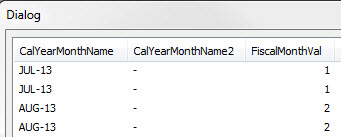
Am I missing something here?
 sunny_talwar
- Mark as New
- Bookmark
- Subscribe
- Mute
- Subscribe to RSS Feed
- Permalink
- Report Inappropriate Content
Try this:
Date#(CalYearMonthName, 'MMM-YY') as CalYearMonthName2
rubenmarin
- Mark as New
- Bookmark
- Subscribe
- Mute
- Subscribe to RSS Feed
- Permalink
- Report Inappropriate Content
Nothing is missing, I supossed MonthYear field was created by you based on a date field, if it's not created by you follow Sunny answer to transform it into a real date.
- Mark as New
- Bookmark
- Subscribe
- Mute
- Subscribe to RSS Feed
- Permalink
- Report Inappropriate Content
Sunny,
Your trick fixed the first argument. But still getting dash/hypen when ran it as
Dual(Date#(CalYearMonthName, 'MMM-YY'), Year(CalYearMonthName)*12+Month(CalYearMonthName)) as 'CalYearMonthName2'
sunny_talwar
- Mark as New
- Bookmark
- Subscribe
- Mute
- Subscribe to RSS Feed
- Permalink
- Report Inappropriate Content
I guess the whole things will need the same Date#() function
Dual(Date#(CalYearMonthName, 'MMM-YY'), Year(Date#(CalYearMonthName, 'MMM-YY'))*12+Month(Date#(CalYearMonthName, 'MMM-YY'))) as 'CalYearMonthName2'
- Mark as New
- Bookmark
- Subscribe
- Mute
- Subscribe to RSS Feed
- Permalink
- Report Inappropriate Content
You guys are awsome!!!
It's working beautifully. I am going to test it more with more data.

 rupamjyotidas
- Mark as New
- Bookmark
- Subscribe
- Mute
- Subscribe to RSS Feed
- Permalink
- Report Inappropriate Content
Can you close the thread