Unlock a world of possibilities! Login now and discover the exclusive benefits awaiting you.

- Qlik Community
- :
- All Forums
- :
- QlikView
- :
- Re: Date field
- Subscribe to RSS Feed
- Mark Topic as New
- Mark Topic as Read
- Float this Topic for Current User
- Bookmark
- Subscribe
- Mute
- Printer Friendly Page

 master_student
- Mark as New
- Bookmark
- Subscribe
- Mute
- Subscribe to RSS Feed
- Permalink
- Report Inappropriate Content
Date field
Hello dear community,
I have a date field format timestamp. How to convert it into Date 'DD/MM/YYYY' I need to convert it in the script.

Thanks for your help.
- « Previous Replies
-
- 1
- 2
- Next Replies »

- Mark as New
- Bookmark
- Subscribe
- Mute
- Subscribe to RSS Feed
- Permalink
- Report Inappropriate Content
Hi,
you can just use Date( "your date field" )
Example:
=date(ReloadTime())
Regards,
Marouen

 sunny_talwar
- Mark as New
- Bookmark
- Subscribe
- Mute
- Subscribe to RSS Feed
- Permalink
- Report Inappropriate Content
Check these link out to convert Unix date to date:
IT Walk Thru: QlikView Expression for Converting Unix int Epoch Dates to date
sunny_talwar
- Mark as New
- Bookmark
- Subscribe
- Mute
- Subscribe to RSS Feed
- Permalink
- Report Inappropriate Content
Here is a link from outside QlikView where you would see what your date corresponds to:
 MayilVahanan
- Mark as New
- Bookmark
- Subscribe
- Mute
- Subscribe to RSS Feed
- Permalink
- Report Inappropriate Content
Hi
What's your expected result
Please close the thread by marking correct answer & give likes if you like the post.
master_student
- Mark as New
- Bookmark
- Subscribe
- Mute
- Subscribe to RSS Feed
- Permalink
- Report Inappropriate Content
from timestamp into date 'DD/MM/YYYY'
master_student
- Mark as New
- Bookmark
- Subscribe
- Mute
- Subscribe to RSS Feed
- Permalink
- Report Inappropriate Content
Hi Marouen,
Please see the result when I did as you recommended
in the script : Date(LASTUPDATE) AS Date_Balance
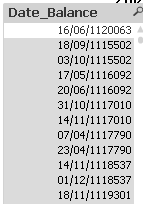
Any suggestion please?
sunny_talwar
- Mark as New
- Bookmark
- Subscribe
- Mute
- Subscribe to RSS Feed
- Permalink
- Report Inappropriate Content
What would 406735040 correspond to in date?
sunny_talwar
- Mark as New
- Bookmark
- Subscribe
- Mute
- Subscribe to RSS Feed
- Permalink
- Report Inappropriate Content
Is this right?


 florentina_doga
- Mark as New
- Bookmark
- Subscribe
- Mute
- Subscribe to RSS Feed
- Permalink
- Report Inappropriate Content
pls try this
load *,
date(left(aa,5),'DD-MMM-YYYY') as date,
time(num('0.'&right(aa,4)),'hh:mm:ss') as time;
load * inline [aa
406735040
406735055];
- « Previous Replies
-
- 1
- 2
- Next Replies »