Unlock a world of possibilities! Login now and discover the exclusive benefits awaiting you.

- Qlik Community
- :
- All Forums
- :
- QlikView
- :
- Re: Date format convert issue
- Subscribe to RSS Feed
- Mark Topic as New
- Mark Topic as Read
- Float this Topic for Current User
- Bookmark
- Subscribe
- Mute
- Printer Friendly Page

- Mark as New
- Bookmark
- Subscribe
- Mute
- Subscribe to RSS Feed
- Permalink
- Report Inappropriate Content
Date format convert issue
Hi Guys
I created one table as below's screenshot, you can see that, from column H to M, is date format.

The problem is when I load into QlikView by script, the date column will display in number.
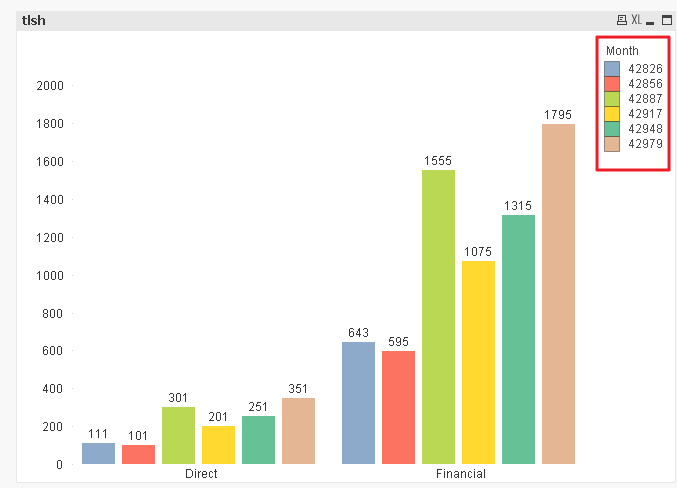
So I modified the script:
Directory;
CrossTable(Month, Data, 7)
LOAD Dept,
Section,
[Job No],
[Job Type],
[Job Name],
[Customer 1],
[Customer 2],
[42826],
[42856],
[42887],
[42917],
[42948],
[42979]
FROM
[17A JOB List.xlsx]
(ooxml, embedded labels, table is job);
Test:
Load *,Date(Num#(Month),'YYYY-MM') as TestedDate Resident Directory;
DROP Table Directory;
However, when I reload, QlikView always pop-up error message:
Table not found
Test:
Load *,Date(Num#(Month),'YYYY-MM') as TestedDate Resident Directory
So I confused, I don't know how to revise the script. I have uploaded the QVW file in attachment. Does somebody can help me.
Thx a lot!
Accepted Solutions

 md_qlikview
- Mark as New
- Bookmark
- Subscribe
- Mute
- Subscribe to RSS Feed
- Permalink
- Report Inappropriate Content
Hi,
Try by giving Proper name to your first loaded table instead of Directory,
Say
Table1:
.
.
.
Final:
Load *,Date(Num#(Month),'YYYY-MM') as TestedDate Resident Table1
Drop Table Table1;
md_qlikview
- Mark as New
- Bookmark
- Subscribe
- Mute
- Subscribe to RSS Feed
- Permalink
- Report Inappropriate Content
Hi,
Try by giving Proper name to your first loaded table instead of Directory,
Say
Table1:
.
.
.
Final:
Load *,Date(Num#(Month),'YYYY-MM') as TestedDate Resident Table1
Drop Table Table1;
- Mark as New
- Bookmark
- Subscribe
- Mute
- Subscribe to RSS Feed
- Permalink
- Report Inappropriate Content
Hi Milind
You're right, seems need to change to another name, and it is working now.
Thx