Unlock a world of possibilities! Login now and discover the exclusive benefits awaiting you.

- Qlik Community
- :
- All Forums
- :
- QlikView
- :
- Re: Date is missing
- Subscribe to RSS Feed
- Mark Topic as New
- Mark Topic as Read
- Float this Topic for Current User
- Bookmark
- Subscribe
- Mute
- Printer Friendly Page

 prma7799
- Mark as New
- Bookmark
- Subscribe
- Mute
- Subscribe to RSS Feed
- Permalink
- Report Inappropriate Content
Date is missing
Hi All,
When i am using (alt(Date#(F2,'MMM DD'),Date(F2,'DD MMM')) as Date)
then my one date is missing.
Can anybody tell me where i was wrong in ALT function
Thanks
PM
- « Previous Replies
-
- 1
- 2
- Next Replies »

 PrashantSangle
- Mark as New
- Bookmark
- Subscribe
- Mute
- Subscribe to RSS Feed
- Permalink
- Report Inappropriate Content
Hi,
Try like
alt(Date#(F2,'MMM DD'),
Date(F2,'DD MMM'),
Date#(F2,'MMMD'),
Date(F2,'MMMD')
) as Date
Regards
Please appreciate our Qlik community members by giving Kudos for sharing their time for your query. If your query is answered, please mark the topic as resolved 🙂

 tamilarasu
- Mark as New
- Bookmark
- Subscribe
- Mute
- Subscribe to RSS Feed
- Permalink
- Report Inappropriate Content
Hi Prashantbi,
Jan3 is not a valid format. Just give space between date and month. i.e jan 3.
Below solution works for your data.. Just try this.
alt(Date#(F2,'MMM DD'),Date#(F2,'DD MMM'),Date#( F2 , 'MMMDD' ))

 agni_gold
- Mark as New
- Bookmark
- Subscribe
- Mute
- Subscribe to RSS Feed
- Permalink
- Report Inappropriate Content
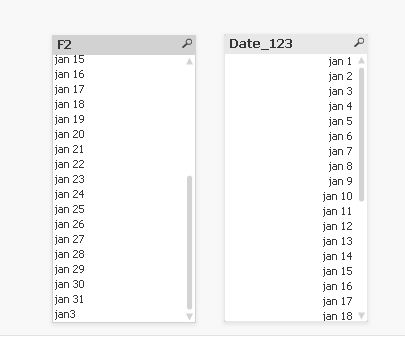
Date#
(trim(Left(F2,3))&' '& trim(Mid(F2,4,3)),'MMM DD') as
Date_123
you can also try this

 jonathandienst
- Mark as New
- Bookmark
- Subscribe
- Mute
- Subscribe to RSS Feed
- Permalink
- Report Inappropriate Content
Hi
You have 3 different date formats, so you need 3 parts to your Alt():
Date(alt(Date#(F2,'MMM DD'), Date(F2,'DD MMM'), Date#(F2,'MMMDD'))) as Date
agni_gold
- Mark as New
- Bookmark
- Subscribe
- Mute
- Subscribe to RSS Feed
- Permalink
- Report Inappropriate Content
prma7799
- Mark as New
- Bookmark
- Subscribe
- Mute
- Subscribe to RSS Feed
- Permalink
- Report Inappropriate Content
Hi Greeshma,
No need to write above full expression I used only
alt(date#( F2 , 'MMM DD' ),date#( F2 , 'MMMDD' )), 'MM/DD/') function

- « Previous Replies
-
- 1
- 2
- Next Replies »