Unlock a world of possibilities! Login now and discover the exclusive benefits awaiting you.

- Qlik Community
- :
- All Forums
- :
- QlikView
- :
- Re: Date transformation in set analysis
- Subscribe to RSS Feed
- Mark Topic as New
- Mark Topic as Read
- Float this Topic for Current User
- Bookmark
- Subscribe
- Mute
- Printer Friendly Page

 mario-sarkis
- Mark as New
- Bookmark
- Subscribe
- Mute
- Subscribe to RSS Feed
- Permalink
- Report Inappropriate Content
Date transformation in set analysis
hey all
if my data looks like this
id. Date. Balance
1. 1/30/2016 1000
2. 1/30/2016. 2000
1. 2/16/2016 1500
2 2/16/2016. 1300
my output i neet to show the balance of max date VS the last balance the previous month(last month has one date it can be any day during the month)
wut can be my expression hope u can help
Sample output:
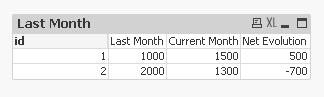
id. Last month. Current month. Net evolution
1. 1000. 1500. 500
2. 2000. 1300. (700)
thank you

 sunny_talwar
- Mark as New
- Bookmark
- Subscribe
- Mute
- Subscribe to RSS Feed
- Permalink
- Report Inappropriate Content
May be this:
Dimension: id
Expressions:
1) Sum({<MonthYear = {"$(=MonthName(AddMonths(Max(MonthYear), -1)))"}>}Balance)
2) Sum({<MonthYear = {"$(=MonthName(AddMonths(Max(MonthYear), 0)))"}>}Balance)
3) =[Current Month] - [Last Month]
 Kushal_Chawda
- Mark as New
- Bookmark
- Subscribe
- Mute
- Subscribe to RSS Feed
- Permalink
- Report Inappropriate Content
Create Straight Table. Make sure that your Date field is in proper Date format
Dimension - ID
Expression:
1)Last Month
=sum({<Date = {">=$(=monthstart(addmonths(max(Date),-1)))<=$(=monthend(addmonths(max(Date),-1)))"}>}Balance)
2)Current Month
=sum({<Date = {">=$(=monthstart(max(Date)))<=$(=max(Date))"}>}Balance)
3)[Current Month]-[Last Month]
