Unlock a world of possibilities! Login now and discover the exclusive benefits awaiting you.

- Qlik Community
- :
- All Forums
- :
- QlikView
- :
- Re: Day Of Week
- Subscribe to RSS Feed
- Mark Topic as New
- Mark Topic as Read
- Float this Topic for Current User
- Bookmark
- Subscribe
- Mute
- Printer Friendly Page

- Mark as New
- Bookmark
- Subscribe
- Mute
- Subscribe to RSS Feed
- Permalink
- Report Inappropriate Content
Day Of Week
Hi All
I have list boxes for Year and Month. I would now like to create one for "Day of Week" containing "Monday" to "Sunday" as values.
What function can I use for this?
- Tags:
- new_to_qlikview
Accepted Solutions

 MarcoWedel
- Mark as New
- Bookmark
- Subscribe
- Mute
- Subscribe to RSS Feed
- Permalink
- Report Inappropriate Content
To get only one value per day of week in chronological order you could use:
=Dual(Date(Date,'WWWW'), WeekDay(Date))

.png "Former Employee") JonnyPoole
JonnyPoole
- Mark as New
- Bookmark
- Subscribe
- Mute
- Subscribe to RSS Feed
- Permalink
- Report Inappropriate Content
There is a date mask to use. 'WWW' will return Mon,Tue, Wed. 'WWWW' will return the full word Monday, Tuesday...
Pass the 'WWW' mask to the function date() to render a date in this format.
=Date(Date,'WWWW')

 jpapador
- Mark as New
- Bookmark
- Subscribe
- Mute
- Subscribe to RSS Feed
- Permalink
- Report Inappropriate Content
DayName(DateField)
MarcoWedel
- Mark as New
- Bookmark
- Subscribe
- Mute
- Subscribe to RSS Feed
- Permalink
- Report Inappropriate Content
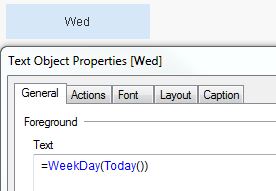
WeekDay()
- Mark as New
- Bookmark
- Subscribe
- Mute
- Subscribe to RSS Feed
- Permalink
- Report Inappropriate Content
Hi Jonathan
Thanks for your answer. I have applied your method and now it shows a lot of random weekdays.
I would only like it to show Monday, Tuesday, Wednesday, Thursday, Friday, Saterday and Sunday.
MarcoWedel
- Mark as New
- Bookmark
- Subscribe
- Mute
- Subscribe to RSS Feed
- Permalink
- Report Inappropriate Content
To get only one value per day of week in chronological order you could use:
=Dual(Date(Date,'WWWW'), WeekDay(Date))
- Mark as New
- Bookmark
- Subscribe
- Mute
- Subscribe to RSS Feed
- Permalink
- Report Inappropriate Content
WeekDay returns an interger
MarcoWedel
- Mark as New
- Bookmark
- Subscribe
- Mute
- Subscribe to RSS Feed
- Permalink
- Report Inappropriate Content
Does it?