Unlock a world of possibilities! Login now and discover the exclusive benefits awaiting you.

- Qlik Community
- :
- All Forums
- :
- QlikView
- :
- Default date on calendar object
- Subscribe to RSS Feed
- Mark Topic as New
- Mark Topic as Read
- Float this Topic for Current User
- Bookmark
- Subscribe
- Mute
- Printer Friendly Page

- Mark as New
- Bookmark
- Subscribe
- Mute
- Subscribe to RSS Feed
- Permalink
- Report Inappropriate Content
Default date on calendar object
I have a calendar object and for the data field I have the following expression:
=date(SALE_DATE, 'MM/DD/YYYY')
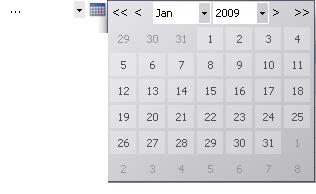
The dates range from 2009 to 2011. When I click the calendar icon to bring up the date selector the selector is defaulted to Jan 2009. I want it to default to the current month and year. I don't want to select a date, I just want the calendar pop-up to show the current month and year when clicked. Any ideas? Thanks.
Here's how it looks now:
- « Previous Replies
-
- 1
- 2
- Next Replies »
- Mark as New
- Bookmark
- Subscribe
- Mute
- Subscribe to RSS Feed
- Permalink
- Report Inappropriate Content
Hi jagan,
I am also using the similar approach ,but I have a problem.
When I select a different date ,calender is showing the numerical representation of the date selected.I have checked with your test application and it is also having same problem.
how to avoid that and show the actual date format in the calender object?
Many thanks for your help.
Regards
Murali Krishna
- « Previous Replies
-
- 1
- 2
- Next Replies »