Unlock a world of possibilities! Login now and discover the exclusive benefits awaiting you.

- Qlik Community
- :
- All Forums
- :
- QlikView
- :
- Re: Define if with a percentage
- Subscribe to RSS Feed
- Mark Topic as New
- Mark Topic as Read
- Float this Topic for Current User
- Bookmark
- Subscribe
- Mute
- Printer Friendly Page

- Mark as New
- Bookmark
- Subscribe
- Mute
- Subscribe to RSS Feed
- Permalink
- Report Inappropriate Content
Define if with a percentage
Hi guys,
I have a problem that i can't solve.
I have a table with relative numbers, and what i like to do is, if the value is higher a arrow will show up, if goes down, the arrow shows down, but if its equal, que arrow stands...
here is my problem :
i have 1,94% in current year, and have 1,94% last year.. bue the arrow shows down... the real numbers are 1,945% and 1,944%, i round the numbers... is there an option or something that can pass by the 0,001% and give me the correct arrow, or it just doesnt work?
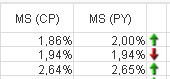
i want the if expression to give me an yellow arrow.
thanks!
PCordeiro
Accepted Solutions
- Mark as New
- Bookmark
- Subscribe
- Mute
- Subscribe to RSS Feed
- Permalink
- Report Inappropriate Content
It worked!
i try this...
round((sum({$<%Measure_N={'€sP'}, %Time.Type={'PY'}>} Valor) + sum({$<%Measure_N={'€cP'}, %Time.Type={'PY'}>} Valor))
/
(sum({$<%Measure_N={'€sP'}, %Time.Type={'PY'}>} TOTAL Valor) + sum({$<%Measure_N={'€cP'}, %Time.Type={'PY'}>} TOTAL Valor)), 0.0001)
thanks! you help me a lot!

 swuehl
- Mark as New
- Bookmark
- Subscribe
- Mute
- Subscribe to RSS Feed
- Permalink
- Report Inappropriate Content
Could you post your complete expression(s)?
You can use Round() / Floor() / Ceil() functions to also round numbers in the expression that you are using for the arrows.
Or multiply by 10000 in that expression and round to avoid comparing floating point values:
If( Round( MSCPExpression *10000) = Round( MSPYExpression*10000), Yellow(), ....)
- Mark as New
- Bookmark
- Subscribe
- Mute
- Subscribe to RSS Feed
- Permalink
- Report Inappropriate Content
My expression for the pictures is:
if(num(Column(4)) = num(Column(5)), 'qmem://<bundled>/BuiltIn/arrow_e_y.png',
if(num(Column(4)) < num(Column(5)), 'qmem://<bundled>/BuiltIn/arrow_n_g.png',
if(num(Column(4)) > num(Column(5)), 'qmem://<bundled>/BuiltIn/arrow_s_r.png'
)))
And the column 4 and 5 are:
------------------------column 4
(sum({$<%Measure_N={'€sP'}, %Time.Type={'CP'}>} Valor) + sum({$<%Measure_N={'€cP'}, %Time.Type={'CP'}>} Valor))
/
(sum({$<%Measure_N={'€sP'}, %Time.Type={'CP'}>} TOTAL Valor) + sum({$<%Measure_N={'€cP'}, %Time.Type={'CP'}>} TOTAL Valor))
-------------------------column 5
(sum({$<%Measure_N={'€sP'}, %Time.Type={'PY'}>} Valor) + sum({$<%Measure_N={'€cP'}, %Time.Type={'PY'}>} Valor))
/
(sum({$<%Measure_N={'€sP'}, %Time.Type={'PY'}>} TOTAL Valor) + sum({$<%Measure_N={'€cP'}, %Time.Type={'PY'}>} TOTAL Valor))
i try put the num(....., '#.##0,00%) but doesnt work
swuehl
- Mark as New
- Bookmark
- Subscribe
- Mute
- Subscribe to RSS Feed
- Permalink
- Report Inappropriate Content
Num() is just a formatting function, it will not change the underlying number that is actually compared.
Use rounding functions like suggested above:
if(Floor(10000* Column(4)) = Floor(10000* Column(5)), 'qmem://<bundled>/BuiltIn/arrow_e_y.png',
if(num(Column(4)) < num(Column(5)), 'qmem://<bundled>/BuiltIn/arrow_n_g.png',
if(num(Column(4)) > num(Column(5)), 'qmem://<bundled>/BuiltIn/arrow_s_r.png'
)))
- Mark as New
- Bookmark
- Subscribe
- Mute
- Subscribe to RSS Feed
- Permalink
- Report Inappropriate Content
It worked!
i try this...
round((sum({$<%Measure_N={'€sP'}, %Time.Type={'PY'}>} Valor) + sum({$<%Measure_N={'€cP'}, %Time.Type={'PY'}>} Valor))
/
(sum({$<%Measure_N={'€sP'}, %Time.Type={'PY'}>} TOTAL Valor) + sum({$<%Measure_N={'€cP'}, %Time.Type={'PY'}>} TOTAL Valor)), 0.0001)
thanks! you help me a lot!