Unlock a world of possibilities! Login now and discover the exclusive benefits awaiting you.

- Qlik Community
- :
- All Forums
- :
- QlikView
- :
- Re: 2 Total
- Subscribe to RSS Feed
- Mark Topic as New
- Mark Topic as Read
- Float this Topic for Current User
- Bookmark
- Subscribe
- Mute
- Printer Friendly Page

 smilingjohn
- Mark as New
- Bookmark
- Subscribe
- Mute
- Subscribe to RSS Feed
- Permalink
- Report Inappropriate Content
Difficult Req
Hi All ,
Please find the attachment of the excel sheet ,
I want to show subtotal and Total in a table in QlikView .
I have Department and Category and Sales ,
As shown in the screenshot below is it possible to achive this in Qlikview ?
Thanks in Advcance
Accepted Solutions


- Mark as New
- Bookmark
- Subscribe
- Mute
- Subscribe to RSS Feed
- Permalink
- Report Inappropriate Content
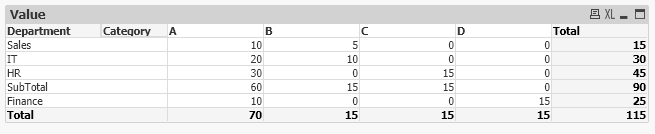
Can you try this?
tab1:
LOAD * INLINE [
    Department , Category, Saes
    Sales, A, 10
    IT, A, 20
    HR, A, 30
    Finance, A, 10
    Sales, B, 5
    IT, B, 10
    HR, C, 15
    Finance, D, 15
];

Concatenate(tab1)
LOAD DISTINCT 'SubTotal' As Department, Category
Resident tab1;

tab2:
LOAD * INLINE [
    Department, Dim
    Sales, 1
    IT, 1
    HR, 1
    SubTotal, 2
    Finance, 3
];
Dimensions: Department & Category
Exp:
If(Department='SubTotal',
RangeSum(Above(total Sum(Saes) , 0, 4)),
Sum(Saes)
) smilingjohn
- Mark as New
- Bookmark
- Subscribe
- Mute
- Subscribe to RSS Feed
- Permalink
- Report Inappropriate Content
Hi community any help on this .
smilingjohn
- Mark as New
- Bookmark
- Subscribe
- Mute
- Subscribe to RSS Feed
- Permalink
- Report Inappropriate Content
Hi community
Is my requirements possible in qlikview or not ?
- Mark as New
- Bookmark
- Subscribe
- Mute
- Subscribe to RSS Feed
- Permalink
- Report Inappropriate Content
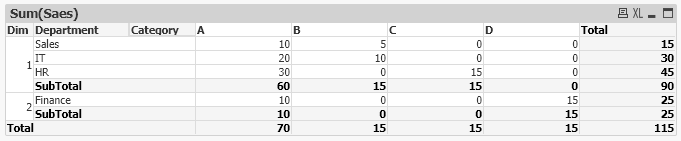
Are you looking something like this? Do you want Subtotal before Finance?
tab1:
LOAD * INLINE [
    Department , Category, Saes
    Sales, A, 10
    IT, A, 20
    HR, A, 30
    Finance, A, 10
    Sales, B, 5
    IT, B, 10
    HR, C, 15
    Finance, D, 15
];

tab2:
LOAD * INLINE [
    Department, Dim
    Sales, 1
    IT, 1
    HR, 1
    Finance, 2
];- Mark as New
- Bookmark
- Subscribe
- Mute
- Subscribe to RSS Feed
- Permalink
- Report Inappropriate Content
 smilingjohn
- Mark as New
- Bookmark
- Subscribe
- Mute
- Subscribe to RSS Feed
- Permalink
- Report Inappropriate Content
Hi @Saravanan_Desingh ,
How are you getting this in pivot table can you please attach the qlikview file ??? And also after finance there should not be subtotal . How can it be done.
Thanks
- Mark as New
- Bookmark
- Subscribe
- Mute
- Subscribe to RSS Feed
- Permalink
- Report Inappropriate Content
Please find the file here.
smilingjohn
- Mark as New
- Bookmark
- Subscribe
- Mute
- Subscribe to RSS Feed
- Permalink
- Report Inappropriate Content
Thanks for the file , How should we remove the subtotal after Finance ?
- Mark as New
- Bookmark
- Subscribe
- Mute
- Subscribe to RSS Feed
- Permalink
- Report Inappropriate Content
Can you try this?
tab1:
LOAD * INLINE [
    Department , Category, Saes
    Sales, A, 10
    IT, A, 20
    HR, A, 30
    Finance, A, 10
    Sales, B, 5
    IT, B, 10
    HR, C, 15
    Finance, D, 15
];

Concatenate(tab1)
LOAD DISTINCT 'SubTotal' As Department, Category
Resident tab1;

tab2:
LOAD * INLINE [
    Department, Dim
    Sales, 1
    IT, 1
    HR, 1
    SubTotal, 2
    Finance, 3
];
Dimensions: Department & Category
Exp:
If(Department='SubTotal',
RangeSum(Above(total Sum(Saes) , 0, 4)),
Sum(Saes)
)- Mark as New
- Bookmark
- Subscribe
- Mute
- Subscribe to RSS Feed
- Permalink
- Report Inappropriate Content
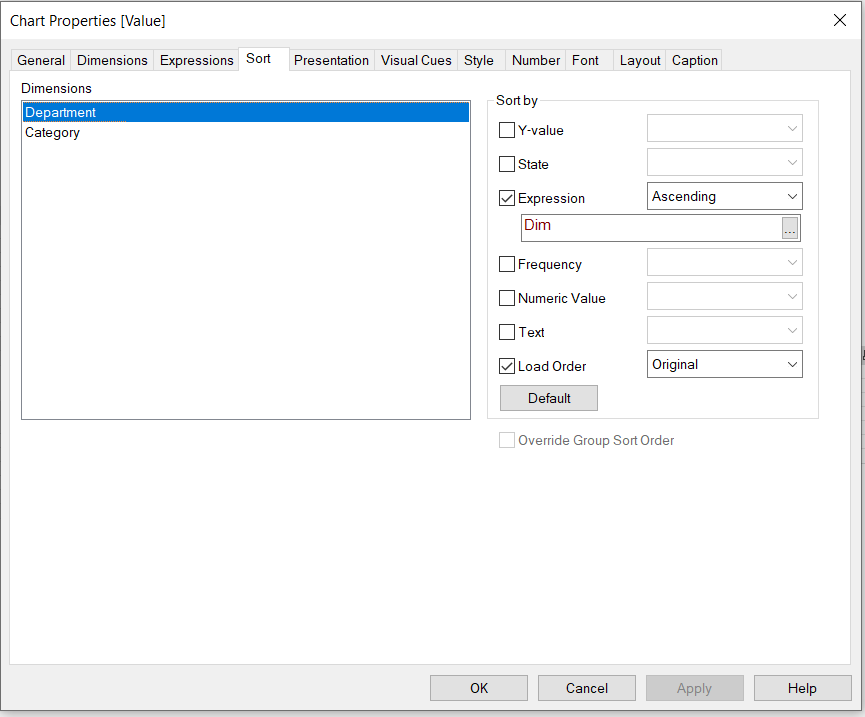
In the Sort, use Dim.